KO
|
EN
gitlite — search
Search
#typescript
#ai-agents
#ai
#dsh-plugin
#deepseek-harness
#open-source
#claude-code
#codex
#cli
#developer-tools
#react
#windows
exporters
★ 28
Open GitHub ↗
The official exporters for Motion Canvas
Download README (.md)
Explore Similar Repositories
hub
:
🚀 The collaborative collection of open source CI/CD templates to help everyone quickly build powerful pipelines.
mast1c0re-ps2-usb-game-loader
:
Load PS2 games from a exFAT USB stick using the mast1c0re vulnerability on the PlayStation 4
cgarena
:
Local bot arena similar to CodinGame.
openapify
:
Framework agnostic OpenAPI Specification generation for code lovers
C2023-Public
:
Code for Team 1678's 2023 robot, Tangerine Tumbler.
// repository documentation
Was this content helpful?
★ 0
(0 ratings)
Select Rating:
★
★
★
★
★
Submit Feedback
Recent Feedback
×
Download README
Do you want to download the
README.md
file for
exporters
?
Download (.md)
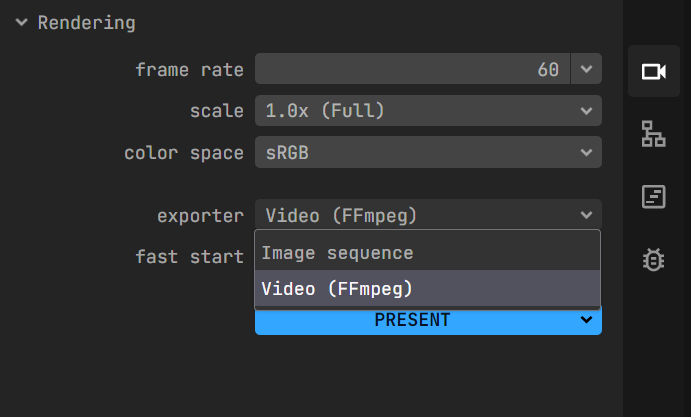
<br/> <p align="center"> <a href="https://motion-canvas.github.io"> <img width="180" src="https://motion-canvas.github.io/img/logo_dark.svg" alt="Vite logo"> </a> </p> <p align="center"> <a href="https://lerna.js.org"><img src="https://img.shields.io/badge/published%20with-lerna-c084fc?style=flat" alt="published with lerna"></a> <a href="https://vitejs.dev"><img src="https://img.shields.io/badge/powered%20by-vite-646cff?style=flat" alt="powered by lerna"></a> <a href="https://www.npmjs.com/package/@motion-canvas/core"><img src="https://img.shields.io/npm/v/@motion-canvas/core?style=flat" alt="npm package version"></a> <a href="https://chat.motioncanvas.io"><img src="https://img.shields.io/discord/1071029581009657896?style=flat&logo=discord&logoColor=fff&color=404eed" alt="discord"></a> </p> <br/> # Motion Canvas Exporters The official exporters for [Motion Canvas](https://motion-canvas.io). ## Installation 1. In an existing Motion Canvas project, install the exporter package: ```sh npm install @motion-canvas/ffmpeg ``` 2. Add the exporter as a plugin in your `vite.config.ts`: ```diff import {defineConfig} from 'vite'; import motionCanvas from '@motion-canvas/vite-plugin'; + import ffmpeg from '@motion-canvas/ffmpeg'; export default defineConfig({ plugins: [ motionCanvas(), + ffmpeg(), ], }); ``` 3. Pick the exporter in the Video Settings tab: