KO
|
EN
gitlite — search
Search
#javascript
#python
#hacktoberfest
#react
#ai
#typescript
#llm
#go
#golang
#android
#machine-learning
#rust
#deep-learning
#linux
AppWarpCocos2DX
★ 15
Open GitHub ↗
Cocos2DX SDK for AppWarp
Download README (.md)
Explore Similar Repositories
zfcuser-ldap
:
ZFCUser addon to provide LDAP authentication access.
ExcellaLean
:
A boilerplate lean enterprise architecture for building a scalable and maintainable software system based on a .Net backend and a Javascript frontend.
fidb-crawler
:
經濟部工業局爬工廠資料程式
bin-packing
:
A look at 2D bin packing with Optaplanner
browser-reset
:
reset setting for all browsers
// repository documentation
Was this content helpful?
★ 0
(0 ratings)
Select Rating:
★
★
★
★
★
Submit Feedback
Recent Feedback
×
Download README
Do you want to download the
README.md
file for
AppWarpCocos2DX
?
Download (.md)
##Cocos2DX SDK for AppWarp Visit [AppWarp Cocos2DX home page](http://appwarp.shephertz.com/game-development-center/cocos2dx-game-developers-home/) to learn about AppWarp features and documentation. **IMPORTANT** The instructions below assume you have already setup Cocos2DX environment for iOS and Android development. To help set up your development for Cocos2DX, you can read this [Cocos2DX getting started guide](http://www.raywenderlich.com/33750/cocos2d-x-tutorial-for-ios-and-android-getting-started). The steps below describe the integration points of AppWarpX in your Cococs2DX application. ##Instructions for iOS * Download the contents of this repo * Extract the contents and add (drag n drop) the AppWarpX folder to your xcode project. * Your XCode structure should look something like this 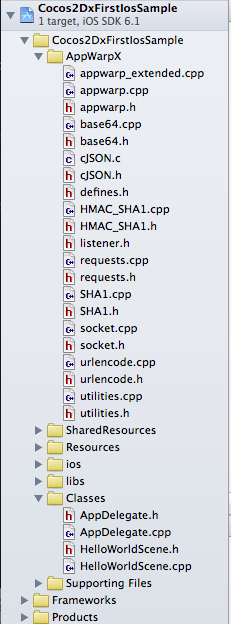 * Now add path for curl as follows: -Open Xcode project -Click on project name in the left pane -Select your project under PROJECT heading and search for Header Search Path -Double click on the value of Header Search Path -Click on "+" button on the bottom left cornor of the popup appeared -Add this: "$(SRCROOT)/../cocos2d/external/curl/include/ios" __The Header Search path should look like this__ 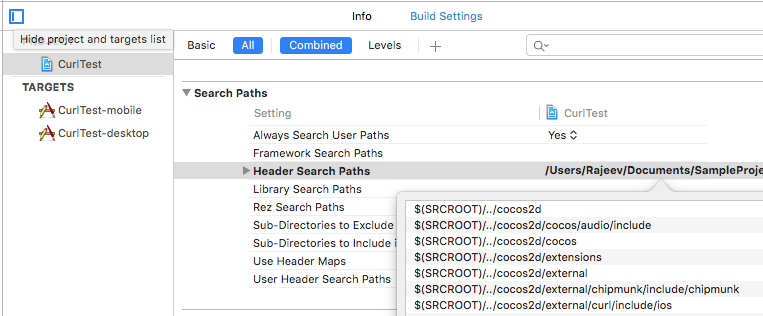 You also need to add library search path as follows: -Select your project under PROJECT heading and search for Library Search Path -Double click on the value of Library Search Path -Click on "+" button on the bottom left cornor of the popup appeared -Add this: "$(SRCROOT)/../cocos2d/external/curl/prebuilt/ios" __The Library Search path should look like this__  Now select your project under Targets section and add $(inherited) to Library Search Path under build settings: __The Library Search path should look like this__  After that, add "-lcurl" to Other Linker Flags under build settings: __The Other Linker Flags should look like this__  * Build ##Instructions for Android * Download the contents of this repo * Extract and add the AppWarpX folder next to your Classes folder. The directory structure should look like this 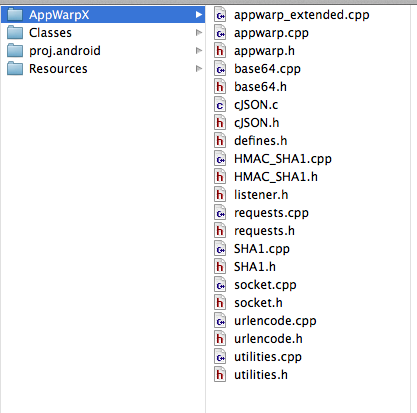 * Edit proj.android\jni\Android.mk file * Add $(call import-module,curl/prebuilt/android) to Android.mk file if you are using cocos V3.X or above for enabling cURL support. Add AppWarp source c and cpp files so that they can also be built. After adding the AppWarp source files, your android.mk file should be as follows: ``` LOCAL_SRC_FILES := hellocpp/main.cpp \ ../../Classes/AppDelegate.cpp \ ../../Classes/HelloWorldScene.cpp \ ../../AppWarpX/appwarp.cpp \ ../../AppWarpX/appwarp_extended.cpp \ ../../AppWarpX/base64.cpp \ ../../AppWarpX/cJSON.c \ ../../AppWarpX/HMAC_SHA1.cpp \ ../../AppWarpX/requests.cpp \ ../../AppWarpX/SHA1.cpp \ ../../AppWarpX/socket.cpp \ ../../AppWarpX/udpsocket.cpp \ ../../AppWarpX/urlencode.cpp \ ../../AppWarpX/utilities.cpp ``` Add AppWarp source file folder so that it can be detected by Compiler. For Example : ``` LOCAL_C_INCLUDES := $(LOCAL_PATH)/../../Classes \ $(LOCAL_PATH)/../../AppWarpX ``` * Build the native code * Add the following to your manifest file to give internet permission if not given already ``` <uses-permission android:name="android.permission.INTERNET" /> ``` * Run your Android application
