KO
|
EN
gitlite — search
Search
#python
#java
#python3
#arduino
#golang
#machine-learning
#rust
#html
#flask
#javascript
#seismology
#nodejs
stereogramaxo
★ 22
Open GitHub ↗
Self-designed Autostereogram Generator
Download README (.md)
Explore Similar Repositories
u5e
:
Unicode Text C++ library
tanok
:
Elm Architecture-inspired wrapper for Rx.js+React
nodelet_rosbag
:
No description available.
iron-swiper
:
Polymer element that wraps Swiper.js
omsi
:
No description available.
// repository documentation
Was this content helpful?
★ 0
(0 ratings)
Select Rating:
★
★
★
★
★
Submit Feedback
Recent Feedback
×
Download README
Do you want to download the
README.md
file for
stereogramaxo
?
Download (.md)
# Stereogramaxo This started as a weekend project, inspired on boredom and genuine love and curiosity for these [beautiful works of art](https://en.wikipedia.org/wiki/Autostereogram). It is written in python for the sake of simplicity, and relays on the active PIL fork, [**Pillow**](https://python-pillow.github.io/) for image processing. ## Examples: The following images were generated by using this tool. In order to understand them, you should [know how to see stereograms](http://www.hidden-3d.com/how_to_view_stereogram.php). 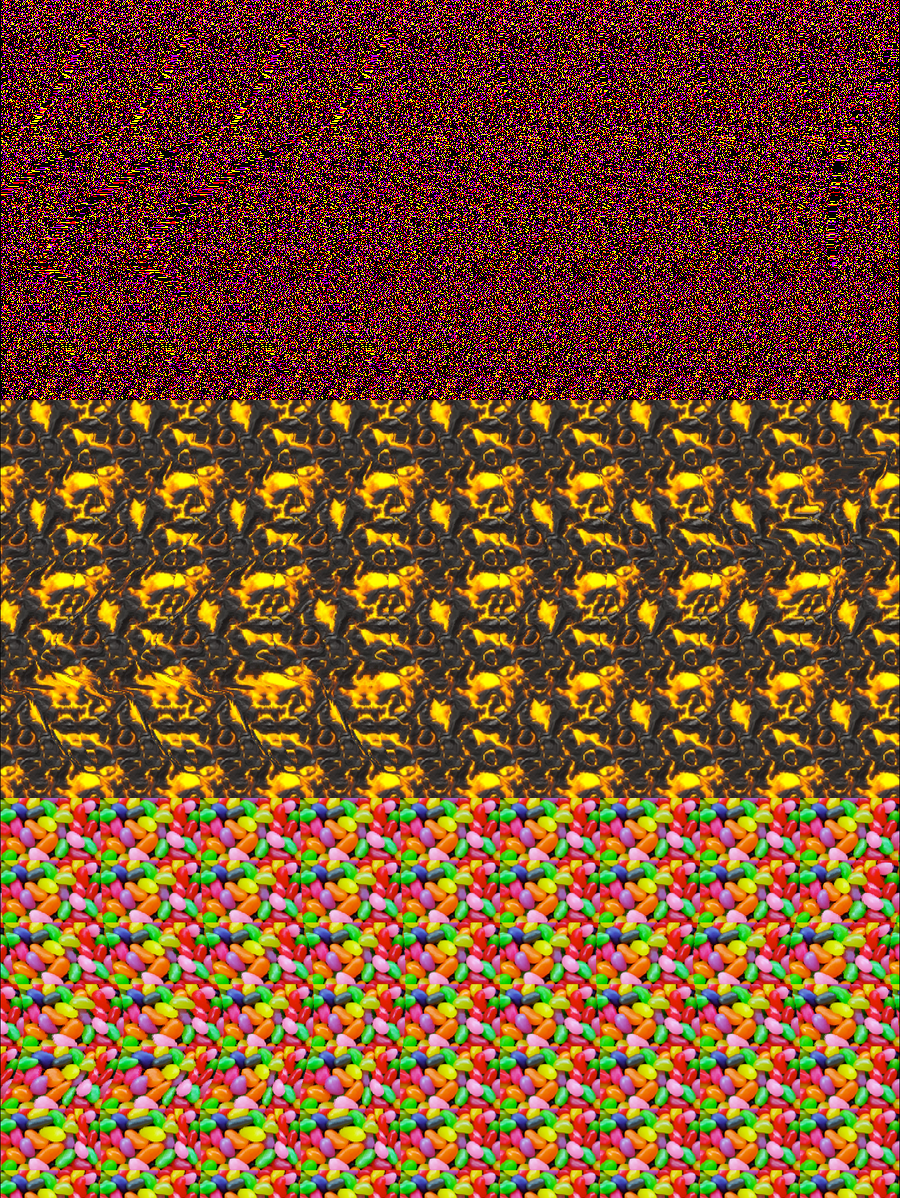 ## Usage: The project is built as a python script. ```shell $ python main.py --help usage: main.py [-h] (--depthmap DEPTHMAP | --text TEXT) (--dots | --pattern PATTERN) (--wall | --cross) [--dot-prob DOT_PROB] [--dot-bg-color DOT_BG_COLOR] [--dot-colors DOT_COLORS] [--blur BLUR] [--forcedepth FORCEDEPTH] [--output OUTPUT] Stereogramaxo: An autostereogram generator, by Mexomagno optional arguments: -h, --help show this help message and exit --depthmap DEPTHMAP, -d DEPTHMAP Path to a depthmap image file --text TEXT, -t TEXT Generate a depthmap with text --dots Generate a dot pattern for the background --pattern PATTERN, -p PATTERN Path to an image file to use as background pattern --wall, -w Wall eyed mode --cross, -c Cross eyed mode --blur BLUR, -b BLUR Gaussian blur ammount --forcedepth FORCEDEPTH Force max depth to use --output OUTPUT, -o OUTPUT Directory where to store the results --dot-prob DOT_PROB Dot apparition probability --dot-bg-color DOT_BG_COLOR Background color --dot-colors DOT_COLORS Colors of dots ``` The demo images above were generated by issuing: ```shell # First shark: Dot pattern $ python main.py --depthmap depthmaps/shark.png --dots --wall --output . {"text": "output_image_1.png", "code": 200} # Second shark: Image pattern, cross-eyed $ python main.py --depthmap depthmaps/shark.png --pattern patterns/jellybeans.png --cross --output . {"text": "output_image_2.png", "code": 200} # Third shark: Flatter, smoother: $ python main.py --depthmap depthmaps/shark.png --pattern patterns/jellybeans4.png --wall --forcedepth 0.4 --blur 10 --output . {"text": "output_image_3.png", "code": 200} ``` On success, the resulting image will be stored inside the specified output folder. If no output directory is specified, the generated image is temporarily displayed. ## Web GUI As a convenience feature, I include a simple web gui to interact with the script, as well as a PHP backend script to interface between the python script and the GUI. _First screen_ 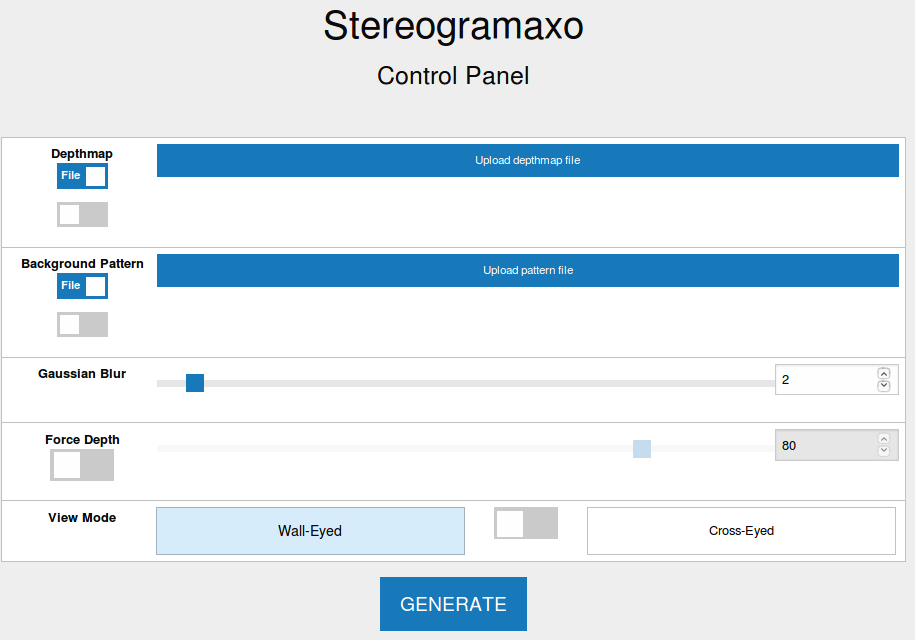 From the GUI you have access to every feature of the cli script. When generated, the resulting image is displayed in a modal over the form. _Editing to create a dot-pattern 3D text stereogram_ 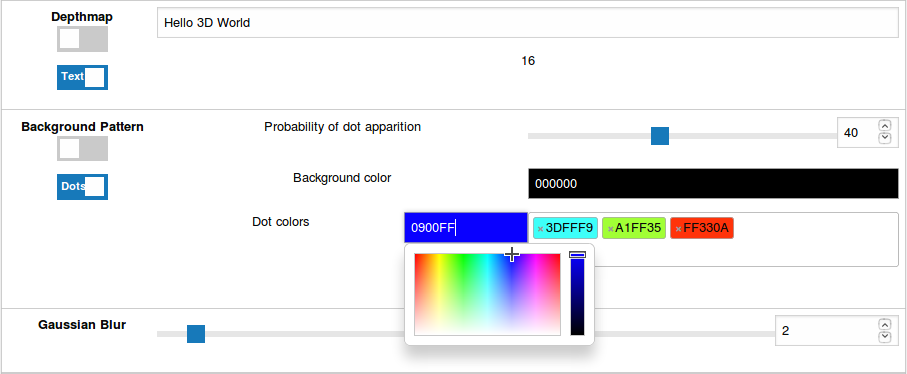 ## Installation #### CLI tool: 1. Clone the project somewhere 1. Install the required pip packages specified in the [Pipfile](https://pipenv.readthedocs.io/en/latest/basics/) #### Web GUI: 1. Install a web server (I used [Nginx](https://www.nginx.com/)) 1. Install php (5 or higher should be enough) 1. Move files from `WEB` folder to wherever you need to in order to make them accessible from your web instance 1. Make sure to correctly configure file permissions to be able to use them with your webserver 1. Edit the `WEB/run.php` file and change the value of the `$sirds_path` variable to point to where you cloned the project 1. Done > Beware of the paths I'm using inside this file: I use an `ENV` folder, as this is where I configured my virtualenv. Change it to match your own environment. ## Features - Support for **Random dot** and **image-based** patterns - Customizable dot pattern colors (background, dots) - Text depth map generation (as an alternative to external depthmaps) - [**Wall-eyed** and **Cross-eyed**](https://en.wikipedia.org/wiki/Autostereogram#Simulated_3D_perception) modes supported - Center-to-sides pixel displacement - Blur filter - Process done on oversampled copy for smoother results - "Forced depth" feature, allows to force total depth independent of the actual depthmap grayscale range. Useful if depthmap levels are extreme or too flat. ## TODO: - Maybe some optimizations (multi threading?) - Host somewhere - Improve artifacts on sharp edges (specially on autogenerated text depth maps) ## What never got to be done (take a look at `animated_sirds.py`) - Animated stereograms by varying depth, smoothness, background patterns - Animated stereograms using depthmap based videos
