KO
|
EN
gitlite — search
Search
#javascript
#python
#hacktoberfest
#react
#ai
#typescript
#llm
#go
#golang
#android
#machine-learning
#rust
#deep-learning
#linux
bined
★ 61
Open GitHub ↗
BinEd Binary/Hex Editor
Download README (.md)
Explore Similar Repositories
bined-intellij-plugin
:
Hex viewer/editor plugin for JetBrains IntelliJ platform
hxl
:
Small, optimised terminal hex viewer with colour coding, inspired by hexyl.
hd
:
Hex Display: A modern xxd alternative.
PyHex
:
A command-line hex editor written in Python
formats
:
Command line file explorer / hex viewer
// repository documentation
Was this content helpful?
★ 0
(0 ratings)
Select Rating:
★
★
★
★
★
Submit Feedback
Recent Feedback
×
Download README
Do you want to download the
README.md
file for
bined
?
Download (.md)
BinEd - Binary/Hex Editor ========================= Editor for binary data (hex viewer/editor) written in Java. Homepage: https://bined.exbin.org/editor Downloads: [<img src="images/button-windows.png?raw=true" alt="Download for Windows" height="42">](https://bined.exbin.org/download/?group=editor&variant=0) [<img src="images/button-macos.png?raw=true" alt="Download for macOS" height="42">](https://bined.exbin.org/download/?group=editor&variant=1) [<img src="images/button-zip.png?raw=true" alt="Download ZIP" height="42">](https://bined.exbin.org/download/?group=editor&variant=2) Screenshot ---------- 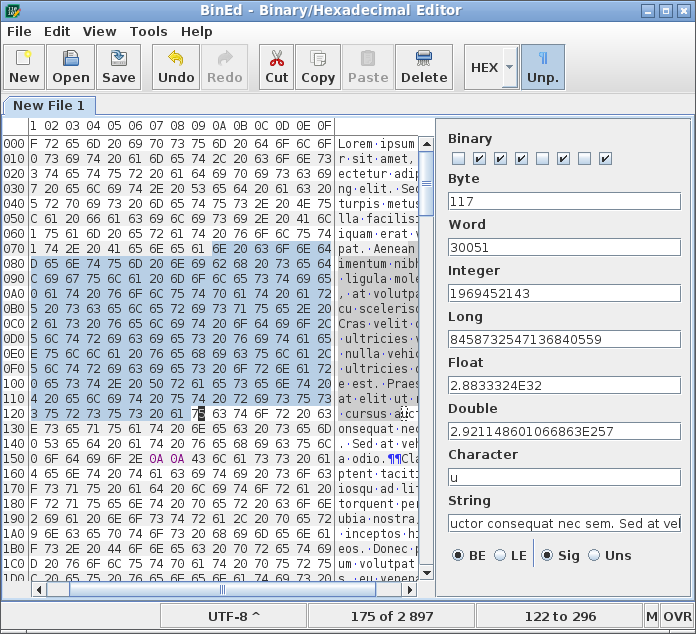 Features -------- * Visualize data as numerical (hexadecimal) codes and text representation * Codes can be also binary, octal or decimal * Support for Unicode, UTF-8 and other charsets * Insert and overwrite edit modes * Searching for text / hexadecimal code with matches highlighting * Support for undo/redo * Support for files with size up to exabytes Compiling --------- Build commands: "gradle build" and "gradle distZip" Java Development Kit (JDK) version 8 or later is required to build this project. For project compiling Gradle 8.1 build system is used: https://gradle.org You can either download and install Gradle or use gradlew or gradlew.bat scripts to download separate copy of Gradle to perform the project build. On the first build there will be an attempt to download all required dependency modules. Alternative is to deploy all dependency modules into local maven repository. You can try to run following commands. Start at parent directory to "bined" repo directory. git clone https://github.com/exbin/exbin-auxiliary-java.git cd exbin-auxiliary-java gradlew build publish cd .. git clone https://github.com/exbin/bined-lib-java.git cd bined-lib-java gradlew build publish cd .. git clone https://github.com/exbin/exbin-framework-java.git cd exbin-framework-java gradlew build publish cd .. License ------- Apache License, Version 2.0 - see LICENSE.txt
