KO
|
EN
gitlite — search
Search
#javascript
#python
#hacktoberfest
#react
#ai
#typescript
#llm
#go
#golang
#android
#machine-learning
#rust
#deep-learning
#linux
dala
★ 14
Open GitHub ↗
No description available.
Download README (.md)
Explore Similar Repositories
cpa-grok
:
CLIProxyAPI 反代 Grok 免费号,免费体验 Grok-4.5 模型
skills
:
shanjian skills
Demo_repository_4_test
:
TEST_repository_описание
awesome-generative-ui
:
Developer resources for building with and learning about generative UI
TrafficAnalyzer
:
应急响应流量分析工具,支持pcap、excel、log等多种数据源,同时结合加解密、反编译等多个常用工作流。
// repository documentation
Was this content helpful?
★ 0
(0 ratings)
Select Rating:
★
★
★
★
★
Submit Feedback
Recent Feedback
×
Download README
Do you want to download the
README.md
file for
dala
?
Download (.md)
<p align="center"> <img src="priv/static/images/logo-512.png" width="96" alt="Dala" /> </p> <h1 align="center">Dala</h1> <p align="center">A web terminal built for the AI era: long-running tasks survive restarts, Fork-grade git review built in, CodeMirror everywhere.</p> <p align="center"><a href="README.zh-CN.md">中文文档</a></p> --- 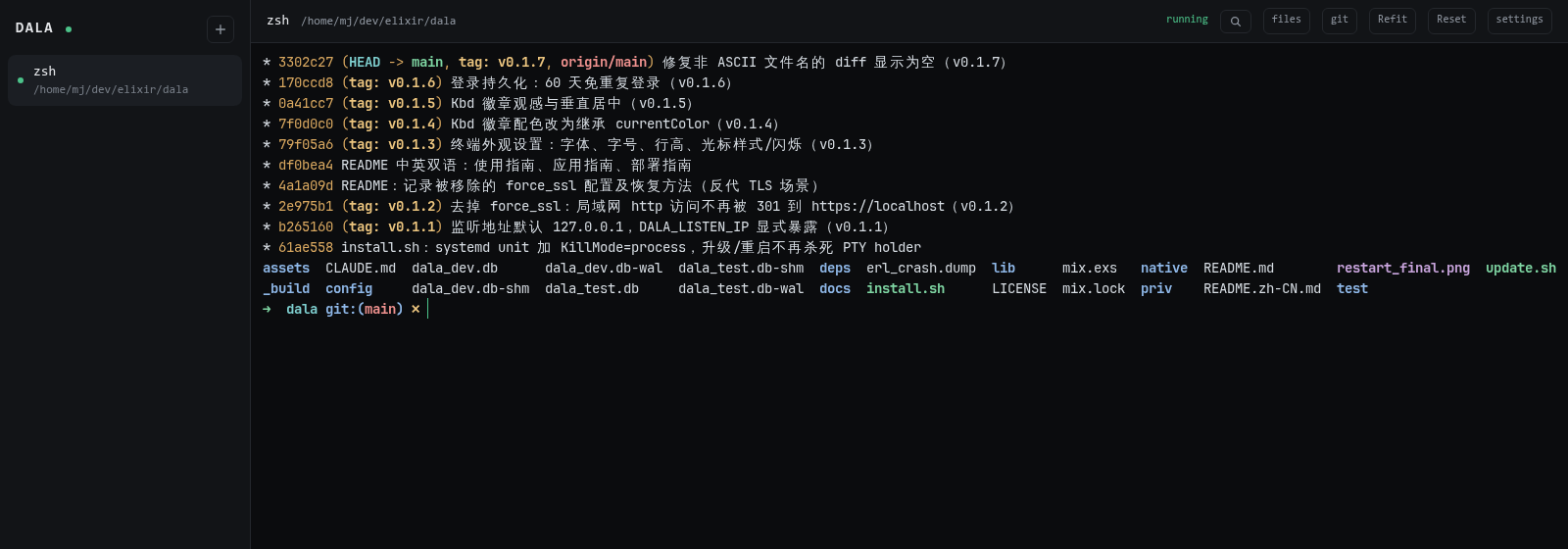 ## Features - **Persistent shells** — every session lives in its own PTY holder daemon (dtach model, written in Rust). Restarting or upgrading dala leaves your shells running: tmux durability, browser UI. - **Git review** — hunk-level *and* line-level stage/unstage/discard, working-tree/index dual perspectives, branch switching, per-file commit browsing, amend. All through a libgit2 NIF, no shelling out. - **Files** — VS Code-style drawer: upload/download/delete, drag & drop, paste files from the OS clipboard, `Ctrl/⌘+P` fuzzy quick-open. Large text/HTML downloads stream with HTTP gzip while byte ranges remain resumable. - **Editing & preview** — CodeMirror 6 syntax-highlighted editor, character-level merge diffs, Markdown/CSV preview. - **Screenshots for AI CLIs** — paste an image into the terminal; dala saves it to disk and types the file path for claude code / codex / opencode. - **Self-upgrade** — one click in the sidebar updates to the latest GitHub release. Shells stay alive through the restart. ## Screenshots | Git review — stage/discard per hunk | Line-level staging (`l`) | |---|---| | 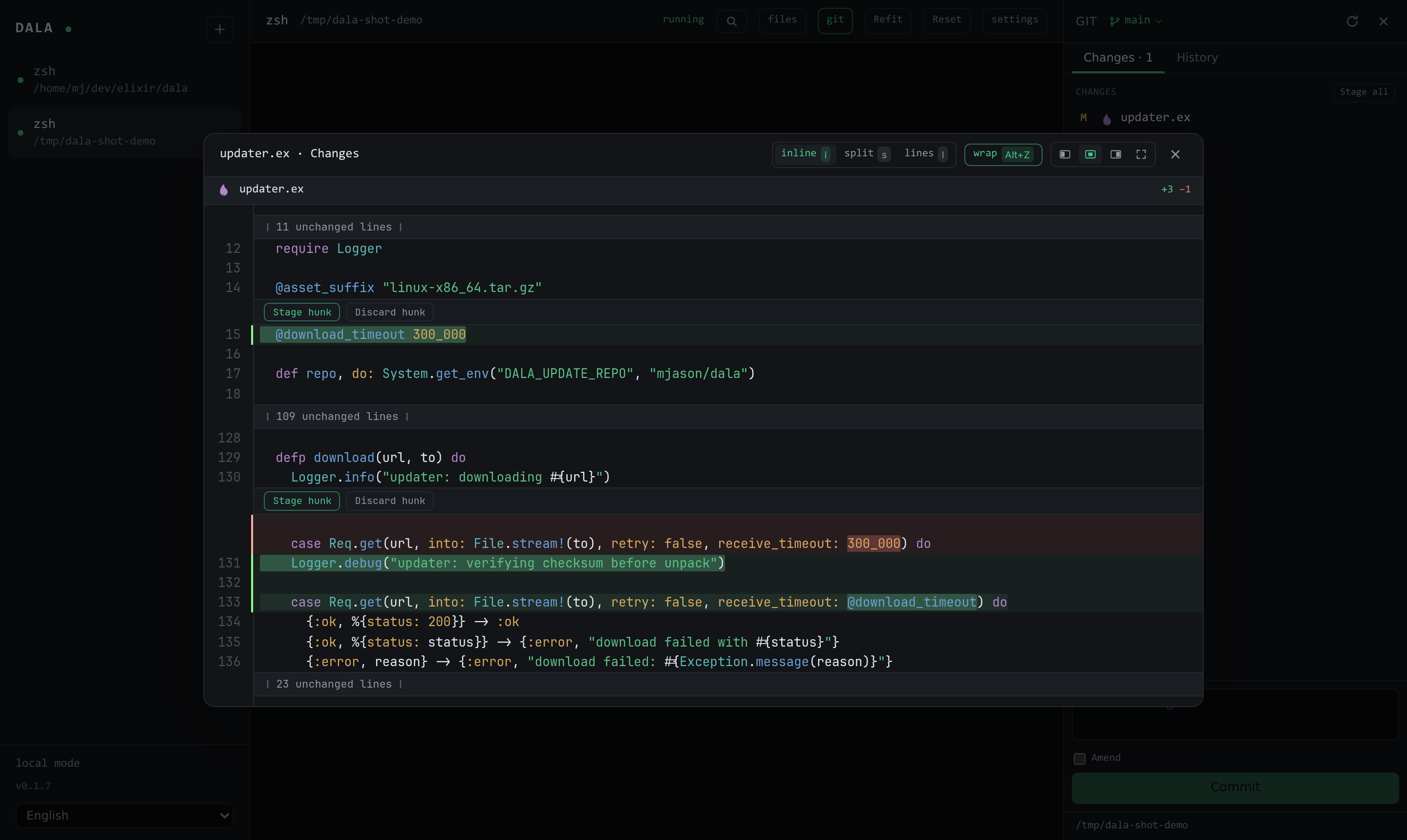 | 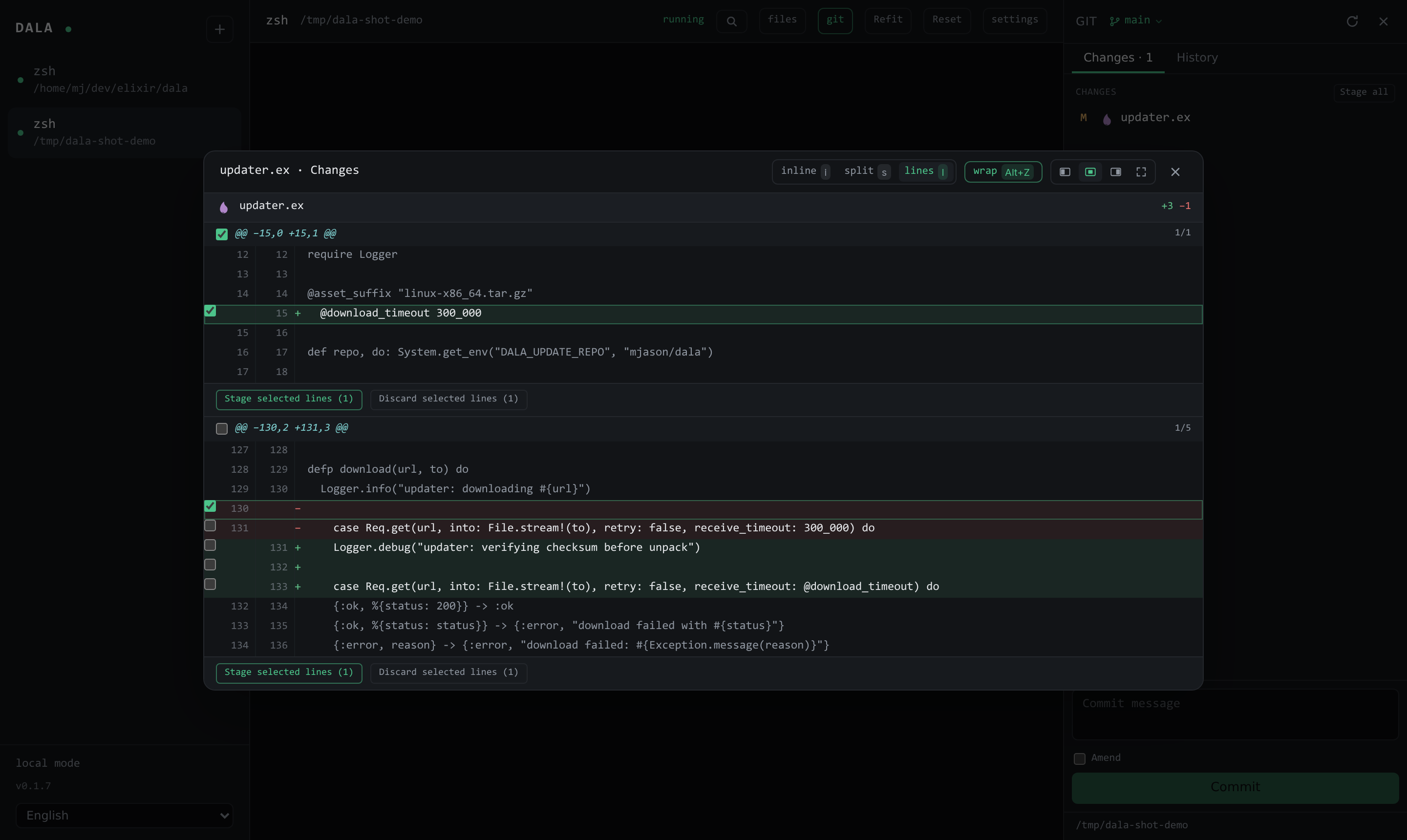 | 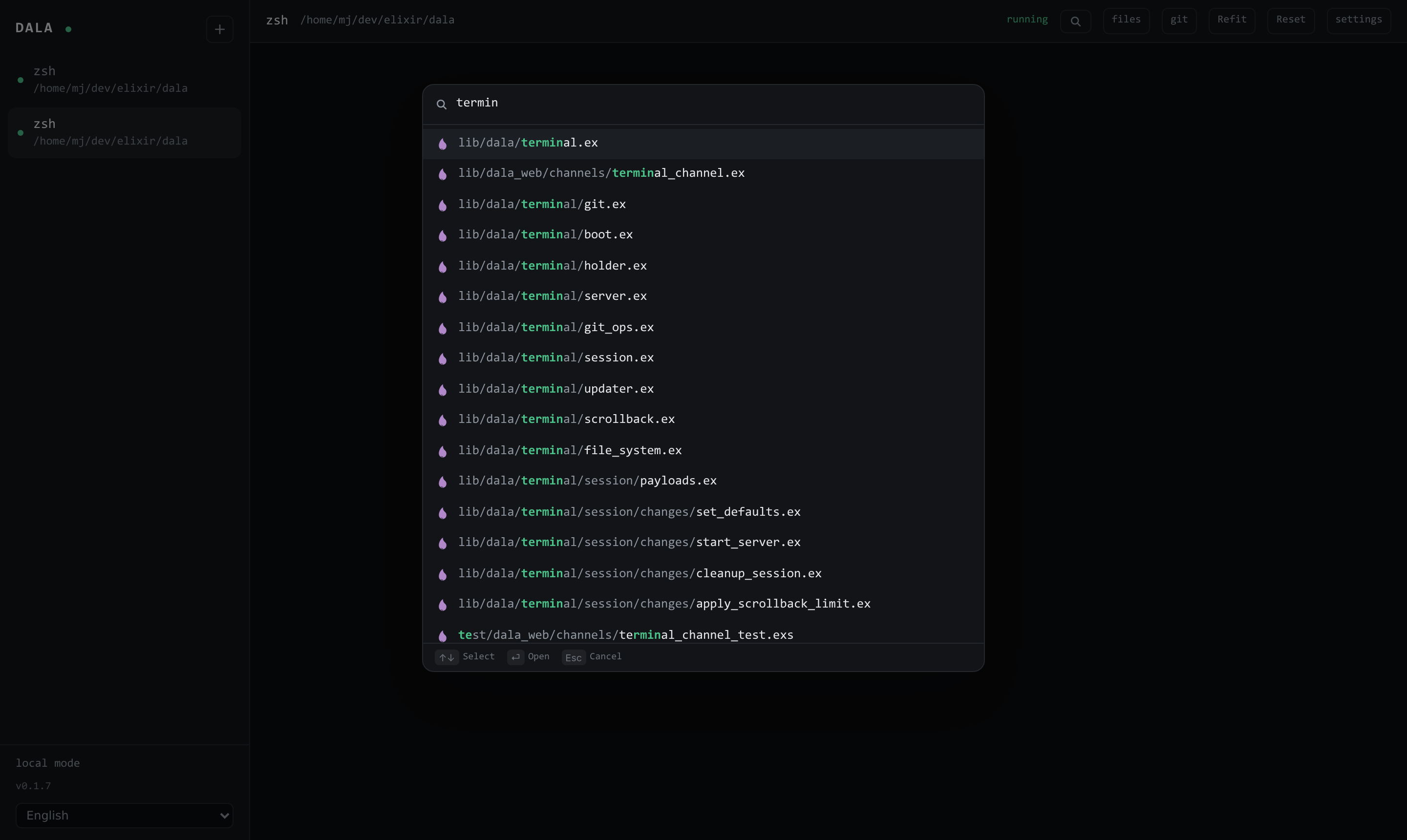 ## Quick start (Linux x86_64 / macOS arm64) ```sh curl -fsSL https://raw.githubusercontent.com/mjason/dala/main/install.sh | bash ``` This installs a prebuilt native release as a **user daemon** on `http://localhost:4400`: systemd on Linux, or the signed and notarized server under launchd on Apple Silicon Macs. Config lives in `~/.config/dala/config.jsonc`, data in `~/.local/share/dala`. To update later — either click the sidebar update button, or: ```sh curl -fsSL https://raw.githubusercontent.com/mjason/dala/main/update.sh | bash ``` ## Desktop client An Electron app (Windows / macOS / Linux) that manages multiple dala servers, VS Code style. Chromium engine means rendering, IME and clipboard behave exactly like Chrome on every platform: - **Servers menu** — switch the current window between servers (`Ctrl/⌘+1..9`), or open a server **in a new window**; one window per server works like VS Code workspaces - Sign-in state is kept per server (60-day persistent login), the last-used server reopens on launch - Manage servers on the built-in page (`Ctrl/⌘+,`) - External links from the terminal open in a built-in browser window Client releases use their own tags (`client-vX.Y.Z`), independent from server releases (`vX.Y.Z`) — so they never carry the "Latest" badge. Download the installer for your OS from the [client releases](https://github.com/mjason/dala/releases?q=client&expanded=true) (`.exe`, `.dmg`, `.deb`/`.AppImage`). > **macOS**: the universal `.dmg` (Apple Silicon + Intel) is signed and > notarized (Developer ID) — it opens without any Gatekeeper prompt. > Upgrading from the Tauri client (≤ v0.5.x)? Your server list is imported > automatically on first launch. > **Auto-update**: since client-v0.1.2 the client checks for new versions > (on launch and every 4 hours), downloads in the background and offers a > one-click restart; File → Check for Updates triggers it manually. Build from source: ```sh cd clients/desktop && npm install && npm run build ``` ## Usage guide ### Sessions The sidebar lists your shells. `+` creates one; each runs on the server inside its own holder process, so closing the tab, refreshing, restarting dala or upgrading it never kills a shell. A session that *exited* (the process itself ended) shows an overlay with a restart button. Per-session settings (rename, scrollback cache size, kill/restart, delete) are behind the `settings` button. ### Keyboard shortcuts | Shortcut (Linux/Windows · macOS) | Action | |---|---| | `Ctrl+P` · `⌘P` | Quick-open a file (fuzzy search; on macOS it works even while the terminal is focused) | | `Ctrl+Shift+E` · `⇧⌘E` | File drawer | | `Ctrl+Shift+G` · `⇧⌘G` | Git panel | | `Ctrl+Shift+F` · `⇧⌘F` | Refit terminal width | | `Ctrl+Shift+X` · `⇧⌘X` | Reset terminal | | `Ctrl+Shift+K` · `⇧⌘K` (or click the strip below the terminal) | **Composer** (Warp-style rich input): CodeMirror Markdown editor (highlighted code fences, Tab indent, Enter newline), **Shift+Enter delivers the whole line**, `@` references files, `/` completes commands (incl. custom commands/skills), `+` attaches | | `Ctrl+\`` (Control on macOS too — `⌘\`` is taken by the OS) | Focus the terminal from anywhere | | `Ctrl+Shift+\`` (or the `⚡>_` header button) | **Quick shell**: a disposable overlay terminal (slides over the session, drag its left edge to resize, one-click fullscreen) already cd'd into the active session's directory; `+` in the panel opens more tabs. **Esc closes it** — every quick shell is destroyed on the spot, nothing is kept (inside vim & co. Esc belongs to the program); `exit`/`Ctrl+D` closes a single tab | | `Esc` | Close the topmost window | The sidebar, quick shell, file drawer and git panel edges are all draggable (widths remembered per browser); double-click a divider to reset that panel, or use "Reset layout" in settings to reset them all. File drawer: `↑↓` select · `⏎` open · `⌫` parent directory · `Del` delete · `Esc` deselect (uploads then target the root) · `Ctrl/⌘+V` paste a copied file. Diff windows: `i` inline · `s` side-by-side · `l` line-select mode · `Alt+Z` wrap. Every button shows its shortcut in a hover tooltip. ### Git panel Open it with `Ctrl+Shift+G` in any session whose directory is inside a git repo. - **Changes** — staged and unstaged lists (a file with both kinds of changes appears in both). Click a file for a syntax-highlighted diff with two perspectives: unstaged (index ↔ working tree) and staged (HEAD ↔ index). - **Hunks & lines** — every change block has Stage/Discard/Unstage buttons (inline and side-by-side modes). Press `l` for line-select mode: tick individual `+`/`-` lines and stage/discard/unstage exactly those. - **Commit** — message box at the bottom; `Amend (--amend)` melds staged changes into the previous commit (empty message keeps the original). - **Branches** — click the branch name in the header to list local/remote branches and switch (remote branches get a local tracking branch). Dirty conflicts abort safely. - **History** — commit log; multi-file commits get a file rail so you can review file by file. ### Agent awareness (Claude Code / opencode / Codex…) dala speaks Warp's open cli-agent protocol (OSC 777). Install the agent's plugin once and you get the integration: **Claude Code** (run inside Claude Code, then restart it or `/reload-plugins`): ``` /plugin marketplace add warpdotdev/claude-code-warp /plugin install warp@claude-code-warp ``` **opencode** (add to `opencode.json`): ```json { "plugin": ["@warp-dot-dev/opencode-warp"] } ``` **Codex** needs no plugin (native notifications). **Gemini CLI**: install `warpdotdev/gemini-cli-warp` (see its README). With that in place: - **Notifications** when a task finishes / awaits your approval / asks you a question while you're on another session or away (click jumps to it) - **Sidebar status dots**: ✳ working (mint pulse) / ⏳ needs you (amber pulse) / ✓ done (blue, cleared when viewed) - **Composer auto-toggle**: opens while the agent works or finishes (without stealing focus), closes when an approval wants raw terminal keys Codex needs no plugin (its native OSC 9 notifications work). Note that sessions started before an upgrade need their shell restarted (holders outlive releases). **Tip — Claude Code after a width change**: when the terminal width changes (e.g. a phone takes over the session's size), Claude Code keeps its transcript hard-wrapped at the old width (upstream: [anthropics/claude-code#43113](https://github.com/anthropics/claude-code/issues/43113)). Press **Ctrl+O twice** to re-render the transcript at the current width in-session — or `claude --continue` after exiting. ### Directory following The file drawer follows the terminal's working directory. The shell is polled (2s) by default; for instant `cd` updates you can optionally add the standard **OSC 7** report, which takes over from polling entirely. For zsh (`~/.zshrc`): ```zsh _osc7() { printf '\e]7;file://%s%s\a' "$HOST" "$PWD" } autoload -U add-zsh-hook && add-zsh-hook chpwd _osc7 && _osc7 ``` For bash (`~/.bashrc`): ```bash PROMPT_COMMAND='printf "\e]7;file://%s%s\a" "$HOSTNAME" "$PWD"'"${PROMPT_COMMAND:+;$PROMPT_COMMAND}" ``` (Many setups — vte.sh, WezTerm/Kitty shell integration — already emit OSC 7.) ### Images for AI CLIs Run claude code / codex / opencode inside a dala shell and paste a screenshot (`Ctrl/⌘+V`): dala stores it under the session directory and types its path into the prompt — the same flow those CLIs support in a native terminal. ## Project config: dala.jsonc Everything works with zero configuration — the file editor's LSP resolves servers per project automatically (a Python venv's basedpyright, rust-analyzer, elixir-ls, typescript-language-server, gopls… probed from the venv, PATH, `~/.local/bin`, `~/.cargo/bin` and Mason). A `dala.jsonc` at the project root takes over when the defaults aren't enough. Comments and trailing commas are allowed. ```jsonc { // Override which language servers attach, per language. Several servers // can share one file (e.g. a framework's DSL server next to pyright). "lsp": { "python": [ { "command": [".venv/bin/basedpyright-langserver", "--stdio"] }, { "command": [".venv/bin/dm", "lsp"] }, // framework DSL server ], }, // Monorepos: map sub-projects to their own root. The longest matching // path prefix wins; the LSP rootUri and working directory land there. "projects": { "assets": { // frontend at <root>/assets "lsp": { "typescript": [ { "command": ["node_modules/.bin/tsls", "--stdio"] } ] }, }, "clients/desktop": {}, // {} = auto-discovery at that root }, // Voice input: the Whisper transcription prompt. The model treats it as // the PRECEDING transcript and mimics its spelling and punctuation, so // write a natural sentence (in the language you speak) with your jargon // embedded — not a bare keyword list. Only the last ~224 tokens count. // Per project — editable from Settings' Voice tab, which reads/writes // the nearest dala.jsonc (created here when missing). "speech": { "prompt": "This session covers dala, zellij, Phoenix LiveView and basedpyright.", }, // Composer slash-command menu: extend or patch the per-agent command // catalog. dala ships tables curated from each CLI's official docs // (priv/agent_commands) and scans the CLIs' own custom-command files // (.claude/commands|skills, ~/.codex/prompts, opencode command dirs) — // when a CLI update adds commands first, add them here (or globally in // <data_dir>/agent_commands/<agent>.json). Entries override built-ins by // name; "hidden": true removes one from the menu. "agentCommands": { "codex": [ { "name": "/my-new-cmd", "description": "Added by a newer Codex" }, { "name": "/quit", "hidden": true }, ], }, } ``` Each server entry also accepts **`initializationOptions`** (sent verbatim in the LSP `initialize` request) and **`settings`** (delivered via `workspace/didChangeConfiguration` — how pyright-family servers take `python.pythonPath`, `venvPath` and friends): ```jsonc { "lsp": { "python": [ { "command": ["pyright-langserver", "--stdio"], "settings": { "python": { "pythonPath": "${root}/.venv/bin/python" } }, } ] } } ``` Rules: - **Command words expand** `~`, `$VAR` / `${VAR}` and `${root}` (the project root) — inside `initializationOptions`/`settings` string values too. Relative paths resolve against the root. - **Nearest config wins**: a `dala.jsonc` inside a sub-directory beats the top-level one for files under it — an alternative to `"projects"`. - A `"projects"` entry without `"lsp"` still moves the root: auto-discovery then runs *at the sub-project* (its venv, its node_modules). - The legacy `.dala/lsp.json` (the bare `lsp` map as the whole file) keeps working; `dala.jsonc` wins when both exist. - The editor's **LSP debug window** shows, per file, which config applied and every probed path (found or missing) — same data at `GET /lsp/debug` for AI agents. ## Application guide - **Long-running AI agents.** Kick off a multi-hour agent run, close the laptop, come back from any browser: the shell, its scrollback and the agent are still there. This is the core reason dala exists — terminal multiplexers work, but a browser tab with persistent state travels better. - **Review what the agent wrote.** The git panel is built for the "AI writes, human reviews" loop: skim per-file diffs, stage exactly the lines you accept, discard the rest, amend fixups — without leaving the browser. - **Multi-device access.** Expose dala on your LAN (see deployment guide), enable login, and drive the same shells from a phone or tablet. ## Deployment guide ### Layout | Path | Purpose | |---|---| | `~/.local/dala/versions/<tag>` | unpacked releases | | `~/.local/dala/current` | symlink to the active version | | `~/.config/dala/config.jsonc` | server configuration (port, listen address, auth, …) | | `~/.local/share/dala/secrets.json` | auto-generated secrets (0600, created on first boot) | | `~/.config/dala/dala.env` | LEGACY environment file — still honored as overrides on old installs | | `~/.config/systemd/user/dala.service` (Linux) | systemd user unit | | `~/Library/LaunchAgents/com.manjialin.dala.plist` (macOS) | launchd user agent | | `~/.local/share/dala` | SQLite DB, session store, scrollback cache | The unit runs `Dala.Release.migrate()` before every start, so upgrades migrate the database automatically. `KillMode=process` keeps PTY holders (and your shells) alive across service restarts. ### Configuration reference (`~/.config/dala/config.jsonc`) Configuration is a FILE on purpose: the service process carries no dala-specific environment variables, so nothing can leak into the shells it spawns (and nothing collides with whatever you run inside them). Secrets are generated by the server on first boot (`<dataDir>/secrets.json`, 0600) — you never write them. Restart the service after editing. | Key | Default | Meaning | |---|---|---| | `port` | `4400` | HTTP port | | `listenIp` | `"127.0.0.1"` | Listen address. **Loopback only by default** — `"0.0.0.0"` serves the LAN (enable auth!) | | `auth.enabled` | `false` | Require sign-in | | `auth.users` | — | Bootstrap accounts, `"email:password[,email2:password2]"` (min 8-char passwords). **First-boot only**: existing accounts are never touched — remove once created so the plaintext doesn't linger. Password reset: add `"usersReset": true` for one boot | | `host` / `scheme` / `urlPort` | `"localhost"` / `"http"` / `port` | Public URL parts (set behind a reverse proxy) | | `checkOrigin` | `false` | WebSocket origin check — enable behind a reverse proxy with a fixed host | | `databasePath` | `<dataDir>/dala.db` | SQLite location | | `dataDir` | `~/.local/share/dala` | Session store, scrollback cache, secrets | | `releaseRoot` / `serviceName` | set by install.sh | Enable the in-app updater | | `server` | `true` (written by install.sh) | Start the HTTP server (release installs) | Upload/preview size limits live under `"limits"` (`drawerUploadMaxMb`, `browserAttachmentMaxMb`, `mcpAttachmentMaxMb`, `attachmentStorageMaxMb`, `textSaveMaxMb`, `textPreviewDefaultMb`, `textPreviewMaxMb`), and `updateRepo`/`dnsClusterQuery` are available too. Environment variables are for DEVELOPMENT and legacy installs only, and dala's own env names are `DALA_`-prefixed (`DALA_PORT`, `DALA_HOST`, … — generic names like `PORT` collide with other tools; the bare legacy names keep working solely for old `dala.env` installs). **Once `config.jsonc` exists, every environment variable is ignored** — a configured install is deterministic. Old installs should migrate: one command, reversible — ```sh curl -fsSL https://raw.githubusercontent.com/mjason/dala/main/migrate-config.sh | bash ``` see [docs/config-migration.md](docs/config-migration.md). Legacy-mode servers show a migration notice in the sidebar footer. On Linux, `install.sh` runs `loginctl enable-linger` so the daemon also runs while you are logged out. The macOS LaunchAgent starts when the user logs in. ### LAN access 1. In `config.jsonc`: `"listenIp": "0.0.0.0"` and `"auth": { "enabled": true, "users": "you@example.com:yourpassword" }`, then restart. Once you can sign in, **remove `users`** — the account is persisted; don't leave the plaintext password in the file. 2. Open `http://<machine-ip>:<port>` from another device. 3. **WSL2**: use mirrored networking (`.wslconfig` → `networkingMode=mirrored`) and allow the port through the Hyper-V firewall (admin PowerShell): ```powershell New-NetFirewallHyperVRule -Name dala-4400 -DisplayName "dala 4400" ` -Direction Inbound -VMCreatorId "{40E0AC32-46A5-438A-A0B2-2B479E8F2E90}" ` -Protocol TCP -LocalPorts 4400 ``` A terminal server hands out your shell — never expose it without auth, and prefer a VPN (tailscale etc.) over raw internet exposure. ### HTTPS / reverse proxy dala serves plain http by design; TLS belongs to a reverse proxy (nginx/caddy). The Phoenix generator's `force_ssl` block was removed in v0.1.2 (it only exempted `localhost`, so LAN-IP access got 301-redirected to `https://localhost/`). To force https behind a TLS proxy, put it back in `config/prod.exs` (compile-time — requires a rebuild): ```elixir config :dala, DalaWeb.Endpoint, force_ssl: [ rewrite_on: [:x_forwarded_proto], exclude: [ hosts: ["localhost", "127.0.0.1"] ] ] ``` and set `"scheme": "https"`, `"host": "<your-domain>"`, `"checkOrigin": true` in `config.jsonc`. ### Releases & building from source Releases are built by GitHub Actions on every `v*` tag (`.github/workflows/release.yml`): production assets, Rust NIFs and the PTY holder are packaged for Linux x86_64 and macOS arm64. Every Mach-O artifact in the macOS release is signed with the Developer ID certificate and the complete release is submitted to Apple notarization before publication. Local development needs Elixir 1.19+/OTP 28, Rust and Node 22: ```sh mix setup mix phx.server # http://localhost:4000 ``` ## Architecture - Phoenix + Bandit server, React + xterm.js frontend (Phoenix Channels transport) - One `dala_holder` (Rust) per session: a daemonized PTY owner with an **embedded headless terminal emulator** (`alacritty_terminal`) — the tmux model. Attaching gets a synthesized repaint (history tail + screen + cursor + modes) instead of a raw byte replay, so attach latency is independent of how much output the session ever produced and alt-screen apps (vim, htop) reattach pixel-perfect - `dala_git` (Rustler + libgit2): status/diff/stage/patch-apply/branches/checkout as NIFs - SQLite (Ash + Ecto) for accounts, DETS for sessions & scrollback cache ## License MIT
