KO
|
EN
gitlite — search
Search
#python
#java
#python3
#arduino
#golang
#machine-learning
#rust
#html
#flask
#javascript
#seismology
#nodejs
run
★ 16
Open GitHub ↗
No description available.
Download README (.md)
Explore Similar Repositories
Saliency-Ranking
:
Code release for the TPAMI 2021 paper "Instance-Level Relative Saliency Ranking with Graph Reasoning" by Nian Liu, Long Li, Wangbo Zhao, Junwei Han, and Ling Shao.
-
:
No description available.
troika-srd
:
A website for the Troika! roleplaying game system reference document
chrome-headless-screenshots
:
Node.js script and Docker image to take screenshots of webpages with Chrome headless and Puppeteer
observed-optional-object
:
Observe objects in SwiftUI Views which may be nil
// repository documentation
Was this content helpful?
★ 0
(0 ratings)
Select Rating:
★
★
★
★
★
Submit Feedback
Recent Feedback
×
Download README
Do you want to download the
README.md
file for
run
?
Download (.md)
## Note 1. clone or Fork before vercel 404 need to pull the latest code 2. python in README means python3 python 3. use v2.0 need change vercel setting from gatsby to vite 4. 2023.09.26 garmin need secret_string(and in Actions) get ```bash python run_page/get_garmin_secret.py ${email} ${password} # if cn python run_page/get_garmin_secret.py ${email} ${password} --is-cn ``` 5. 2024.09.29: Added `Elevation Gain` field, If you forked the project before this update, please run the following command: - To resolve errors: `sqlalchemy.exc.OperationalError: (sqlite3.OperationalError) no such column: activities.elevation_gain` - If you don't have a local environment, set `RUN_TYPE` to `db_updater` in the `.github/workflows/run_data_sync.yml` file once then change back. ```bash python run_page/db_updater.py ``` - For old data: To include `Elevation Gain` for past activities, perform a full reimport. - To show the 'Elevation Gain' column, modify `SHOW_ELEVATION_GAIN` in `src/utils/const.ts` - note: `Elevation Gain` may be inaccurate. You can use Strava's "Correct Elevation" or Garmin's "Elev Corrections" feature for more precise data. 6. This project now uses MapCN (free) by default. If you choose to use Mapbox, please get your own token. Do not use the project maintainer's token - check this [issue](https://github.com/yihong0618/running_page/issues/643) and [issue #1055](https://github.com/yihong0618/running_page/issues/1055) <p align="center"> <img width="150" src="https://raw.githubusercontent.com/shaonianche/gallery/master/running_page/running_page_logo.png" /> </p> <h3 align="center"> <a href="https://yihong.run"> Create a personal running home page </a> </h3> <p align="center"> <a href="https://github.com/yihong0618/running_page/actions"><img src="https://github.com/yihong0618/running_page/actions/workflows/run_data_sync.yml/badge.svg" alt="GitHub Action"></a> <a href="https://t.me/running_page"><img src="https://badgen.net/badge/icon/join?icon=telegram&label=usergroup" alt="Chat on telegram"></a> </p> <p align="center"> <img src="https://user-images.githubusercontent.com/15976103/98808834-c02f1d80-2457-11eb-9a7c-70e91faa5e30.gif" alt="demo" width="800"> </p> English | [简体中文](https://github.com/yihong0618/running_page/blob/master/README-CN.md) | [Wiki](https://mfydev.github.io/Running-Page-Wiki/) ## [Runner's Page Show](https://github.com/yihong0618/running_page/issues/12) <details> <summary>Running page runners</summary> <br> | Runner | page | App | | ---------------------------------------------------- | ---------------------------------------------- | ----------- | | [zhubao315](https://github.com/zhubao315) | <https://zhubao315.github.io/running> | Strava | | [shaonianche](https://github.com/shaonianche) | <https://run.duanfei.org> | Strava | | [yihong0618](https://github.com/yihong0618) | <https://yihong.run> | Nike | | [superleeyom](https://github.com/superleeyom) | <https://running.leeyom.top> | Strava | | [geekplux](https://github.com/geekplux) | <https://activities.geekplux.com> | Nike | | [guanlan](https://github.com/guanlan) | <https://grun.vercel.app> | Strava | | [tuzimoe](https://github.com/tuzimoe) | <https://run.tuzi.moe> | Nike | | [ben_29](https://github.com/ben-29) | <https://running.ben29.xyz> | Strava | | [kcllf](https://github.com/kcllf) | <https://running-tau.vercel.app> | Garmin-cn | | [mq](https://github.com/MQ-0707) | <https://running-iota.vercel.app> | Keep | | [zhaohongxuan](https://github.com/zhaohongxuan) | <https://zhaohongxuan.github.io/workouts> | Strava | | [yvetterowe](https://github.com/yvetterowe) | <https://run.haoluo.io> | Strava | | [love-exercise](https://github.com/KaiOrange) | <https://run.kai666666.top> | Keep | | [zstone12](https://github.com/zstone12) | <https://running-page.zstone12.vercel.app> | Keep | | [Lax](https://github.com/Lax) | <https://lax.github.io/running> | Keep | | [lusuzi](https://github.com/lusuzi) | <https://running.lusuzi.vercel.app> | Nike | | [wh1994](https://github.com/wh1994) | <https://run4life.fun> | Garmin | | [liuyihui](https://github.com/YiHui-Liu) | <https://run.foolishfox.cn> | Keep | | [sunyunxian](https://github.com/sunyunxian) | <https://sunyunxian.github.io/running_page> | Strava | | [AhianZhang](https://github.com/AhianZhang) | <https://running.ahianzhang.com> | Nike | | [L1cardo](https://github.com/L1cardo) | <https://run.licardo.cn> | Nike | | [luckylele666](https://github.com/luckylele666) | <https://0000928.xyz> | Strava | | [MFYDev](https://github.com/MFYDev) | <https://mfydev.run> | Garmin-cn | | [Eished](https://github.com/eished) | <https://run.iknow.fun> | Keep | | [Liuxin](https://github.com/liuxindtc) | <https://liuxin.run> | Nike | | [loucx](https://github.com/loucx) | <https://loucx.github.io/running> | Nike | | [winf42](https://github.com/winf42) | <https://winf42.github.io> | Garmin-cn | | [sun0225SUN](https://github.com/sun0225SUN) | <https://run.sunguoqi.com> | Nike | | [Zhan](https://www.zlog.in/about/) | <https://run.zlog.in> | Nike | | [Dennis](https://run.domon.cn) | <https://run.domon.cn> | Garmin-cn | | [hanpei](https://running.nexts.top) | <https://running.nexts.top> | Garmin-cn | | [liugezhou](https://github.com/liugezhou) | <https://run.liugezhou.online> | Strava | | [Jason Tan](https://github.com/Jason-cqtan) | <https://jason-cqtan.github.io/running_page> | Nike | | [Conge](https://github.com/conge) | <https://conge.github.io/running_page> | Strava | | [zHElEARN](https://github.com/zHElEARN) | <https://workouts.zhelearn.com> | Strava | | [Ym9i](https://github.com/Ym9i) | <https://bobrun.vercel.app/> | Strava | | [jianchengwang](https://github.com/jianchengwang) | <https://jianchengwang.github.io/running_page> | Suunto | | [fxbin](https://github.com/fxbin) | <https://fxbin.github.io/sport-records/> | Keep | | [shensl4499](https://github.com/shensl4499) | <https://waner.run> | codoon | | [haowei93](https://github.com/haowei93) | <https://running-fun.eu.org> | gpx | | [stevenash0822](https://github.com/stevenash0822) | <https://run.imangry.xyz/> | Strava | | [Vint](https://github.com/VintLin) | <https://vinton.store/Running/> | Keep | | [Muyids](https://github.com/muyids) | <https://muyids.github.io/running> | Garmin-cn | | [Gao Hao](https://github.com/efish2002) | <https://efish2002.github.io/running_page/> | Garmin-cn | | [Jinlei](https://github.com/iamjinlei0312) | <https://jinlei.run/> | 咕咚 | | [RealTiny656](https://github.com/tiny656) | <https://tiny656.github.io/running_page/> | JoyRun | | [EINDEX](https://github.com/eindex) | <https://workouts.eindex.me/> | Strava/Nike | | [Melt](https://github.com/fpGHwd) | <https://running.autove.dev/> | Strava | | [deepinwine](https://github.com/deepinwine) | <https://deepin.autove.dev/> | Garmin-cn | | [Echo](https://github.com/donghao526) | <https://donghao526.github.io/running> | JoyRun | | [Jeffggmm](https://github.com/Jeffggmm) | <https://jeffggmm.github.io/workouts_page/> | Garmin | | [s1smart](https://github.com/s1smart) | <https://s1smart.github.io/running_page/> | Strava | | [XmchxUp](https://github.com/XmchxUp) | <https://xmchxup.github.io/running_page/> | Strava | | [Ryan](https://github.com/85Ryan) | <https://85ryan.github.io/gooorun/> | Strava | | [PPZ](https://github.com/8824PPZ) | <https://run.dudubbbbbbbbb.top/> | Strava | | [Yer1k](https://github.com/Yer1k) | <https://running.yer1k.com/> | Strava | | [AlienVision](https://github.com/weaming) | <https://run.drink.cafe/> | Strava | | [闻笑忘](https://wenxiaowan.com) | <https://wenxiaowan.com> | 苹果健身 | | [Vensent](https://github.com/Vensent) | <https://vensent.github.io/workouts_page/> | Garmin | | [Zeonsing](https://github.com/NoonieBao) | <https://run.jogzeal.com/> | Coros | | [yaoper](https://github.com/yaoper) | <https://running.yaoper.cn> | codoon | | [NoZTurn](https://github.com/NoZTurn) | <https://run.jiangkai.org> | Strava | | [laqieer](https://github.com/laqieer) | <https://laqieer.github.io/running_page/> | Strava | | [Guoxin](https://github.com/guoxinl) | <https://running.guoxin.space/> | Strava | | [laihj](https://github.com/laihj) | <https://run.laihjx.com/> | 苹果健身 | | [Ginta](https://github.com/mar-heaven) | <https://running.ginta.top/> | Keep | | [Samuel](https://github.com/SamuelDixxon) | <https://samueldixxon.github.io/running_page/> | Keep | | [Evan](https://github.com/LinghaoChan) | <https://github.com/LinghaoChan/running> | Keep | | [Shuqi](https://github.com/zhufengme) | <https://runner-shuqi.devlink.cn/> | Garmin | | [shugoal](https://github.com/shugoal) | <https://shugoal.github.io/wk-shu/> | Garmin | | [Daniel](https://danielyu316.github.io/running_page) | <https://danielyu316.github.io/running_page/> | Codoon | | [arthurfsy2](https://github.com/arthurfsy2) | <https://fsy.4a1801.life> | Garmin | | [JMGutiH](https://github.com/JMGutiH) | <https://jmgutih.github.io/workouts_page/> | Strava | | [Bolyn](https://run.wbolyn.com) | <https://run.wbolyn.com> | Coros | | [LeiChen](https://github.com/xthirty77) | <https://xthirty77.github.io/running_page/> | Coros | | [itrunner](https://itrunner.cn) | <https://itrunner.cn> | Garmin | | [maslke](https://github.com/maslke) | <https://maslke.space/running_page/> | Garmin-cn | | [Niewei Yang](https://github.com/Niewei-Yang) | <https://neewii-worksout.vercel.app/> | Strava | | [RUN.LOG](https://github.com/bzzd2001) | <https://run.731558.xyz:6881/> | Strava | | [StoneRicky](https://github.com/StoneRicky) | <https://stonericky.github.io/running_page/> | COROS | </details> ## How it works 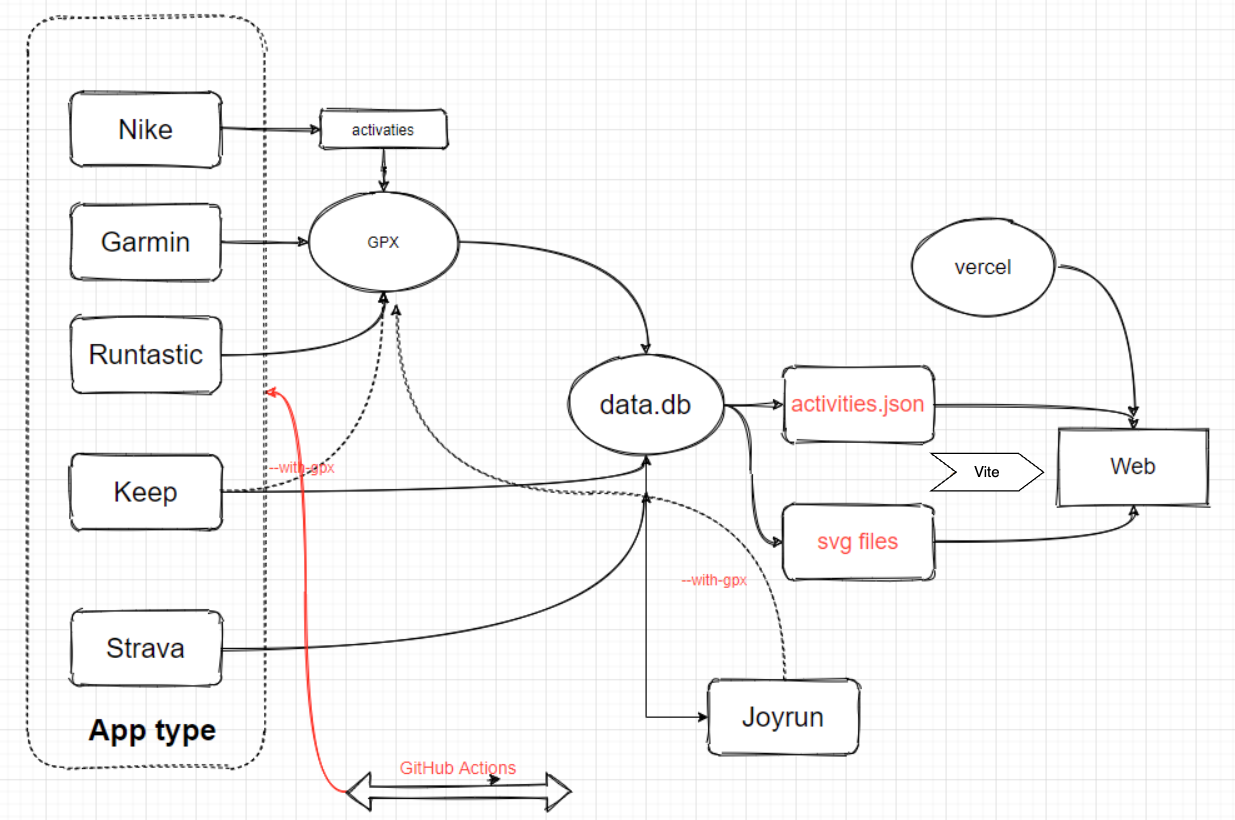 ## Features 1. GitHub Actions automatically synchronizes running data and generates page displays 2. Support for Vercel (recommended) and GitHub Pages automated deployment 3. React Hooks 4. Mapbox for map display 5. Supports most sports apps such as nike strava... 6. Support for metric and imperial units > automatically backup gpx data for easy backup and uploading to other software. > > Note: If you don't want to make the data public, you can choose strava's fuzzy processing, or private repositories. ## Support - **[Garmin](#garmin)** - **[Garmin-CN](#garmin-cnchina)** - **[New Way To Sync Nike Run Club](#nike-run-club-new)** - **[Nike Run Club](#nike-run-club)** - **[Strava](#strava)** - **[GPX](#gpx)** - **[TCX](#tcx)** - **[FIT](#fit)** - **[Garmin-CN_to_Garmin(Sync Garmin-CN activities to Garmin Global)](#garmin-cn-to-garmin)** - **[Nike_to_Strava(Using NRC Run, Strava backup data)](#nike_to_strava)** - **[Tcx_to_Strava(upload all tcx data to strava)](#tcx_to_strava)** - **[Tcx_to_Garmin(upload all tcx data to Garmin)](#tcx_to_garmin)** - **[Gpx_to_Strava(upload all gpx data to strava)](#gpx_to_strava)** - **[Garmin_to_Strava(Using Garmin Run, Strava backup data)](#garmin_to_strava)** - **[Strava_to_Garmin(Using Strava Run, Garmin backup data)](#strava_to_garmin)** - **[COROS](#coros)** - **[iGPSPORT](#igpsport)** - **[Joyrun](#joyrun)** - **[Komoot](#komoot)** - **[Onelap](#onelap)** ## Download Clone or fork the repo. ```bash git clone https://github.com/yihong0618/running_page.git --depth=1 ``` ## Installation and testing (node >= 20 python >= 3.11) ```bash pip3 install -r requirements.txt npm install -g corepack && corepack enable && pnpm install pnpm develop ``` Open your browser and visit <http://localhost:5173/> ## Docker ```bash # NRC docker build -t running_page:latest . --build-arg app=NRC --build-arg nike_refresh_token="" # Garmin docker build -t running_page:latest . --build-arg app=Garmin --build-arg secret_string="" # Garmin-CN docker build -t running_page:latest . --build-arg app=Garmin-CN --build-arg secret_string="" # Strava docker build -t running_page:latest . --build-arg app=Strava --build-arg client_id="" --build-arg client_secret="" --build-arg refresh_token="" # Nike_to_Strava docker build -t running_page:latest . --build-arg app=Nike_to_Strava --build-arg nike_refresh_token="" --build-arg client_id="" --build-arg client_secret="" --build-arg refresh_token="" # Keep docker build -t running_page:latest . --build-arg app=Keep --build-arg keep_phone_number="" --build-arg keep_password="" # run docker run -itd -p 80:80 running_page:latest # visit Open your browser and visit localhost:80 ``` ### Imperial Units * add `--build-arg VITE_USE_IMPERIAL=true` to `docker build ...` * add `--units imperial` flag to each `python3 run_page/gen_svg.py ...` command in the [Dockerfile](https://github.com/yihong0618/running_page/blob/master/Dockerfile) ## Local sync data ### Modifying Mapbox token > If you use English please change `IS_CHINESE = false` in `src/utils/const.ts` <br> > Suggested changes to your own [Mapbox token](https://www.mapbox.com/) ```typescript const MAPBOX_TOKEN = 'pk.eyJ1IjoieWlob25nMDYxOCIsImEiOiJja2J3M28xbG4wYzl0MzJxZm0ya2Fua2p2In0.PNKfkeQwYuyGOTT_x9BJ4Q'; ``` ## Change Default Map Tile Style > In addition to using the default map tile style, you can customize the map display by modifying the following configurations in `src/utils/const.ts`: ```typescript const MAP_TILE_VENDOR = 'mapcn'; // Default (free!) const MAP_TILE_STYLE = 'osm-bright'; const MAP_TILE_ACCESS_TOKEN = ''; // Not needed for MapCN ``` Currently supported `MAP_TILE_VENDOR` options include: - **"mapcn"** - MapCN map services (FREE, no token required) ⭐ DEFAULT & RECOMMENDED - **"mapbox"** - Mapbox map services (requires token, has costs) - **"maptiler"** - MapTiler map services (free tier available) - **"stadiamaps"** - Stadia Maps services (free tier available) Using MapCN (Default) MapCN is a free map tile provider and is now the default. No configuration needed! Available MapCN styles: - **osm-bright** - Light OpenStreetMap style (default) - **osm-liberty** - Alternative light style - **dark-matter** - Dark theme style **No access token required! ** 🎉 ## Attribution When using MapCN (Carto Basemaps), please ensure you comply with their attribution requirements: - Map tiles: © [CARTO](https://carto.com/) - Map data: © [OpenStreetMap](https://www.openstreetmap.org/copyright) contributors The project template already includes appropriate attribution in the map display. ## Using Other Providers If you prefer Mapbox, MapTiler, or Stadia Maps, you can change the vendor: ```typescript const MAP_TILE_VENDOR = 'mapbox'; // or 'maptiler' or 'stadiamaps' const MAP_TILE_STYLE = 'dark-v10'; // style for chosen vendor const MAP_TILE_ACCESS_TOKEN = 'your_access_token_here'; ``` Each `MAP_TILE_VENDOR` provides multiple `MAP_TILE_STYLE` options. Ensure the style matches your selected vendor. For available `MAP_TILE_STYLE` names, refer to the definitions in `src/utils/const.ts`. When using **"mapbox"**, **"maptiler"** or **"stadiamaps"**, you must configure an `ACCESS_TOKEN`. The default token may cause quota limit issues if not replaced. - **Mapbox**: Register at [https://www.mapbox.com/](https://www.mapbox.com/) (Has usage costs) - **MapTiler**: Register at [https://cloud.maptiler.com/auth/widget](https://cloud.maptiler.com/auth/widget) (Free tier available) - **Stadia Maps**: Sign up at [https://client.stadiamaps.com/signup/](https://client.stadiamaps.com/signup/) (Free tier available) ## Custom your page - Find `src/static/site-metadata.ts` in the repository directory, find the following content, and change it to what you want. ```typescript siteMetadata: { siteTitle: 'Running Page', #website title siteUrl: 'https://yihong.run', #website url logo: 'https://encrypted-tbn0.gstatic.com/images?q=tbn:ANd9GcQTtc69JxHNcmN1ETpMUX4dozAgAN6iPjWalQ&usqp=CAU', #logo img description: 'Personal site and blog', navLinks: [ { name: 'Blog', #navigation name url: 'https://yihong.run/running', #navigation url }, { name: 'About', url: 'https://github.com/yihong0618/running_page/blob/master/README-CN.md', }, ], }, ``` - Modifying styling in `src/utils/const.ts` ```typescript // styling: set to `false` if you want to disable dash-line route const USE_DASH_LINE = true; // styling: route line opacity: [0, 1] const LINE_OPACITY = 0.4; // styling: set to `true` if you want to display only the routes without showing the map // Note: This config only affects the page display; please refer to "privacy protection" below for data protection // update for now 2024/11/17 the privacy mode is true const PRIVACY_MODE = true; // update for now 2024/11/17 the lights on default is false // styling: set to `false` if you want to make light off as default, only effect when `PRIVACY_MODE` = false const LIGHTS_ON = false; // set to `true` if you want to show the 'Elevation Gain' column const SHOW_ELEVATION_GAIN = true; ``` - To use Google Analytics, you need to modify the configuration in the `src/utils/const.ts` file. ```typescript const USE_GOOGLE_ANALYTICS = false; const GOOGLE_ANALYTICS_TRACKING_ID = ''; ``` > privacy protection,setting flowing env: ```bash # ignore distance for each polyline start and end. IGNORE_START_END_RANGE = 200 # ignore meters for each point in below polyline. IGNORE_RANGE = 200 # a polyline include point you want to ignore. IGNORE_POLYLINE = ktjrFoemeU~IorGq}DeB # Do filter before saving to database, you will lose some data, but you can protect your privacy, when you using public repo. enable for set 1, disable via unset. IGNORE_BEFORE_SAVING = ``` You can using `Google map` [Interactive Polyline Encoder Utility](https://developers.google.com/maps/documentation/utilities/polylineutility), to making your `IGNORE_POLYLINE`. ## Download your running data > Download your running data and do not forget to [generate svg in `total` page](#total-data-analysis) ### GPX <details> <summary>Make your <code>GPX</code> data</summary> <br> Copy all your gpx files to GPX_OUT or new gpx files ```bash python run_page/gpx_sync.py ``` </details> ### TCX <details> <summary>Make your <code>TCX</code> data</summary> <br> Copy all your tcx files to TCX_OUT or new tcx files ```bash python run_page/tcx_sync.py ``` </details> ### FIT <details> <summary>Make your <code>FIT</code> data</summary> <br> Copy all your tcx files to FIT_OUT or new fit files ```bash python run_page/fit_sync.py ``` </details> ### Garmin <details> <summary>Get your <code>Garmin</code> data</summary> <br> - If you only want to sync `type running` add args --only-run - If you only want `tcx` files add args --tcx - If you only want `fit` files add args --fit - If you are using Garmin as a data source, it is recommended that you pull the code to your local environment to run and obtain the Garmin secret. **The Python version must be >=3.8** #### Get Garmin Secret Enter the following command in the terminal ```bash # to get secret_string python run_page/get_garmin_secret.py ${your email} ${your password} ``` #### Execute Garmin Sync Script Copy the Secret output in the terminal,If you are using GitHub, please configure **GARMIN_SECRET_STRING** in `GitHub Action`. ```bash # use this secret_string python run_page/garmin_sync.py ${secret_string} ``` example: ```bash python run_page/get_garmin_secret.py xxxxxxxxxxx ``` only-run: ```bash python run_page/garmin_sync.py xxxxxxxxxxxxxx(secret_string) --only-run ``` </details> ### Garmin-CN(China) <details> <summary>Get your <code>Garmin-CN</code> data</summary> <br> - If you only want to sync `type running` add args --only-run - If you only want `tcx` files add args --tcx - If you only want `fit` files add args --fit - If you are using Garmin as a data source, it is recommended that you pull the code to your local environment to run and obtain the Garmin secret. **The Python version must be >=3.10** #### Get Garmin CN Secret Enter the following command in the terminal ```bash # to get secret_string python run_page/get_garmin_secret.py ${your email} ${your password} --is-cn ```  #### Execute Garmin CN Sync Script Copy the Secret output in the terminal,If you are using GitHub, please configure **GARMIN_SECRET_STRING_CN** in GitHub Action.  example: ```bash python run_page/garmin_sync.py xxxxxxxxx(secret_string) --is-cn ``` only-run: ```bash python run_page/garmin_sync.py xxxxxxxxxxxxxx(secret_string) --is-cn --only-run ``` </details> ### Garmin-CN to Garmin <details> <summary> Sync your <code>Garmin-CN</code> data to <code>Garmin</code></summary> <br> - If you only want to sync `type running` add args --only-run **The Python version must be >=3.10** #### Get Garmin CN Secret Enter the following command in the terminal ```bash # to get secret_string python run_page/get_garmin_secret.py ${your email} ${your password} --is-cn ``` #### Get Garmin Secret Enter the following command in the terminal ```bash # to get secret_string python run_page/get_garmin_secret.py ${your email} ${your password} ``` #### Sync Garmin CN to Garmin Enter the following command in the terminal ```bash # to sync garmin-cn to garmin-global python run_page/garmin_sync_cn_global.py ${garmin_cn_secret_string} ${garmin_secret_string} ``` </details> ### Nike Run Club New <details> <summary>Get your <code>Nike Run Club</code> data</summary> <br> > Please note:Due to the discontinuation of Nike Run Club in mainland China, you can only log in through a VPN. Before starting, please ensure that you are using a global non-mainland China proxy, allowing you to access `nike.com` instead of `nike.com.cn`, as shown in the following image.  <br> 1. Sign in/Sign up [NikeRunClub](https://www.nike.com/) account  2. after successful login,openF12->Application->localstorage-> copy the content of "access_token" from the value of key`https://www.nike.com`. 3. Execute in the root directory , you should be able to see the image below, and then you can log into your account on the mobile as usual: ```bash python run_page/nike_sync.py ${access_token} ```  if you want to automate the submission of NRC data, you can refer to [issue692](https://github.com/yihong0618/running_page/issues/692#issuecomment-2218849713). If you've previously synced activities and want to continue syncing new ones, with `--continue-sync` args ```bash python run_page/nike_sync.py ${access_token} --continue-sync ``` </details> ### Nike Run Club <details> <summary>Get your <code>Nike Run Club</code> data</summary> <br> > Please note: When you choose to deploy running_page on your own server, due to Nike has blocked some IDC's IP band, maybe your server cannot sync Nike Run Club's data correctly and display `403 error`, then you have to change another way to host it. Get Nike's `refresh_token` **ALL need to do outside GFW.**  1. Login from this [website](https://unite.nike.com/s3/unite/mobile.html?androidSDKVersion=3.1.0&corsoverride=https%3A%2F%2Funite.nike.com&uxid=com.nike.sport.running.droid.3.8&backendEnvironment=identity&view=login&clientId=VhAeafEGJ6G8e9DxRUz8iE50CZ9MiJMG), open F12 -> XHR -> get the `refresh_token` from login api. 2. copy this `refresh_token` and use it in GitHub Secrets or in command line 3. Execute in the root directory: ```bash python run_page/nike_sync.py ${nike refresh_token} ``` example: ```bash python run_page/nike_sync.py eyJhbGciThiMTItNGIw****** ``` 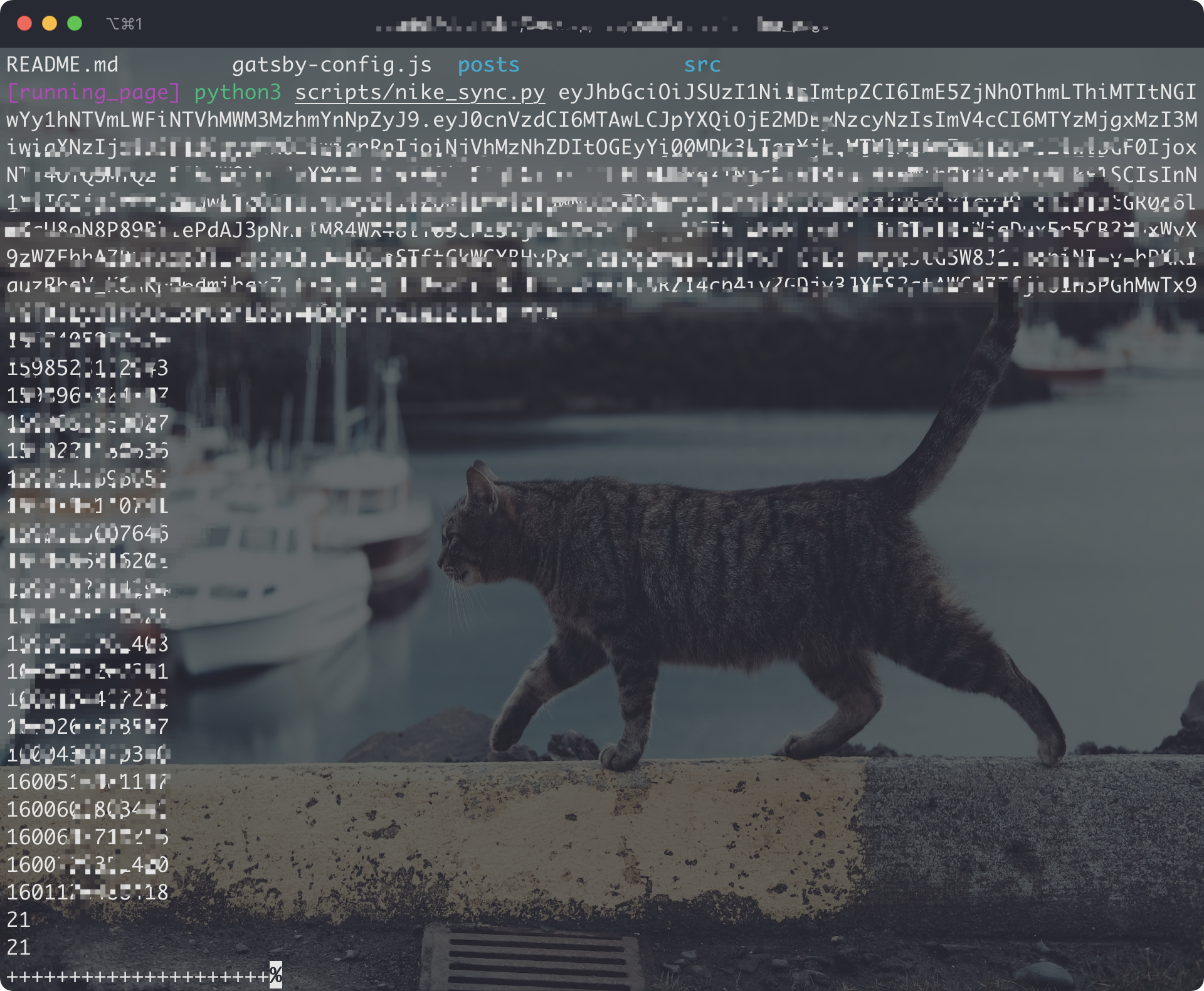 </details> ### Strava <details> <summary> Get your <code>Strava</code> data </summary> <br> 1. Sign in/Sign up [Strava](https://www.strava.com/) account 2. Open after successful Signin [Strava Developers](http://developers.strava.com) -> [Create & Manage Your App](https://strava.com/settings/api) 3. Create `My API Application`: Enter the following information <br> 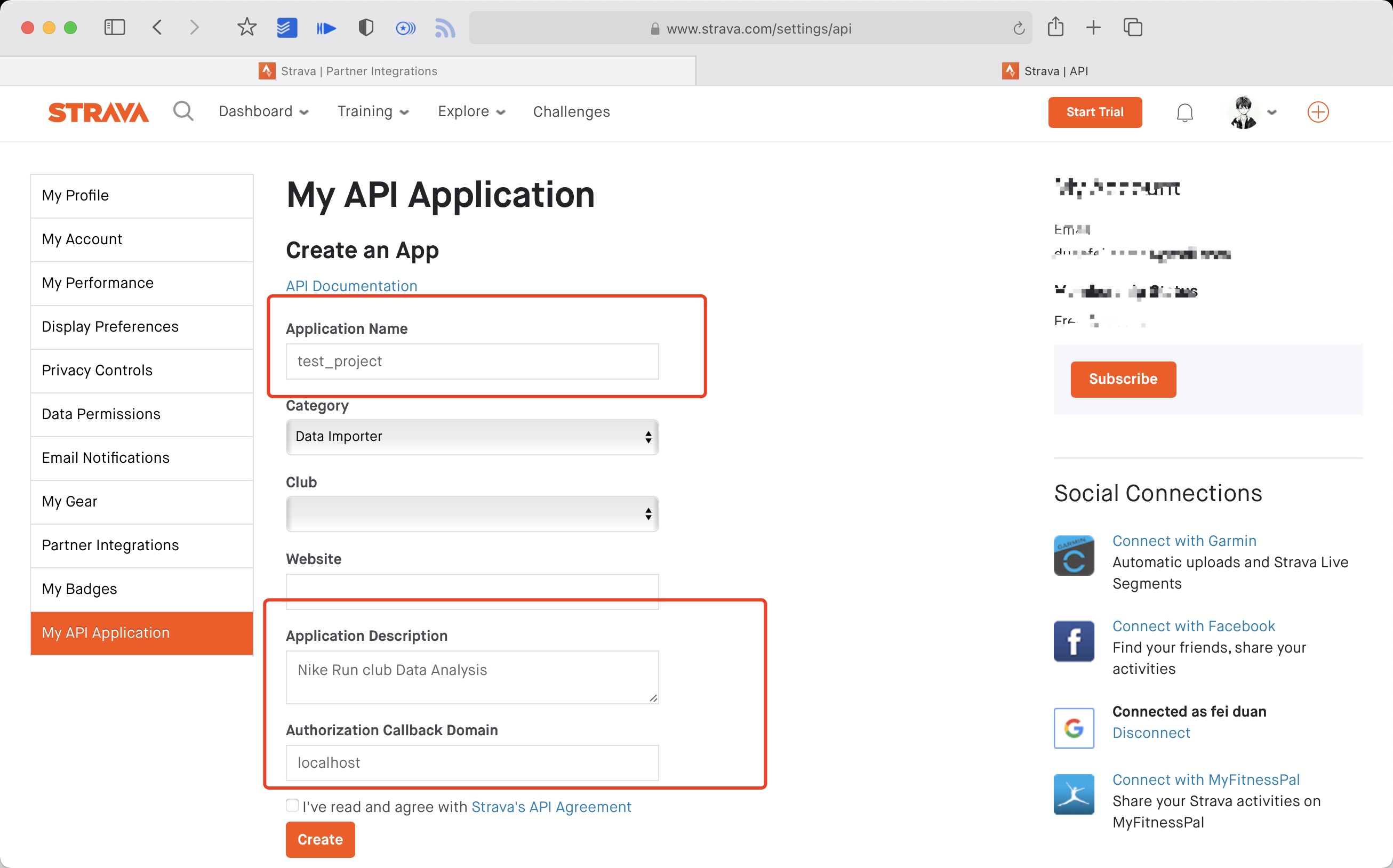 Created successfully: <br>  4. Use the link below to request all permissions: Replace `${your_id}` in the link with `My API Application` Client ID ```plaintext https://www.strava.com/oauth/authorize?client_id=${your_id}&response_type=code&redirect_uri=http://localhost/exchange_token&approval_prompt=force&scope=read_all,profile:read_all,activity:read_all,profile:write,activity:write ``` Example: ```plaintext https://www.strava.com/oauth/authorize?client_id=115321&response_type=code&redirect_uri=http://localhost/exchange_token&approval_prompt=force&scope=read_all,profile:read_all,activity:read_all,profile:write,activity:write ``` 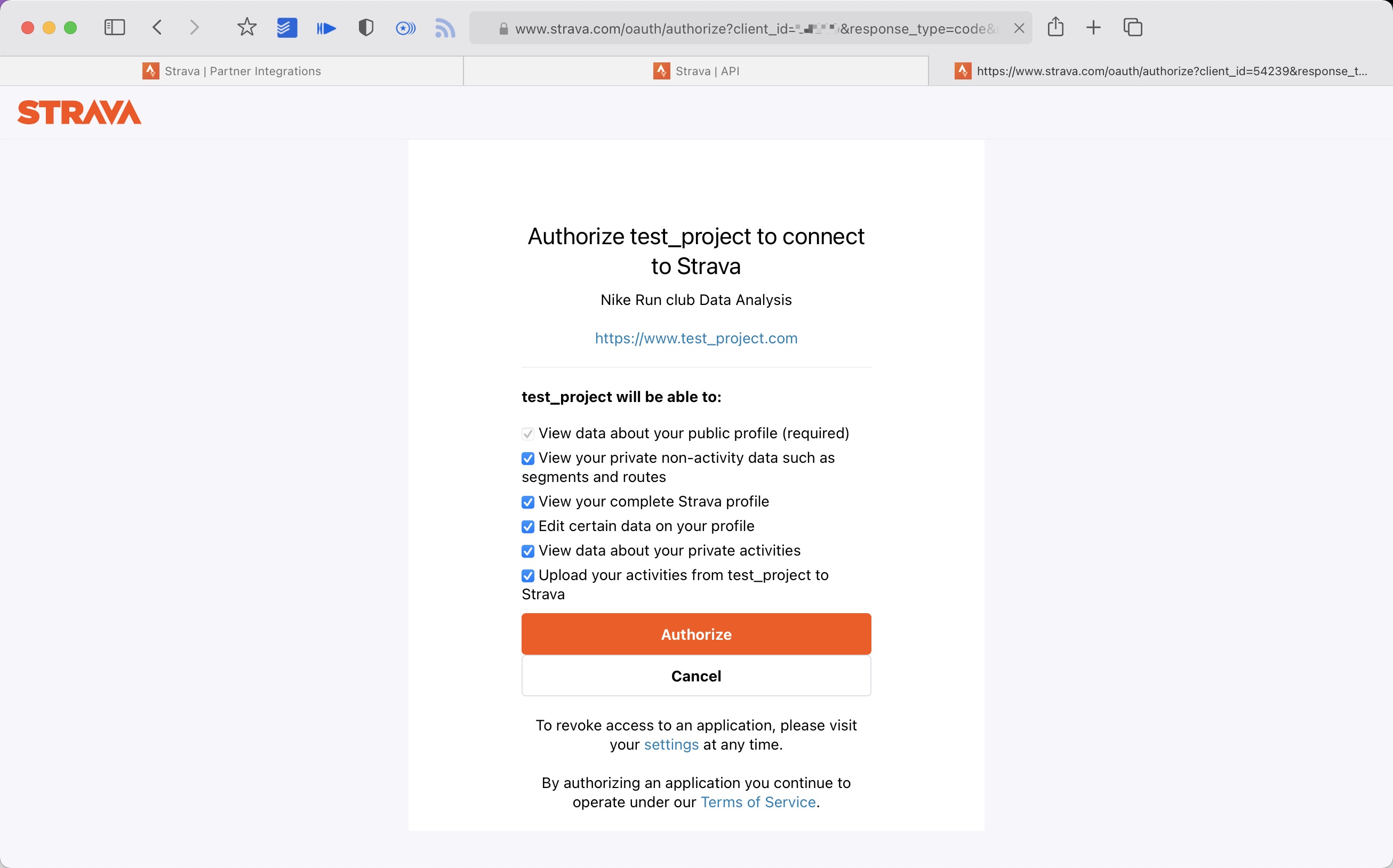 5. Get the `code` value in the link <br> example: ```bash http://localhost/exchange_token?state=&code=1dab37edd9970971fb502c9efdd087f4f3471e6e&scope=read,activity:write,activity:read_all,profile:write,profile:read_all,read_all ``` `code` value: ```bash 1dab37edd9970971fb502c9efdd087f4f3471e6 ``` 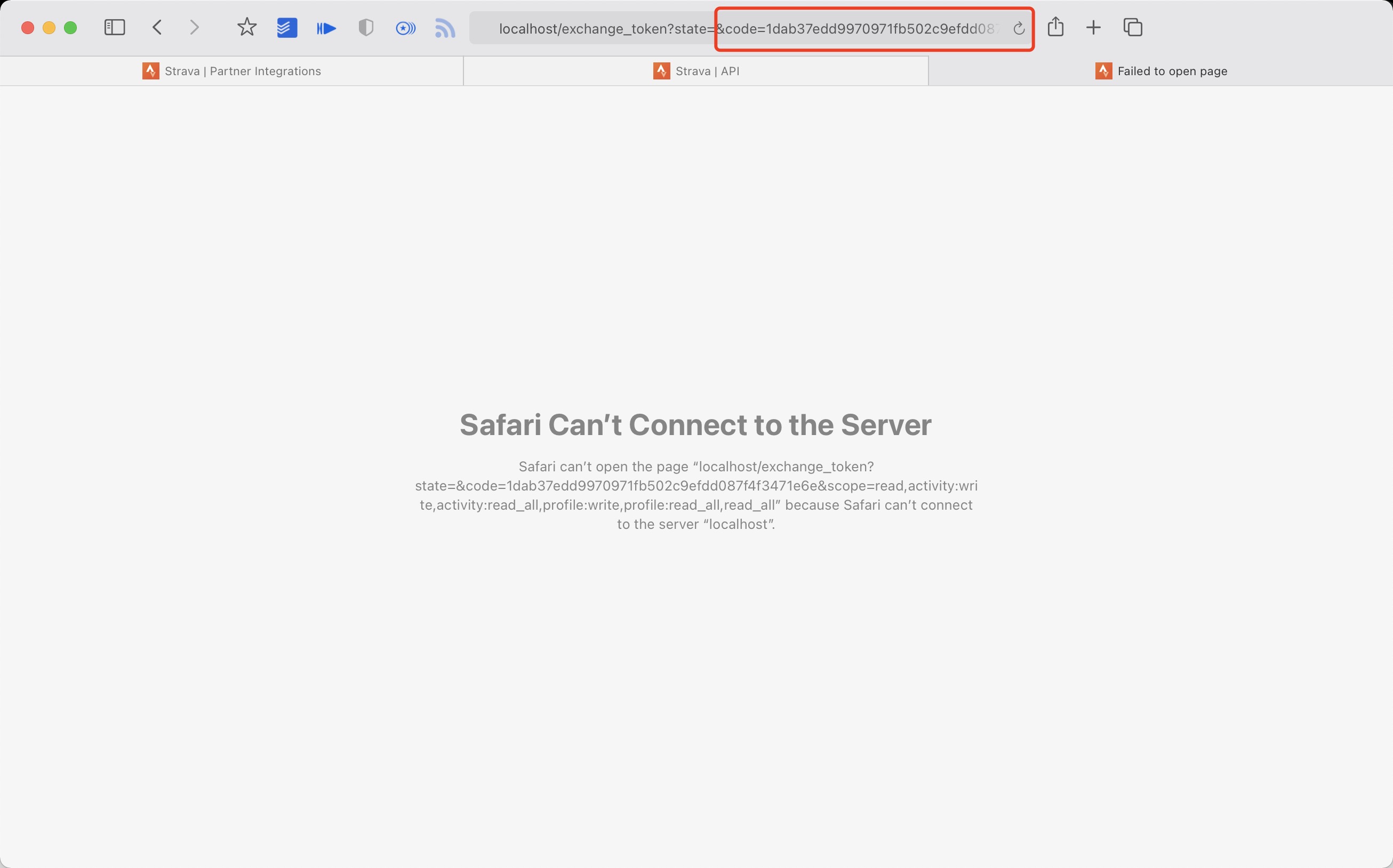 6. Use `Client_id`、`Client_secret`、`Code` get `refresh_token`: Execute in `Terminal/iTerm` ```bash curl -X POST https://www.strava.com/oauth/token \ -F client_id=${Your Client ID} \ -F client_secret=${Your Client Secret} \ -F code=${Your Code} \ -F grant_type=authorization_code ``` example: ```bash curl -X POST https://www.strava.com/oauth/token \ -F client_id=12345 \ -F client_secret=b21******d0bfb377998ed1ac3b0 \ -F code=d09******b58abface48003 \ -F grant_type=authorization_code ``` 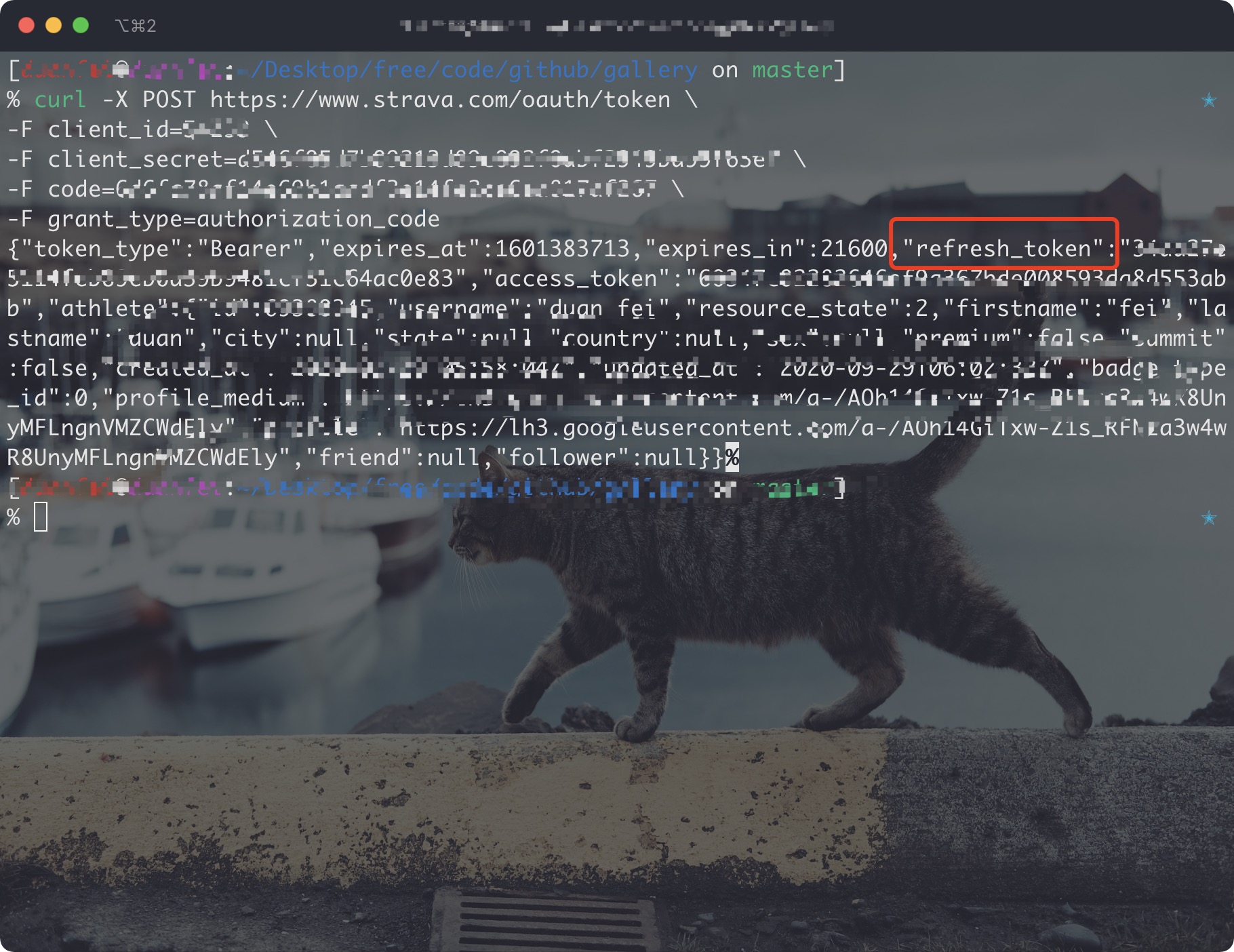 7. Sync `Strava` data > The first time you synchronize Strava data you need to change line 12 of the code False to True in strava_sync.py, and then change it to False after it finishes running. > If you only want to sync `type running` add args --only-run ```bash python run_page/strava_sync.py ${client_id} ${client_secret} ${refresh_token} ``` References: - <https://developers.strava.com/docs/getting-started> - <https://github.com/barrald/strava-uploader> - <https://github.com/strava/go.strava> </details> ### TCX_to_Strava <details> <summary>upload all tcx files to strava</summary> <br> 1. follow the strava steps 2. copy all your tcx files to TCX_OUT 3. Execute in the root directory: ```bash python run_page/tcx_to_strava_sync.py ${client_id} ${client_secret} ${strava_refresh_token} ``` example: ```bash python run_page/tcx_to_strava_sync.py xxx xxx xxx or python run_page/tcx_to_strava_sync.py xxx xxx xxx --all ``` 4. if you want to all files add args `--all` </details> ### TCX_to_Garmin <details> <summary>upload all tcx files to garmin</summary> <br> 1. follow the garmin steps 2. copy all your tcx files to TCX_OUT 3. Execute in the root directory: ```bash python3 run_page/tcx_to_garmin_sync.py ${{ secrets.GARMIN_SECRET_STRING_CN }} --is-cn ``` example: ```bash python run_page/tcx_to_garmin_sync.py xxx --is-cn or Garmin Global python run_page/tcx_to_garmin_sync.py xxx ``` 4. if you want to all files add args `--all` </details> ### GPX_to_Strava <details> <summary>upload all gpx files to strava</summary> <br> 1. follow the strava steps 2. copy all your gpx files to GPX_OUT 3. Execute in the root directory: ```bash python run_page/gpx_to_strava_sync.py ${client_id} ${client_secret} ${strava_refresh_token} ``` example: ```bash python run_page/gpx_to_strava_sync.py xxx xxx xxx or python run_page/tcx_to_strava_sync.py xxx xxx xxx --all ``` 4. if you want to all files add args `--all` </details> ### Nike_to_Strava <details> <summary>Get your <code> Nike Run Club </code> data and upload to strava</summary> <br> 1. follow the nike and strava steps 2. Execute in the root directory: ```bash python run_page/nike_to_strava_sync.py ${nike_refresh_token} ${client_id} ${client_secret} ${strava_refresh_token} ``` example: ```bash python run_page/nike_to_strava_sync.py eyJhbGciThiMTItNGIw****** xxx xxx xxx ``` </details> ### Garmin_to_Strava <details> <summary>Get your <code>Garmin</code> data and upload to strava</summary> <br> 1. finish garmin and strava setup 2. Execute in the root directory: ```bash python run_page/garmin_to_strava_sync.py ${client_id} ${client_secret} ${strava_refresh_token} ${garmin_secret_string} --is-cn ``` e.g. ```bash python run_page/garmin_to_strava_sync.py xxx xxx xxx xx ``` </details> ### Strava_to_Garmin <details> <summary>Get your <code>Strava</code> data and upload to Garmin</summary> <br> 1. finish garmin and strava setup, at the same time, you need to add additional strava config in GitHub Actions secret: `secrets.STRAVA_EMAIL`,`secrets.STRAVA_PASSWORD`,`secrets.STRAVA_JWT`, Note: `STRAVA_JWT` is superior to `STRAVA_EMAIL` and `STRAVA_PASSWORD` ,`STRAVA_JWT` is the `strava_remember_token` field of the Strava web login Cookie. 2. Execute in the root directory: ```bash python run_page/strava_to_garmin_sync.py ${{ secrets.STRAVA_CLIENT_ID }} ${{ secrets.STRAVA_CLIENT_SECRET }} ${{ secrets.STRAVA_CLIENT_REFRESH_TOKEN }} ${{ secrets.GARMIN_SECRET_STRING }} ${{ secrets.STRAVA_EMAIL }} ${{ secrets.STRAVA_PASSWORD }} ``` if your garmin account region is **China**, you need to execute the command: ```bash python run_page/strava_to_garmin_sync.py ${{ secrets.STRAVA_CLIENT_ID }} ${{ secrets.STRAVA_CLIENT_SECRET }} ${{ secrets.STRAVA_CLIENT_REFRESH_TOKEN }} ${{ secrets.GARMIN_SECRET_STRING_CN }} ${{ secrets.STRAVA_EMAIL }} ${{ secrets.STRAVA_PASSWORD }} ${{ secrets.STRAVA_JWT }} --is-cn ``` If you want to add Garmin Device during sync, you should add `--use_fake_garmin_device` argument, this will add a Garmin Device (Garmin Forerunner 245 by default, and you can change device in `garmin_device_adaptor.py`) in synced Garmin workout record, this is essential when you want to sync the workout record to other APP like Keep, JoyRun etc. <img width="830" alt="image" src="https://github.com/yihong0618/running_page/assets/8613196/b5076942-3133-4c89-ad66-a828211667dc"> the final command will be: ```bash python run_page/strava_to_garmin_sync.py ${{ secrets.STRAVA_CLIENT_ID }} ${{ secrets.STRAVA_CLIENT_SECRET }} ${{ secrets.STRAVA_CLIENT_REFRESH_TOKEN }} ${{ secrets.GARMIN_SECRET_STRING_CN }} ${{ secrets.STRAVA_EMAIL }} ${{ secrets.STRAVA_PASSWORD }} ${{ secrets.STRAVA_JWT }}--use_fake_garmin_device ``` ps: **when initializing for the first time, if you have a large amount of strava data, some data may fail to upload, just retry several times.** </details> ### COROS <details> <summary>Get your COROS data</summary> <br> - If you only want to sync `type running` add args --only-run #### Enter the following command in the terminal ```bash python run_page/coros_sync.py 'your coros account' 'your coros password' ``` #### Modify `run_data_sync.yml` `env.RUN_TYPE: coros` #### Set the Coros account information in github action - configure the `COROS_ACCOUNT` , `COROS_PASSWORD` 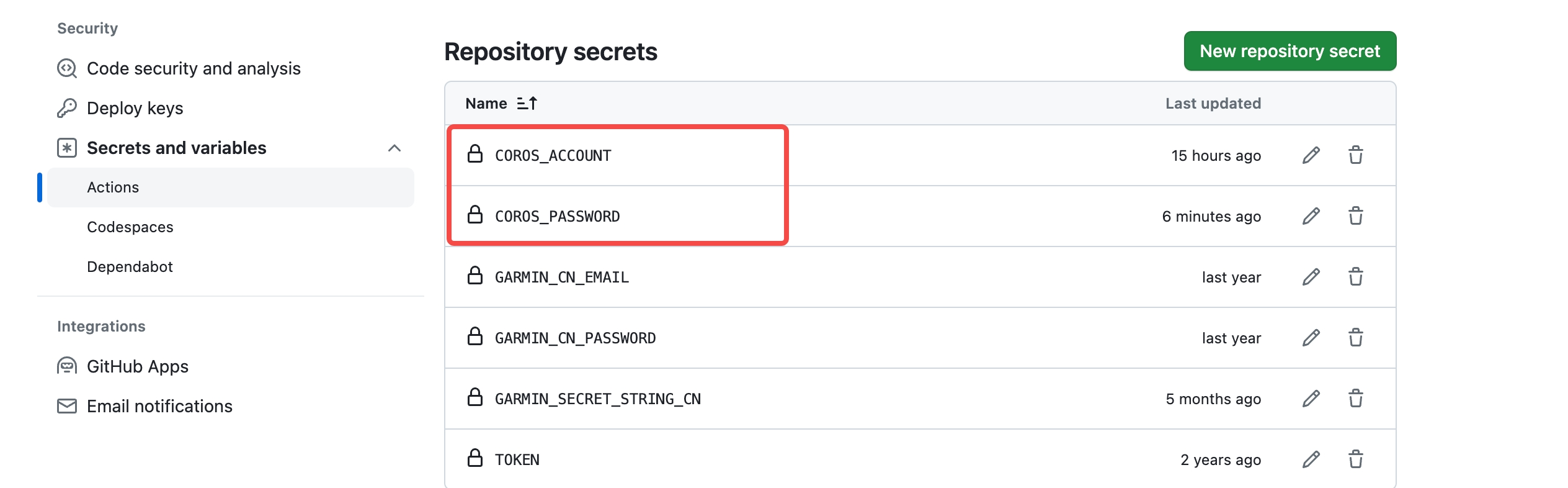 </details> ### iGPSPORT <details> <summary>Get your iGPSPORT data</summary> #### Enter the following command in the terminal ```bash python3 run_page/igpsport_sync.py 'your igpsport phone' 'password' --with-gpx ``` You can replace `with-gpx` with `with-fit` to acquire data in fit format. </details> ### Joyrun <details> <summary>Get your Joyrun data</summary> #### Enter the following command in the terminal ```bash python3 run_page/joyrun_sync.py 'your joyrun phone' 'verication code' --with-gpx ``` You can replace `with-gpx` with `with-tcx` to acquire data in tcx format. </details> ### Komoot <details> <summary>Get your Komoot data</summary> #### Enter the following command in the terminal ```bash python3 run_page/komoot_sync.py 'your komoot email' 'password' --with-gpx ``` | Parameter | Description | | --- | --- | | `mail` | Login using specified email address | | `password` | Use provided password and skip interactive prompt | | `-n`, `--anonymous` | Skip authentication, no interactive prompt (valid only with `-d`) | | `--with-gpx` | Download all tours as GPX | | `-r`, `--remove-deleted` | Remove GPX files (from `--output` dir) without corresponding tour in Komoot (deleted and previous versions) | | `--start-date=YYYY-MM-DD` | Filter tours on or after specified date | | `--end-date=YYYY-MM-DD` | Filter tours on or before specified date | | `-e`, `--no-poi` | Do not include highlights as POIs | </details> ### Onelap <details> <summary>Get your Onelap data</summary> #### Enter the following command in the terminal ```bash python3 run_page/onelap_sync.py 'your onelap phone' 'password' --with-fit ``` </details> ### Total Data Analysis <details> <summary> Running data display </summary> <br> - Generate SVG data display - Display of results:[Click to view](https://raw.githubusercontent.com/yihong0618/running_page/master/assets/github.svg)、[Click to view](https://raw.githubusercontent.com/yihong0618/running_page/28fa801e4e30f30af5ae3dc906bf085daa137936/assets/grid.svg) ```bash python run_page/gen_svg.py -h usage: gen_svg.py [-h] [--gpx-dir DIR] [--output FILE] [--language LANGUAGE] [--year YEAR] [--title TITLE] [--athlete NAME] [--special FILE] [--type TYPE] [--background-color COLOR] [--track-color COLOR] [--track-color2 COLOR] [--text-color COLOR] [--special-color COLOR] [--special-color2 COLOR] [--units UNITS] [--verbose] [--logfile FILE] [--special-distance DISTANCE] [--special-distance2 DISTANCE] [--min-distance DISTANCE] [--use-localtime] [--from-db] [--github-style GITHUB_STYLE] [--circular-rings] [--circular-ring-color COLOR] [--empty-data-color COLOR] [--birth YYYY-MM] options: -h, --help show this help message and exit --gpx-dir DIR Directory containing GPX files (default: current directory). --output FILE Name of generated SVG image file (default: "poster.svg"). --language LANGUAGE Language (default: english). --year YEAR Filter tracks by year; "NUM", "NUM-NUM", "all" (default: all years) --title TITLE Title to display. --athlete NAME Athlete name to display (default: "John Doe"). --special FILE Mark track file from the GPX directory as special; use multiple times to mark multiple tracks. --type TYPE Type of poster to create (default: "grid", available: "grid", "circular", "github", "monthoflife"). --background-color COLOR Background color of poster (default: "#222222"). --track-color COLOR Color of tracks (default: "#4DD2FF"). --track-color2 COLOR Secondary color of tracks (default: none). --text-color COLOR Color of text (default: "#FFFFFF"). --special-color COLOR Special track color (default: "#FFFF00"). --special-color2 COLOR Secondary color of special tracks (default: none). --units UNITS Distance units; "metric", "imperial" (default: "metric"). --verbose Verbose logging. --logfile FILE --special-distance DISTANCE Special Distance1 by km and color with the special_color --special-distance2 DISTANCE Special Distance2 by km and corlor with the special_color2 --min-distance DISTANCE min distance by km for track filter --use-localtime Use utc time or local time --from-db activities db file --github-style GITHUB_STYLE github svg style; "align-firstday", "align-monday" (default: "align-firstday"). --birth YYYY-MM Birth date in format YYYY-MM Circular Type Options: --circular-rings Draw distance rings. --circular-ring-color COLOR Color of distance rings. Github Type Options: --empty-data-color COLOR Color for empty dates in github style poster (default: #444444) ``` Generate github style svg show ```bash python run_page/gen_svg.py --from-db --title "${{ env.TITLE }}" --type github --athlete "${{ env.ATHLETE }}" --special-distance 10 --special-distance2 20 --special-color yellow --special-color2 red --output assets/github.svg --use-localtime --min-distance 0.5 ``` If you want to change the display color of empty data(only github style), please use `--empty-data-color`: ```bash python run_page/gen_svg.py --from-db --title "${{ env.TITLE }}" --type github --athlete "${{ env.ATHLETE }}" --special-distance 10 --special-distance2 20 --special-color yellow --special-color2 red --output assets/github.svg --use-localtime --min-distance 0.5 ----empty-data-color grey ``` Generate grid style svg show ```bash python run_page/gen_svg.py --from-db --title "${{ env.TITLE_GRID }}" --type grid --athlete "${{ env.ATHLETE }}" --output assets/grid.svg --min-distance 10.0 --special-color yellow --special-color2 red --special-distance 20 --special-distance2 40 --use-localtime ``` ```bash python run_page/gen_svg.py --from-db --type circular --use-localtime ``` Generate a "Runner Month of Life" visualization as if your entire life consisted of only 1000 months. ```bash python3 run_page/gen_svg.py --from-db --type monthoflife --birth 1989-03 --special-distance 10 --special-distance2 20 --special-color '#f9d367' --special-color2 '#f0a1a8' --output assets/mol.svg --use-localtime --athlete yihong0618 --title 'Runner Month of Life' ``` Generate your share png using GPT gpt-image-1([last one](./PNG_OUT/share_image_2025-04-29.png)) ```bash python run_page/auto_share_sync.py --api_key xxxxxxxxx --base_url xxxxxxxx ``` If you want to generate a share png for a date ```bash python run_page/auto_share_sync.py --api_key xxxxxxxxx --base_url xxxxxxxx --date 2023-11-11 ``` If you want to auto gen in ci you can refer this [link](https://github.com/yihong0618/run/blob/master/.github/workflows/run_data_sync.yml#L235-242) For more display effects, see: <https://github.com/flopp/GpxTrackPoster> </details> ## server(recommendation vercel) <details> <summary> Use <code> Vercel </code> to deploy </summary> <br> 1. vercel connects to your GitHub repo. <br> 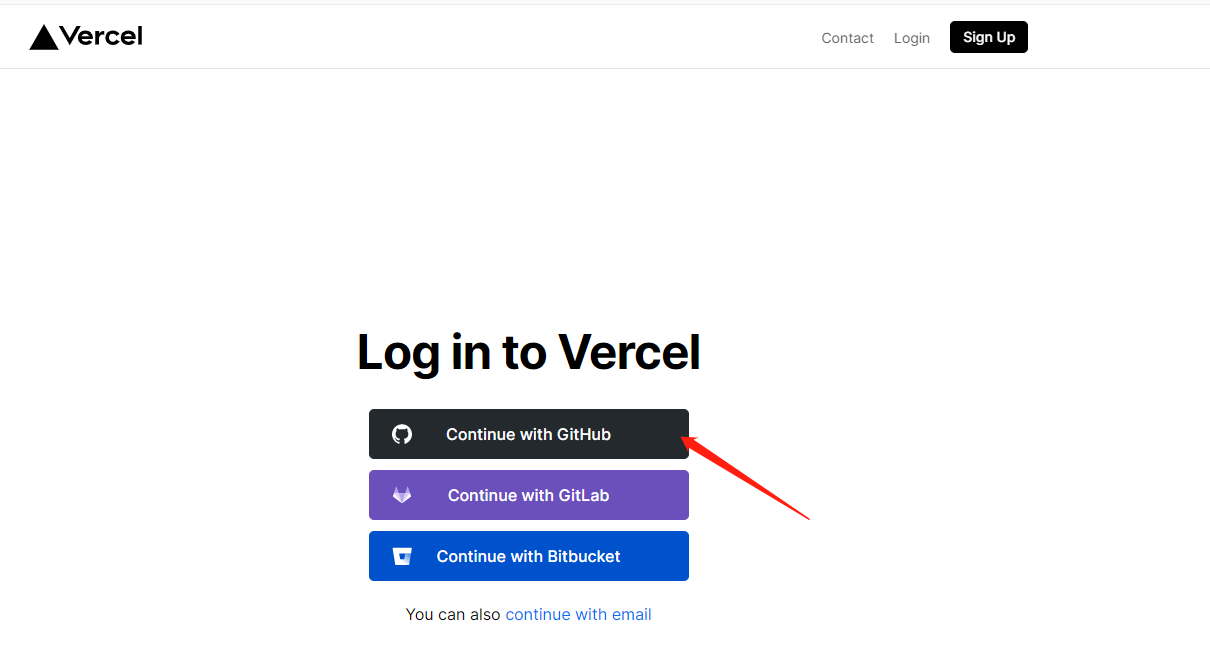 2. import repo <br>  3. Awaiting completion of deployment 4. Visits </details> <details> <summary> Use <code> Cloudflare </code> to deploy </summary> <br> 1. Login to [Cloudflare dashboard](https://dash.cloudflare.com). 2. Click `Workers & Pages` on the left side. 3. Click `Create application` and select `Pages` tab, connect your GitHub account and select `running_page` Repo, then click `Begin setup`. 4. Scroll down to `Build settings`, choose `Create React App` from `Framework preset`, and set `Build output directory` to `dist`. 5. Scroll down, click `Environment variables (advanced)`, then add a variable like the below: > Variable name = `PYTHON_VERSION`, Value = `3.11` 6. Click `Save and Deploy` </details> <details> <summary> Deploy to GitHub Pages </summary> <br> 1. Go to repository's `Settings -> GitHub Pages -> Source`, choose `GitHub Actions` 2. Go to the repository's `Actions -> Workflows -> All Workflows`, choose `Run Data Sync` from the left panel, and click `Run workflow`. - The `Run Data Sync` will update data and then trigger the `Publish GitHub Pages` workflow - Make sure the workflow runs without errors. 3. Open your website to check on the results - note if the website doesn't reflect the latest data, please refresh it by `F5`. - Some browsers (e.g. Chrome) won't refresh if there is a cache, you then need to use `Ctrl+F5` (Windows) or `Shift+Cmd+r` (Mac) to force clearing the cache and reload the page. 4. make sure you have write permissions in Workflow permissions settings. 5. If you want to deploy your running_page to xxx.github.io instead of xxx.github.io/running_page or redirect your GitHub Pages to a custom domain, you need to do three things: - Rename your forked running_page repository to `xxx.github.io`, where xxx is your GitHub username - Modify the Build module in gh-pages.yml, remove `${{ github.event.repository.name }}` and change to `run: PATH_PREFIX=/ pnpm build` - In `src/static/site-metadata.ts`, set siteUrl: '' or your custom domain URL </details> ## GitHub Actions <details> <summary> Modifying information in <code> GitHub Actions </code> </summary> <br> Actions [source code](https://github.com/yihong0618/running_page/blob/master/.github/workflows/run_data_sync.yml) The following steps need to be taken 1. change to your app type and info <br>  2. Add your secret in repo Settings > Secrets (add only the ones you need). <br>  3. My secret is as follows <br> 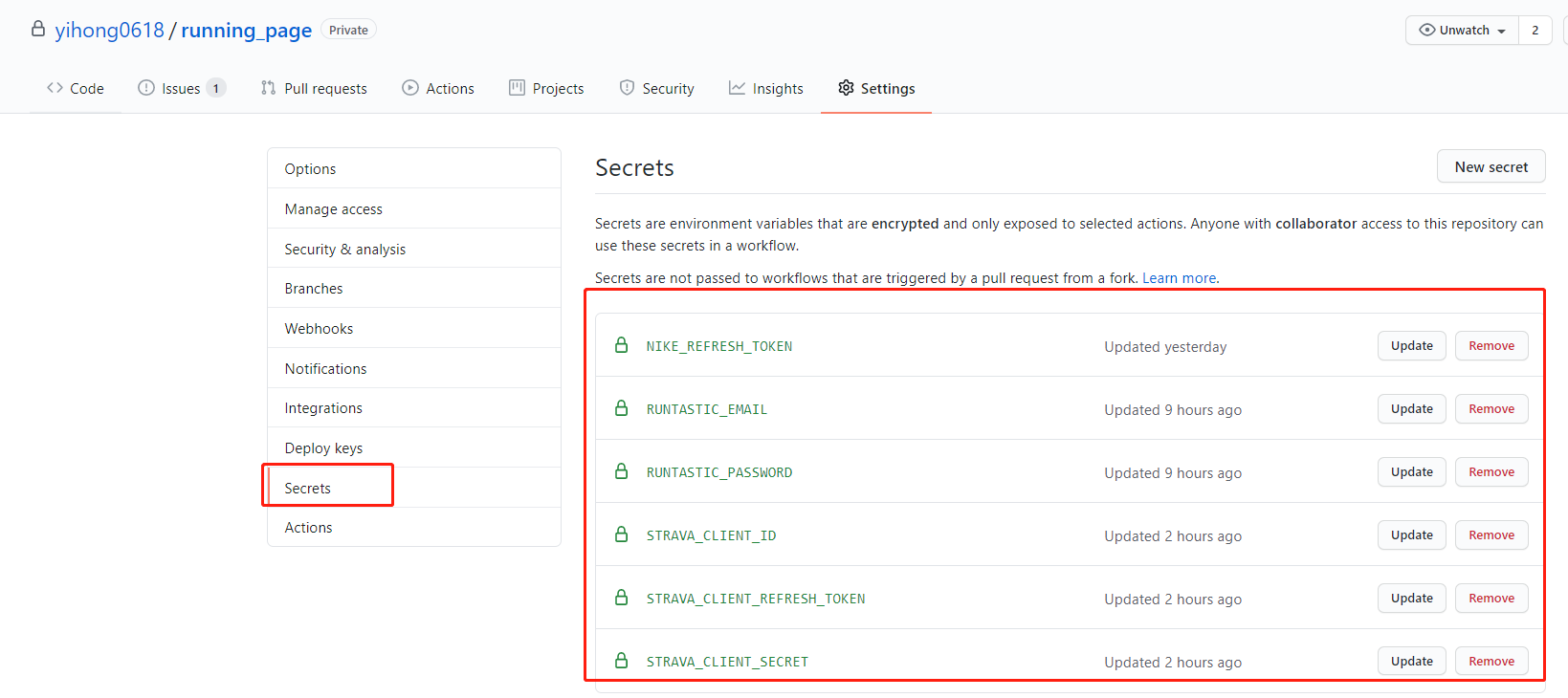 4. Go to repository's `Settings -> Code and automation -> Actions ->General`, Scroll to the bottom, find `Workflow permissions`, choose the first option `Read and write permissions`, click `Save`. </details> ## Shortcuts <details> <summary>Automate with <code> iOS Shortcuts </code> </summary> <br> Take the keep app as an example. Close the app after running, and then automatically trigger Actions to update the data. 1. Get actions id (need to apply token) ```bash curl https://api.github.com/repos/yihong0618/running_page/actions/workflows -H "Authorization: token d8xxxxxxxxxx" # change to your config ``` <center><img src="https://cdn.jujimeizuo.cn/blog/2023/10/get-action-id.jpg" alt="get-action-id"></center> 2. Binding shortcut instruction 1. Get it via icloud [running-page-shortcuts-template](https://www.icloud.com/shortcuts/4a5807a98b9a4e359815ff179c62bacb) 2. Modify the dictionary parameters in the following figure <center> <img src="https://cdn.jujimeizuo.cn/blog/2023/10/running-page-template.jpg"> </center> 3. Automation <center> <img src="https://cdn.jujimeizuo.cn/blog/2023/10/new-automation.png" width=20% height=20%> <img src="https://cdn.jujimeizuo.cn/blog/2023/10/select-close.png" width=20% height=20%> <img src="https://cdn.jujimeizuo.cn/blog/2023/10/select-shortcut.png" width=20% height=20%> <img src="https://cdn.jujimeizuo.cn/blog/2023/10/finish-automation.png" width=20% height=20%> </center> </details> ## Storing Data Files in GitHub Cache <details> <summary>Storing Data Files in GitHub Cache</summary> <br> When `SAVE_DATA_IN_GITHUB_CACHE` is set to `true` in the `run_data_sync.yml` file, the script can store fetched and intermediate data files in the GitHub Action Cache. This helps keep your GitHub commit history and directory clean. If you are deploying using GitHub Pages, it is recommended to set this value to `true`, and set `BUILD_GH_PAGES` to true. </details> # Fit file supported manufacturer: - [x] Garmin - [x] magene # TODO - [x] Complete this document. - [x] Support Garmin, Garmin China - [x] support for nike+strava - [x] Support English - [x] Refine the code - [x] add new features - [ ] tests - [ ] support the world map - [ ] support multiple types, like hiking, biking~ - [ ] support for Zeep life # Contribution - Any Issues PR welcome. - You can PR share your Running page in README I will merge it. Before submitting PR: - Format Python code with `black` (`black .`) # Special thanks - @[flopp](https://github.com/flopp) great repo [GpxTrackPoster](https://github.com/flopp/GpxTrackPoster) - @[danpalmer](https://github.com/danpalmer) UI design - @[shaonianche](https://github.com/shaonianche) icon design and doc - @[geekplux](https://github.com/geekplux) Friendly help and encouragement, refactored the whole front-end code, learned a lot - @[MFYDev](https://github.com/MFYDev) Wiki # Recommended Forks - @[gongzili456](https://github.com/gongzili456) for [motorcycle version](https://github.com/gongzili456/running_page) - @[ben-29](https://github.com/ben-29) for [different types support](https://github.com/ben-29/workouts_page) - @[geekplux](https://github.com/geekplux) for [different types support](https://github.com/geekplux/activities) # Support No need sponsor, just enjoy it. why 404? Just enjoy it~ # Raycast Extension <a title="Install running-page Raycast Extension" href="https://www.raycast.com/Lemon/running-page"><img src="https://www.raycast.com/Lemon/running-page/install_button@2x.png?v=1.1" height="64" alt="" style="height: 64px;"></a> # FAQ - Strava API limit <https://www.strava.com/settings/api> <https://developers.strava.com/docs/#rate-limiting> ```plaintext Strava API Rate Limit Exceeded. Retry after 100 seconds Strava API Rate Limit Timeout. Retry in 799.491622 seconds ``` - vercel git ignore gh-pages: you can change settings -> build -> Ignored Build Step -> Custom command ```bash if [ "$VERCEL_GIT_COMMIT_REF" != "gh-pages" ]; then exit 1; else exit 0; ```
