KO
|
EN
gitlite — search
Search
#javascript
#python
#hacktoberfest
#react
#ai
#typescript
#llm
#go
#golang
#android
#machine-learning
#rust
#deep-learning
#linux
jBM
★ 8
Open GitHub ↗
Java Bookmanager Web Application
Download README (.md)
Explore Similar Repositories
ToolProgression
:
A small mod, which allows to set harvest levels of tools and blocks
SWMenuController
:
Custom menu controller like UIMenuController.
ml-biomass
:
An example of linking TERN AusCover field and image data to predict biomass
mocha-aura
:
Salesforce Lightning components integration with mochajs
TFCommon
:
Common classes and utils for Tensorflow
// repository documentation
Was this content helpful?
★ 0
(0 ratings)
Select Rating:
★
★
★
★
★
Submit Feedback
Recent Feedback
×
Download README
Do you want to download the
README.md
file for
jBM
?
Download (.md)
# jBM - Online Bookmark Manager jBM is a *Jakarta* Web Application to collect your bookmarks online. Data is stored in PostgreSQL. Add bookmarks with a bookmarklet, the web gui or an Android app. jBM is a Java port of [SemanticScuttle](https://sourceforge.net/projects/semanticscuttle/) and contains some code of it. # License [GNU General Public License, version 2](https://www.gnu.org/licenses/gpl-2.0.html) # Setup ## Database create a PostgreSQL database for jBM and execute the [tables-postgresql.sql](entities/src/main/resources/tables-postgresql.sql) script. check that local socket access has md5: host all all 127.0.0.1/32 md5 create the database and a database user (not a unix user): postgres@host:~$ psql psql (9.4.12) Type "help" for help. postgres=# CREATE USER jbm WITH PASSWORD 'sosecret'; CREATE ROLE postgres=# CREATE DATABASE jbm owner jbm; CREATE DATABASE postgres=# GRANT ALL PRIVILEGES ON DATABASE jbm TO jbm; GRANT create the tables with the tables-postgresql.sql script as jbm user and use the -h option: postgres@host:~$ psql -h host -U jbm -d jbm -a -f tables-postgresql.sql ## Tomcat add these driver jars to tomcat/lib * postgresql-42.7.3.jar * jakarta.persistence-api-3.1.0.jar * eclipselink-4.0.3.jar add jBM-custom.properties to tomcat/lib like jakarta.persistence.jdbc.driver=org.postgresql.Driver jakarta.persistence.jdbc.url=jdbc:postgresql://host/jbm jakarta.persistence.jdbc.user=jbm jakarta.persistence.jdbc.password=sosecret ### Security jBM needs JEE Security Roles jBM jBMAPI jBMAPI for the remote API (for the Android App). For Tomcat these are declared in tomcat-users.xml <role rolename="jBM"/> <role rolename="jBMAPI"/> <user username="user" password="sosecret" roles="jBM,jBMAPI"/> # Screenshots #### list Bookmarks 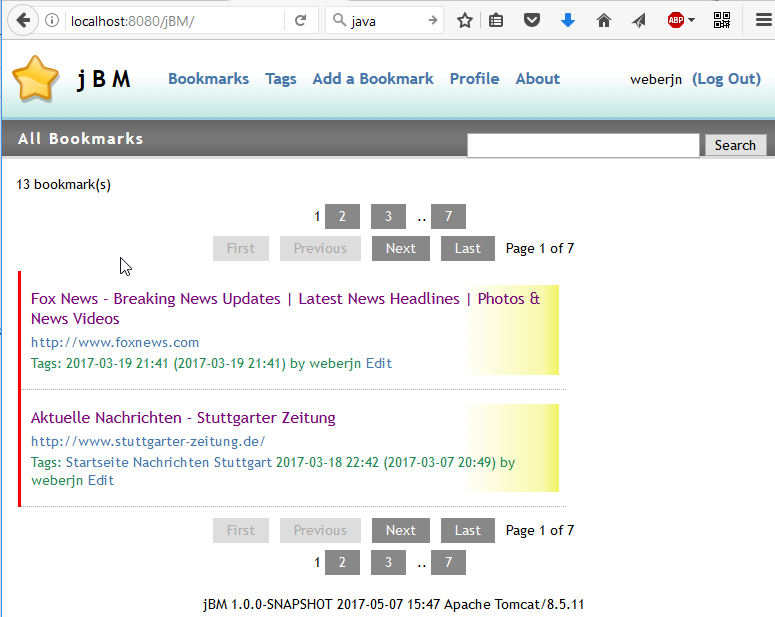 #### add a Bookmark 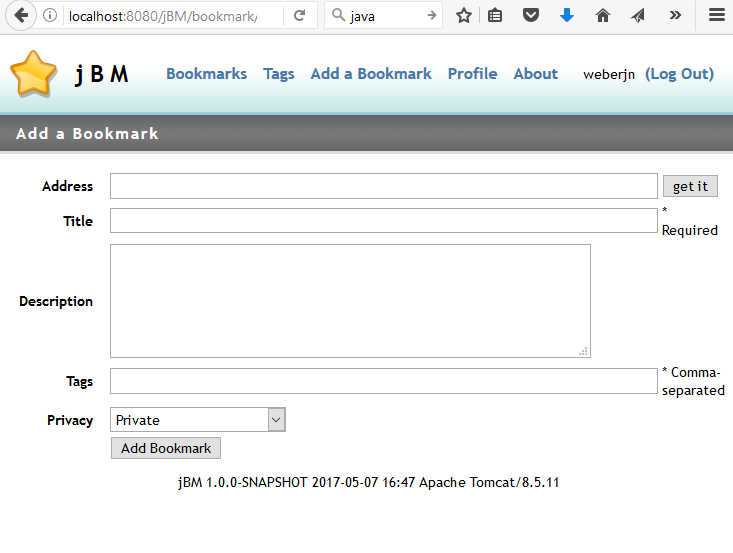 # API jBM supports a subset of the delicious API v1. To see, if the API works, run curl like curl -k -u user:sosecret --data '' http://your.host/jBM/api/posts/all # Android [Scuttloid](https://github.com/ilesinge/scuttloid) can be used as Android Client for jBM. Server-URL is your jBM context root http://your.host/jBM
