KO
|
EN
gitlite — search
Search
#typescript
#ai-agents
#ai
#dsh-plugin
#deepseek-harness
#open-source
#claude-code
#codex
#cli
#developer-tools
#react
#windows
HexagonalLib
★ 38
Open GitHub ↗
Hexagonal lib for .NET
Download README (.md)
Explore Similar Repositories
cb-privacy
:
一个基于区块链+同态加密+小程序的隐私保护方案
ideoxan
:
(OUTDATED) :woman_technologist: Ideoxan is a free to use online tool to learn programming.
MultiProtocol
:
Let Minecraft use multiple protocols, such as Websocket
snowpack-react-ssr
:
minimal example using snowpack and react server side rendering
whatsopen
:
A revival of the "What's Open" app for macOS, now working on Catalina (64 bit)
// repository documentation
Was this content helpful?
★ 0
(0 ratings)
Select Rating:
★
★
★
★
★
Submit Feedback
Recent Feedback
×
Download README
Do you want to download the
README.md
file for
HexagonalLib
?
Download (.md)
# HexagonalLib implementation for .NET _I was highly inspired by this article: [https://www.redblobgames.com/grids/hexagons/](https://www.redblobgames.com/grids/hexagons/) and this repo is mostly just C# implementation of it. Recommended for reading. Here I will describe some technical details regarding implementation._ ## Hexagonal grid To use hexagonal grids you need to create [HexagonalGrid](src/HexagonalLib/HexagonalGrid.cs) and initialize it with grid type and inscribed radius of hex. ```C# var grid = new HexagonalGrid(HexagonalGridType.PointyEven, 1.0f); ``` Grids layouts and orientations are merged to one enum [HexagonalGridType](src/HexagonalLib/HexagonalGridType.cs). * PointyOdd - Horizontal layout shoves odd rows right [odd-r] * PointyEven - Horizontal layout shoves even rows right [even-r] * FlatOdd - Vertical layout shoves odd columns down [odd-q] * FlatEven - Vertical layout shoves even columns down [even-q] ## Coordinates systems There is three coordinates systems represented in lib: * [Offset](src/HexagonalLib/Coordinates/Offset.cs) - offset coordinates ([link](https://www.redblobgames.com/grids/hexagons/#coordinates-offset)) * [Cubic](src/HexagonalLib/Coordinates/Cubic.cs) - cube coordinates ([link](https://www.redblobgames.com/grids/hexagons/#coordinates-cube)) * [Axial](src/HexagonalLib/Coordinates/Axial.cs) - axial coordinates ([link](https://www.redblobgames.com/grids/hexagons/#coordinates-axial)) _Note: there is no [Doubled](https://www.redblobgames.com/grids/hexagons/#coordinates-doubled) coordinates yet. I will add them in later versions._ Struct [HexagonalGrid](src/HexagonalLib/HexagonalGrid.cs) contains a bunch of methods for coordinates conversion (all details are [described](https://www.redblobgames.com/grids/hexagons/#conversions) in original article): ```C# var offsetFromCubic = grid.ToOffset(cubic); var offsetFromAxial = grid.ToOffset(axial); var cubicFromOffset = grid.ToCubic(offset); var cubicFromAxial = grid.ToCubic(axial); var axialFromOffset = grid.ToAxial(offset); var axialFromCubic = grid.ToAxial(cubic); ``` ## Neighbors There is the order of neighbors of hex:  You can take a neighbor of any hex by providing a coordinate of hex and required neighbor index. ```C# var oNeighbor = grid.GetNeighbor(offset, neighborIndex); var cNeighbor = grid.GetNeighbor(cubic, neighborIndex); var aNeighbor = grid.GetNeighbor(axial, neighborIndex); ``` _The neighbor index can be negative or greater than 5 (it will be normalized)_ Or you can take all neighbors of particular hex ```C# var oNeighbors = grid.GetNeighbors(offset); var cNeighbors = grid.GetNeighbors(cubic); var aNeighbors = grid.GetNeighbors(axial); ``` There is also option to check are two hexes neighbors or not: ```C# var isNeighbors1 = grid.IsNeighbors(offset, oNeighbor); var isNeighbors2 = grid.IsNeighbors(cubic, cNeighbor); var isNeighbors3 = grid.IsNeighbors(axial, aNeighbor); ``` ### Ring of neighbors You also can get ring of neighbor for particular hex 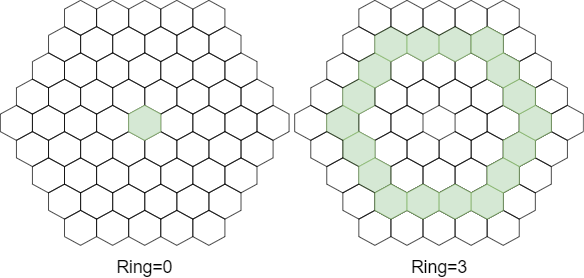 ```C# var oNeighbors = grid.GetNeighborsRing(offset, radius); var cNeighbors = grid.GetNeighborsRing(cubic, radius); var aNeighbors = grid.GetNeighborsRing(axial, radius); ``` ### Circle of neighbors Same as ring but you will receive hexes from all rings 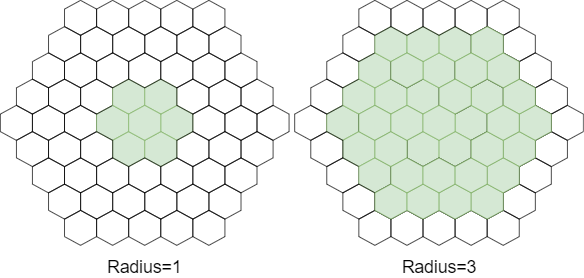 ```C# var oNeighbors = grid.GetNeighborsAround(offset, radius); var cNeighbors = grid.GetNeighborsAround(cubic, radius); var aNeighbors = grid.GetNeighborsAround(axial, radius); ``` ## 2D space There is also list of methods to convert hex coordinate to its center (point represented as tuple): ```C# var pointFromOffset = grid.ToPoint2(offset); var pointFromCubic = grid.ToPoint2(cubic); var pointFromAxial = grid.ToPoint2(axial); ``` To convert point into a hex coordinate which contains this point you can use: ```C# var offsetFromPoint = grid.ToOffset(x, y); var cubicFromPoint = grid.ToCubic(x, y); var axialFromPoint = grid.ToAxial(x, y); ``` Hexagons have 6 sides and 6 corners. There is corners order of the hexes:  To take them in code simly use: ```C# var cornerFromOffset = grid.GetCorner(offset, cornerIndex); var cornerFromCubic = grid.GetCorner(cubic, cornerIndex); var cornerFromAxial = grid.GetCorner(axial, cornerIndex); ``` _The corner index can be negative or greater than 5 (it will be normalized)_
