KO
|
EN
gitlite — search
Search
#python
#java
#python3
#arduino
#golang
#machine-learning
#rust
#html
#flask
#javascript
#seismology
#nodejs
sercapnp
★ 18
Open GitHub ↗
Capnp support for intellij
Download README (.md)
Explore Similar Repositories
ARAE
:
tensorflow implementation of Adversarially Regularized Autoencoders (ARAE)
imad-app
:
Base repository for IMAD course application.
minetest-toolranks
:
Minetest tool ranks mod
WaveViewDemo
:
a demo about trigonometric function
LoginPurpel
:
No description available.
// repository documentation
Was this content helpful?
★ 0
(0 ratings)
Select Rating:
★
★
★
★
★
Submit Feedback
Recent Feedback
×
Download README
Do you want to download the
README.md
file for
sercapnp
?
Download (.md)
# SerCapnp Cap'n Proto language support for IntelliJ-based IDEs (IntelliJ IDEA, WebStorm, PyCharm, CLion, etc.) ## About Cap'n Proto [Cap'n Proto](https://capnproto.org/) is an insanely fast data interchange format and capability-based RPC system. Think JSON, except binary. Or think Protocol Buffers, except faster. ## Features - **Syntax highlighting** — keywords, built-in types, identifiers, strings, numbers, constants (`true`/`false`/`void`), comments, unique IDs (`@0x...`), and ordinals (`@0`, `@1`, ...) - **Bracket matching** — auto-matching for `{}`, `[]`, `()` - **Comment toggling** — Ctrl+/ to toggle `#` line comments - **Code folding** — collapse struct, enum, and interface blocks - **Cap'n Proto ID generation** — generate unique 64-bit schema IDs from Tools menu or Ctrl+Alt+A then G - **New file action** — File → New → Capnp File - **Color settings** — fully customizable colors via Settings → Editor → Color Scheme → Cap'n Proto ### Supported Token Types | Token | Examples | |-------|---------| | Keywords | `struct`, `enum`, `union`, `interface`, `const`, `annotation`, `using`, `import`, `extends` | | Built-in Types | `Void`, `Bool`, `Int8`–`Int64`, `UInt8`–`UInt64`, `Float32`, `Float64`, `Text`, `Data`, `List`, `AnyPointer`, `group` | | Constants | `true`, `false`, `void`, `inf`, `nan` | | Unique IDs | `@0x85150b117366d14b` | | Ordinals | `@0`, `@1`, `@42` | | Strings | `"hello world"` | | Numbers | `42`, `0xFF`, `3.14` | ### Syntax Highlighting 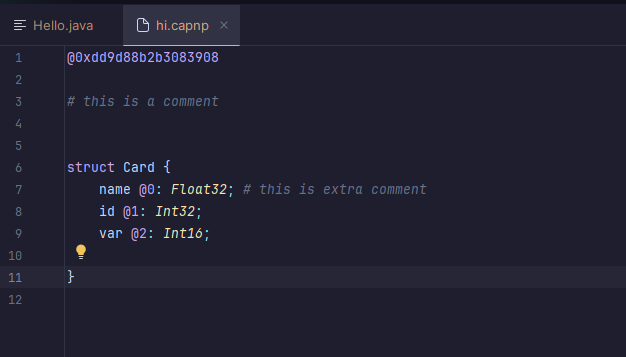 ### Generating IDs 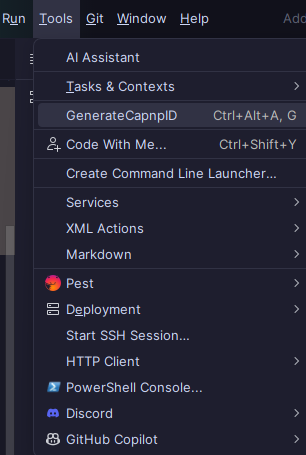 From Tools menu → Generate capnp id, or Ctrl+Alt+A then G. ## Building The plugin can be built using Gradle: ```bash ./gradlew buildPlugin ``` The plugin ZIP can then be found in `build/distributions/`. ## Installation 1. Build the plugin with `./gradlew buildPlugin` 2. In your JetBrains IDE, go to Settings → Plugins → ⚙️ → Install Plugin from Disk... 3. Select the ZIP from `build/distributions/` 4. Restart the IDE ## Compatibility - IntelliJ Platform 2022.1+ (build 221+) - All JetBrains IDEs (IntelliJ IDEA, WebStorm, PyCharm, CLion, GoLand, etc.) ## License BSD 3-Clause. See [LICENSE](LICENSE). ## Development See DEVELOPING.md for instructions on developing, testing, running, and publishing the plugin.
