KO
|
EN
gitlite — search
Search
#javascript
#nodejs
#api
#python
#php
#react
#chrome-extension
#css
#tensorflow
#windows
#c
#android
consoleshow
★ 34
Open GitHub ↗
快捷管理 console,自定义命令,url 过滤命令
Download README (.md)
Explore Similar Repositories
SkyRAT
:
SkyRAT - Powershell Remote Administration Tool
gitmug
:
The GitHub app for minimalists.
MyRWTutorial
:
A reusable starter project for raywenderlich.com tutorials
prompt-view
:
Tiny Java library for producing interactive command line prompts
TestRepo
:
No description available.
// repository documentation
Was this content helpful?
★ 0
(0 ratings)
Select Rating:
★
★
★
★
★
Submit Feedback
Recent Feedback
×
Download README
Do you want to download the
README.md
file for
consoleshow
?
Download (.md)
consoleshow ============================== [](https://badge.fury.io/js/consoleshow) 快捷管理 console,自定义命令,url 过滤命令 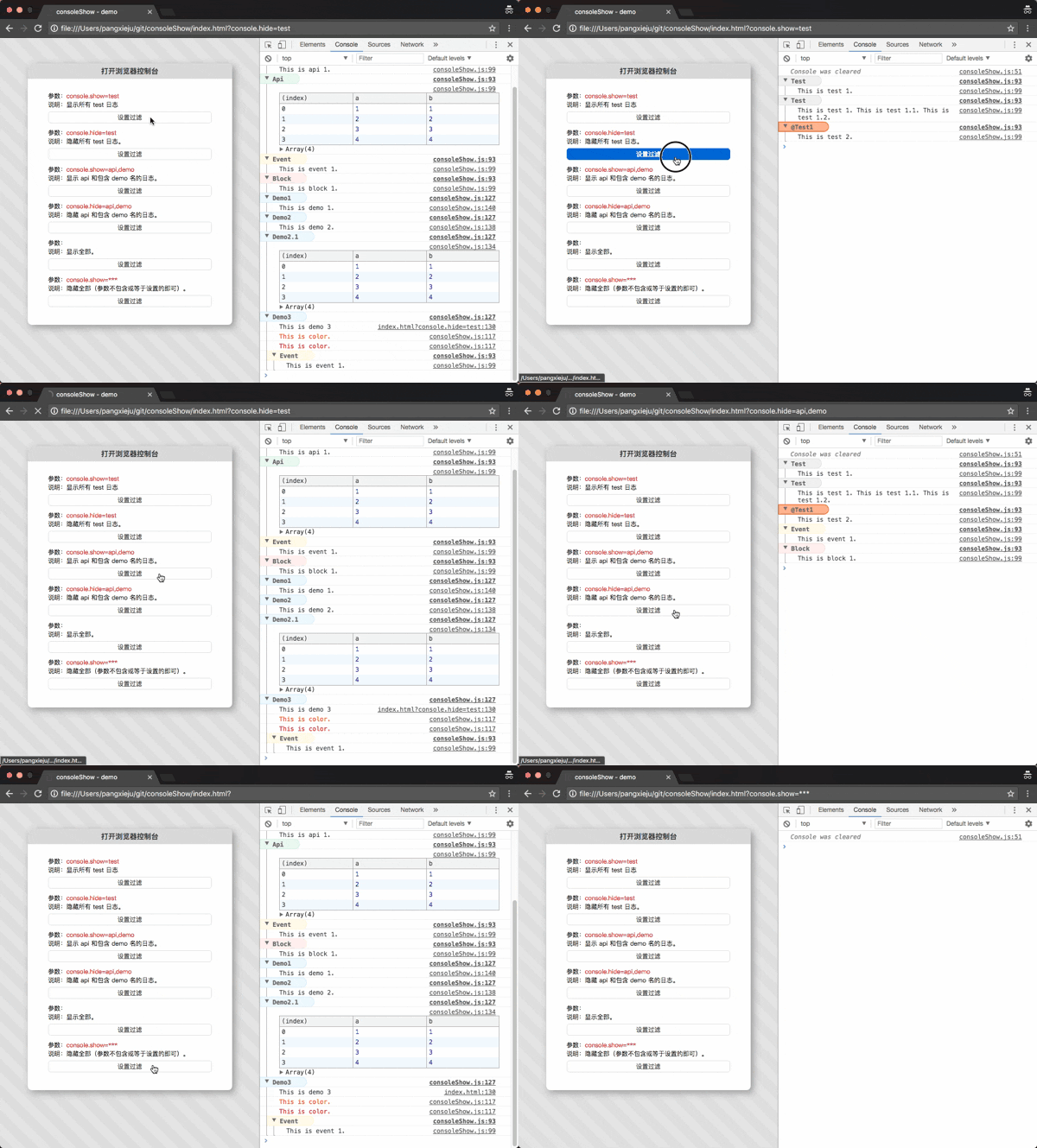 ## 使用指南 安装: ```js npm install consoleshow ``` 演示地址: [http://pangxieju.github.io/consoleshow/index.html](http://pangxieju.github.io/consoleshow/index.html) 扩展命令: * console.color :修改打印颜色 * console.api :输出接口相关信息 * console.block :输出块,组件相关信息 * console.event :输出事件相关信息 * console.data :输出数据信息 * console.tag :输出标签 * console.test :普通输出 * console.plus :自定义输出信息 ```js // 默认初始化 window.consoleshow.config(); // 清除控制台信息 window.consoleshow.config({ clear: true // url 改变时清除控制台信息 }); // 是否折叠控制台信息 window.consoleshow.config({ collapsed: false // 默认值为 true ,折叠显示控制台信息 }); // 显示指定 console window.consoleshow.config({ show: [name_1, name_2] }); // 隐藏指定 console window.consoleshow.config({ hide: [name_1, name_2] }); // 扩展命令 window.consoleshow.config({ extend: [{ name: "api", // 用于控制过滤 console 标记,默认为 test type: "table", // console 默认命令名,默认为 log color: "#fff3cf", // 标题颜色,默认色 #ddd group: true, // 是否使用组显示 console 日志, 默认 false code: false // 是否支持 function,默认false }] }); ``` #### 注意: 1、扩展 name 参数不允许与 console 命令和扩展命令名相同; - console 命令:"debug", "error", "info", "log", "warn", "dir", "dirxml", "table", "trace", "group", "groupCollapsed", "groupEnd", "clear", "count", "assert", "markTimeline", "profile", "profileEnd", "timeline", "timelineEnd", "time", "timeEnd", "timeStamp", "memory";(Chrom 浏览器) - 扩展命令: "color", "api", "block", "event", "data", "tag","test", "plus"; - 如果与 console 命令名相同,name 会取默认参数 test;如果与扩展命令名相同,会覆盖重名扩展设置; 2、扩展 color 属性只支持 16 进制颜色; 3、扩展 type 参数主要设置输出的控制台命令名,例如:table 等于 console.table; 4、扩展 group 参数设置显示 console 是否为 group,用于折叠显示日志; url 过滤 console: ``` // 显示当前页面指定 console http://xxx.com?console.show=name_1,name_2 // 隐藏当前页面指定 console http://xxx.com?console.hide=name_1,name_2 ``` url 展开/折叠 console ``` // 展开group console http://xxx.com?console.collapsed=false // 折叠group console http://xxx.com?console.collapsed=true // 组合过滤 http://xxx.com?console.collapsed=false&console.show=name_1,name_2 http://xxx.com?console.collapsed=true&console.hide=name_1,name_2 ``` url 过滤参数会覆盖初始化参数里的过滤信息。 ### 扩展命令 1、api, block, event, data, tag, test, plus 命令; ```js // test 为扩展命令名 console.test('This is test 1.'); console.test('This is test 1.', 'This is test 1.1.', 'This is test 1.2.'); // 内联配置 console.test('This is test 2.', { config: { "name": "@test1", // 用于控制过滤 console 标记,默认为 test "type": "log", // console 默认命令名,默认为 log "color": "#f50" // 标题颜色,默认色 #ddd } }); console.plus("This is demo 1."); console.plus([ {a: 1, b: 1}, {a: 2, b: 2}, {a: 3, b: 3}, {a: 4, b: 4} ], { config: { "name": "demo2", "type": "table", } }); console.plus(function () { console.log("This is demo 3"); console.color('This is color.'); console.color('This is color.', "#f00"); console.event('This is event 1.'); }, { config: { "name": "demo3" } }) ``` 2、color 命令:console.color(string, color); ```js console.color('This is color.'); console.color('This is color.', "#f00"); ``` #### 注意: 在 webpack 中可以配置是否在正式代码中过滤 console ;一般开发环境是要显示 console 方便调试,正式不显示;相关配置如下: ```js // webpack2-3x 入口配置 entry: { index: [ '../src/index.js', '../node_modules/consoleshow/index.js' // 可以通过 process.env.NODE_ENV 来控制是否输出 ] } // webpack2-3x UglifyJsPlugin 配置 compressor: { drop_console: true, // 清除 console pure_funcs: ['window.consoleshow.config'] // 打包过滤 } ``` ## License This content is released under the [MIT](http://opensource.org/licenses/MIT) License.
