KO
|
EN
gitlite — search
Search
#python
#java
#python3
#arduino
#golang
#machine-learning
#rust
#html
#flask
#javascript
#seismology
#nodejs
prolific
★ 28
Open GitHub ↗
It's like Markdown for Pivotal Tracker
Download README (.md)
Explore Similar Repositories
pivo_flow
:
Simple pivotal tracker integration for day to day work with git
pivotaly
:
Work seamlessly with pivotal tracker within vs-code
pivothub
:
GitHub Issues for Pivotal Tracker
pivotaltracker
:
Node.js wrapper for the Pivotal Tracker REST API
pv
:
A command-line interface to Pivotal Tracker, inspired by Git
// repository documentation
Was this content helpful?
★ 0
(0 ratings)
Select Rating:
★
★
★
★
★
Submit Feedback
Recent Feedback
×
Download README
Do you want to download the
README.md
file for
prolific
?
Download (.md)
# Prolific A little tool for authoring many tracker stories. Prolific converts files that look like: ``` As a user I can toast a bagel When I insert a bagel into toaster and press the on button, I should get a toasted bagel L: mvp, toasting --- As a user I can set the desired color of my bagel I should be able to manipulate a dial and choose one of: - light - medium - dark Pressing the on button gives me toast of the appropriate color. L: mvp, toasting --- As a user I can clean my bagel toaster I should be able to pull out a tray and clean up the crumbs. L: mvp, clean-up --- [BUG] Every third time I use it, the toaster jams L: mvp --- [CHORE] Reticulate the Toaster's turboencabulator A metabolic endocrinide that the developrs will likely need to photoencapsulate. - [ ] Re-enfarbulate the mitilandrinide - [ ] Masticulate the retracto-mandible - [ ] Effervesce all enteropolycarbides --- [RELEASE] Toaster MVP is Ready L: mvp ``` into CSV files ready for import into Tracker. ## Installation To install from source, make sure you have the Go toolchain installed, then: `go install github.com/onsi/prolific` Or just download the OS X binary from the GitHub releases page. ## Usage #### `prolific template` Will generate a template `stories.prolific` file #### `prolific path/to/stories.prolific` Will emit a CSV version of the passed in prolific file. You can use `>` to shovel this content into a file. For example: ``` prolific stories.prolific > stories.csv ``` #### `STDIN` Prolific will also read content from standard input, which can be useful when combined with templates. For example: ``` erb stories.prolific.erb | prolific > stories.csv ``` ## Syntax Stories are separated by `\n---\n\n`. Each story is a block made up of: - **Title**: The first line following the delimiter becomes the story title. The story title must be on a single line. The title is required. - **Story Type** (optional): The story title can be preceded by an optional `[X]` story type. Legal values are `[FEATURE]` (the default), `[BUG]`, `[CHORE]`, and `[RELEASE]`. - **Description** (optional): Content immediately after the title is placed, verbatim, as the story's description. - **Tasks** (optional): Content prefaced with `- [ ]` or `* [ ]` are converted into tasks (similar Github-flavored-Markdown checklists). - **Labels** (optional): If the last line before `\n---\n\n` begins with `L:` Prolific will interpret the content following `L:` as comma-separated labels. ## Import into Tracker Use the Import CSV function to add the stories to your project with the csv file or output from prolific. 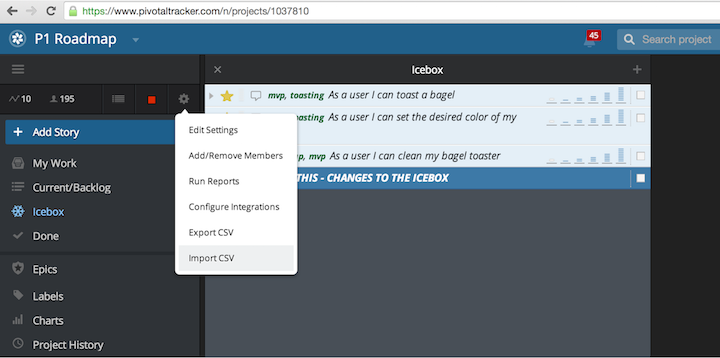 The requester associated with the resulting stories will be the account used to import the csv file. ## License Prolific is MIT Licensed
