KO
|
EN
gitlite — search
Search
#python
#java
#python3
#arduino
#golang
#machine-learning
#rust
#html
#flask
#javascript
#seismology
#nodejs
JXLayoutButton
★ 26
Open GitHub ↗
Button的图片和文本的布局方式,左右上下排列
Download README (.md)
Explore Similar Repositories
popspinnerview
:
PopSpinnerView下拉选择控件
last-release-git
:
semantic-release plugin for projects that must not be published at NPM
yii2-elfinder
:
elFinder file manager for Yii 2
simple-plugins
:
simple pocketmine plugins for immediate use
anomaly-detection
:
入門 機械学習による異常検知―Rによる実践ガイド をPythonで実装
// repository documentation
Was this content helpful?
★ 0
(0 ratings)
Select Rating:
★
★
★
★
★
Submit Feedback
Recent Feedback
×
Download README
Do you want to download the
README.md
file for
JXLayoutButton
?
Download (.md)
# JXLayoutButton 关于实现UIButton的上图下文、上文下图、左图右文、右图左文的布局需求,我也尝试过扩展分类使用EdgeInsets来实现,但总是不太灵活不太如意。 于是我选择了暴力解决办法:使用UIButton的子类,重写layoutSubviews。 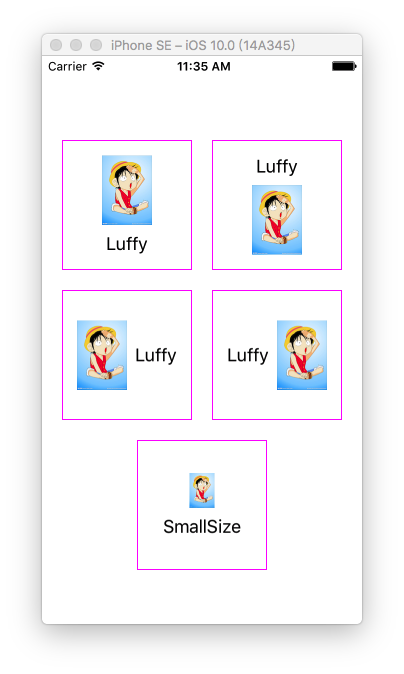 ### JXLayoutButton.h ```objc // // JXLayoutButton.h // JXLayoutButtonDemo // // Created by JiongXing on 16/9/24. // Copyright © 2016年 JiongXing. All rights reserved. // #import <UIKit/UIKit.h> typedef NS_ENUM(NSUInteger, JXLayoutButtonStyle) { JXLayoutButtonStyleLeftImageRightTitle, JXLayoutButtonStyleLeftTitleRightImage, JXLayoutButtonStyleUpImageDownTitle, JXLayoutButtonStyleUpTitleDownImage }; /// 重写layoutSubviews的方式实现布局,忽略imageEdgeInsets、titleEdgeInsets和contentEdgeInsets @interface JXLayoutButton : UIButton /// 布局方式 @property (nonatomic, assign) JXLayoutButtonStyle layoutStyle; /// 图片和文字的间距,默认值8 @property (nonatomic, assign) CGFloat midSpacing; /// 指定图片size @property (nonatomic, assign) CGSize imageSize; @end ``` ### JXLayoutButton.m ```obj // // JXLayoutButton.m // JXLayoutButtonDemo // // Created by JiongXing on 16/9/24. // Copyright © 2016年 JiongXing. All rights reserved. // #import "JXLayoutButton.h" @implementation JXLayoutButton - (instancetype)initWithFrame:(CGRect)frame { if (self = [super initWithFrame:frame]) { self.midSpacing = 8; } return self; } - (void)layoutSubviews { [super layoutSubviews]; if (CGSizeEqualToSize(CGSizeZero, self.imageSize)) { [self.imageView sizeToFit]; } else { self.imageView.frame = CGRectMake(self.imageView.frame.origin.x, self.imageView.frame.origin.y, self.imageSize.width, self.imageSize.height); } [self.titleLabel sizeToFit]; switch (self.layoutStyle) { case JXLayoutButtonStyleLeftImageRightTitle: [self layoutHorizontalWithLeftView:self.imageView rightView:self.titleLabel]; break; case JXLayoutButtonStyleLeftTitleRightImage: [self layoutHorizontalWithLeftView:self.titleLabel rightView:self.imageView]; break; case JXLayoutButtonStyleUpImageDownTitle: [self layoutVerticalWithUpView:self.imageView downView:self.titleLabel]; break; case JXLayoutButtonStyleUpTitleDownImage: [self layoutVerticalWithUpView:self.titleLabel downView:self.imageView]; break; default: break; } } - (void)layoutHorizontalWithLeftView:(UIView *)leftView rightView:(UIView *)rightView { CGRect leftViewFrame = leftView.frame; CGRect rightViewFrame = rightView.frame; CGFloat totalWidth = CGRectGetWidth(leftViewFrame) + self.midSpacing + CGRectGetWidth(rightViewFrame); leftViewFrame.origin.x = (CGRectGetWidth(self.frame) - totalWidth) / 2.0; leftViewFrame.origin.y = (CGRectGetHeight(self.frame) - CGRectGetHeight(leftViewFrame)) / 2.0; leftView.frame = leftViewFrame; rightViewFrame.origin.x = CGRectGetMaxX(leftViewFrame) + self.midSpacing; rightViewFrame.origin.y = (CGRectGetHeight(self.frame) - CGRectGetHeight(rightViewFrame)) / 2.0; rightView.frame = rightViewFrame; } - (void)layoutVerticalWithUpView:(UIView *)upView downView:(UIView *)downView { CGRect upViewFrame = upView.frame; CGRect downViewFrame = downView.frame; CGFloat totalHeight = CGRectGetHeight(upViewFrame) + self.midSpacing + CGRectGetHeight(downViewFrame); upViewFrame.origin.y = (CGRectGetHeight(self.frame) - totalHeight) / 2.0; upViewFrame.origin.x = (CGRectGetWidth(self.frame) - CGRectGetWidth(upViewFrame)) / 2.0; upView.frame = upViewFrame; downViewFrame.origin.y = CGRectGetMaxY(upViewFrame) + self.midSpacing; downViewFrame.origin.x = (CGRectGetWidth(self.frame) - CGRectGetWidth(downViewFrame)) / 2.0; downView.frame = downViewFrame; } - (void)setImage:(UIImage *)image forState:(UIControlState)state { [super setImage:image forState:state]; [self setNeedsLayout]; } - (void)setTitle:(NSString *)title forState:(UIControlState)state { [super setTitle:title forState:state]; [self setNeedsLayout]; } - (void)setMidSpacing:(CGFloat)midSpacing { _midSpacing = midSpacing; [self setNeedsLayout]; } - (void)setImageSize:(CGSize)imageSize { _imageSize = imageSize; [self setNeedsLayout]; } @end ``` ### 测试 ```objc // // ViewController.m // JXLayoutButtonDemo // // Created by JiongXing on 16/9/24. // Copyright © 2016年 JiongXing. All rights reserved. // #import "ViewController.h" #import "JXLayoutButton.h" @interface ViewController () @end @implementation ViewController - (void)viewDidLoad { [super viewDidLoad]; CGFloat margin = 20; CGFloat buttonWidth = (CGRectGetWidth(self.view.frame) - 20 * 3) / 2.0; CGFloat buttonHeight = buttonWidth; [self addButton: [self generateButtonWithStyle:JXLayoutButtonStyleUpImageDownTitle] withFrame:CGRectMake(margin, 64 + margin, buttonWidth, buttonHeight)]; [self addButton: [self generateButtonWithStyle:JXLayoutButtonStyleUpTitleDownImage] withFrame:CGRectMake(margin + buttonWidth + margin, 64 + margin, buttonWidth, buttonHeight)]; [self addButton: [self generateButtonWithStyle:JXLayoutButtonStyleLeftImageRightTitle] withFrame:CGRectMake(margin, 64 + margin + buttonHeight + margin, buttonWidth, buttonHeight)]; [self addButton: [self generateButtonWithStyle:JXLayoutButtonStyleLeftTitleRightImage] withFrame:CGRectMake(margin + buttonWidth + margin, 64 + margin + buttonHeight + margin, buttonWidth, buttonHeight)]; JXLayoutButton *customSizeButton = [self generateButtonWithStyle:JXLayoutButtonStyleUpImageDownTitle]; [customSizeButton setTitle:@"SmallSize" forState:UIControlStateNormal]; customSizeButton.imageSize = CGSizeMake(100 / 4, 140 / 4); [self addButton:customSizeButton withFrame:CGRectMake((CGRectGetWidth(self.view.frame) - buttonWidth) / 2.0, 64 + margin * 3 + buttonHeight * 2, buttonWidth, buttonHeight)]; } - (JXLayoutButton *)generateButtonWithStyle:(JXLayoutButtonStyle)style { JXLayoutButton *button = [JXLayoutButton buttonWithType:UIButtonTypeCustom]; [button setImage:[UIImage imageNamed:@"luffy"] forState:UIControlStateNormal]; [button setTitle:@"Luffy" forState:UIControlStateNormal]; [button setTitleColor:[UIColor darkTextColor] forState:UIControlStateNormal]; button.layoutStyle = style; button.layer.borderWidth = 1; button.layer.borderColor = [UIColor magentaColor].CGColor; return button; } - (void)addButton:(JXLayoutButton *)button withFrame:(CGRect)frame { button.frame = frame; [self.view addSubview:button]; } @end ``` 结果如上图。
