KO
|
EN
gitlite — search
Search
#typescript
#ai-agents
#ai
#dsh-plugin
#deepseek-harness
#open-source
#cli
#claude-code
#codex
#developer-tools
#react
#windows
bender
★ 188
Open GitHub ↗
Bender - Serverless ETL Framework
Download README (.md)
Explore Similar Repositories
rubotnik
:
"Bot-end" Ruby framework to quickly build and launch a Facebook Messenger chatbot
SublimeLinter-flake8
:
SublimeLinter plugin for python, using flake8.
Hasher
:
A small Scala library for easily generating hashes (md5, sha1, sha256, sha512, crc32, bcrypt, hmacs, pbkdf2)
evolutility-ui-jquery
:
Model-driven Web UI for CRUD using REST or localStorage.
EDCC-Palmprint-Recognition
:
EDCC: An efficient and accurate algorithm for palmprint recognition.
// repository documentation
Was this content helpful?
★ 0
(0 ratings)
Select Rating:
★
★
★
★
★
Submit Feedback
Recent Feedback
×
Download README
Do you want to download the
README.md
file for
bender
?
Download (.md)
[](https://circleci.com/gh/Nextdoor/bender)  This project provides an extendable Java framework for creating serverless ETL functions on [AWS Lambda](https://aws.amazon.com/lambda/). Bender handles the complex plumbing and provides the interfaces necessary to build modules for all aspects of the ETL process. An example of what you can do is enrich your log data by appending GeoIP information. For example: ``` input: {"ip": "8.8.8.8"} output: {"ip": "8.8.8.8", "geo_ip": {"location": {"lat": 37.751, "lon": -97.822}}} ``` This enables you to create dashboards like these in [Kibana](https://www.elastic.co/guide/en/elasticsearch/reference/5.4/geo-point.html): 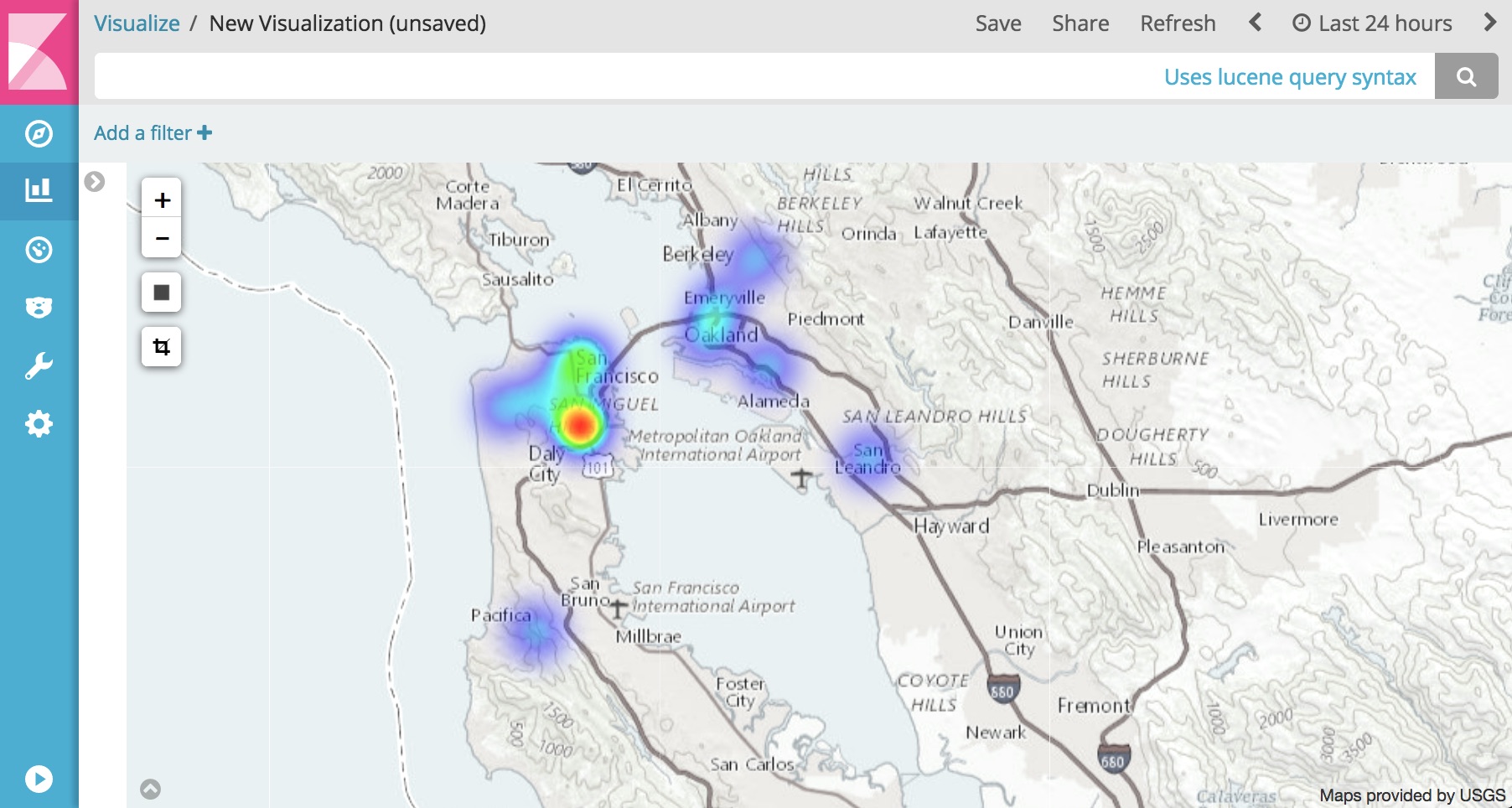 ### Configuration Bender is easily configurable with either json or yaml. The [configuration guide](http://oss.nextdoor.com/bender) provides documentation for option specifics and [sample_configs/](sample_configs/) contains real world examples of how Bender is configured with commonly used pipelines. ### Initial Support While developers are able to write their own Input Handlers, Deserializers, Operations, Wrappers, Serializers, Transporters, or Reporters, out of box the Bender contains basic functionality to read, filter, manipulate, and write JSON from [Amazon Kinesis Streams](https://aws.amazon.com/kinesis/streams/) or [Amazon S3](https://aws.amazon.com/s3/) files. Specially the following is supported: ##### Handlers Handlers interface between Amazon Lambda [triggers](http://docs.aws.amazon.com/lambda/latest/dg/invoking-lambda-function.html) and data sources provided to your ETL function. Events or lines are able to read from: * Kinesis * S3 * S3 via SNS ##### Pre Deserialization Filters Modular filter support is not yet included but basic string matching and regex based filters are included as a part of Bender Core. ##### Deserializers Included is a generic JSON deserializer to transform strings into GSON objects. This allows processing of loosely defined schemas such as those done in application logging. For schema validation the use of GSON to POJOs is encouraged. ##### Operations Data sometimes needs to be transformed, fixed, sanitized, or enriched. Operations allow for these types of data manipulation. * Geo IP lookup * JSON Root node promoter (in the case you have nested data) * JSON Array Dropping * JSON Array Splitting (turning a single event into multiple) * Appending value type information to key names (helps with writing data to ElasticSearch) ##### Wrappers Optionally wrap data to provide additional information on where the data originated from and what processed it: * Kinesis Wrapper * S3 Wrapper * Basic Wrapper ##### Serializers Write your transformed and wrapped data back into JSON before loading it elsewhere. ##### Transporters Transporters convert string payloads to serialized wire formats and send batches of data to destinations. * Firehose * S3 (partitioning support included) * Elasticsearch (time based index inserts) * Splunk * Scalyr * Sumo Logic * Datadog ##### Reporters Monitor the ETL process at each phase within your function and output those metrics for easy consumption in * Cloudwatch Metrics * Datadog ## Local Development/Testing When you are developing your configuration (or a new transport), you may want to test the configuration with some local data. This can be done with the CLI tool. The Bender CLI tool operates almost entirely as if it were in Lambda. It mocks out the appropriate source of the event (Kinesis, S3, etc) and passes the data in to the Handler exactly the way Lambda would. _(Note, this only supports the KinesisHandler at the moment)_. ### Command Line Arguments ```bash $ java -jar bender-cli-1.0.0-SNAPSHOT.jar 2018-03-30 11:06:27,482 ERROR - Missing required option: s usage: BENDER_CONFIG=file://config.yaml java bender-cli-1.0.0-SNAPSHOT.jar -H,--help Print this message -h,--handler <arg> Which Event Handler do you want to simulate? Your options are: KinesisHandler. Default: KinesisHandler --kinesis_stream_name <arg> What stream name should we mimic? Default: log-stream (Kinesis Handler Only) -s,--source_file <arg> Reference to the file that you want to process. Usage depends on the Handler you chose. If you chose KinesisHandler then this is a local file. ``` ### Actual processing of data You can use the Bender CLI tool to actually process data and push it to your destination. This is not the ended production use of the tool, but for validation of your configuration this can work very well. Here is an example of processing some data, and outputting a simple local file with the new data. *`config.yaml`* ```yaml handler: type: KinesisHandler fail_on_exception: true add_shardid_to_partitions: true sources: - name: Syslog Messages source_regex: arn:aws:kinesis:.*:.*:stream/.* deserializer: type: GenericJson nested_field_configs: - field: MESSAGE prefix_field: MESSAGE_PREFIX operations: - type: TimeOperation time_field: $.EPOCH time_field_type: SECONDS - type: JsonKeyNameOperation - type: JsonDropArraysOperation wrapper: type: KinesisWrapper serializer: type: Json transport: type: File filename: output.json ``` *`data.json`* ```json {"program":"app","host":"myhost.com","facility":"local0","priority":"info","message":"Some prefix ... {\"type\":\"image\",\"action\":\"pull\",\"time\":1522366659,\"id\":\"image:id\",\"actor\":{\"id\":\"image:id\",\"attributes\":{\"name\":\"image\"}},\"timenano\":1522366659090067620,\"status\":\"pull\"}","epoch":"1522366659.091506"} ``` *Execution* ```bash $ BENDER_CONFIG=file://config.yaml java -jar bender-cli-1.0.0-SNAPSHOT.jar --source_file data.json 2018-03-30 11:26:24,278 INFO - Invoking the Kinesis Handler... 2018-03-30 11:26:24,950 INFO - Parsing local0.mini.json... 2018-03-30 11:26:25,011 INFO - Processed 1000 records 2018-03-30 11:26:25,031 INFO - Bender Initializing (config: file://config.yaml) 2018-03-30 11:26:25,040 DEBUG - Generating BenderConfig object... this can take a little bit 2018-03-30 11:26:30,447 INFO - Using source: Syslog Messages[sourceRegex=arn:aws:kinesis:.*:.*:stream/.*, containsStrings=[], regexPatterns=[]], deserializers=[GenericJsonDeserializer]], operations=[TimeOperation, KeyNameOperation, DropArraysOperation]] ``` *Output* Here's the output of the file.. just the first line: ```bash $ head -1 output.json {"partition_key":"1","sequence_number":"744","source_arn":"arn:aws:kinesis:us-east-1:123456789:stream/log-stream","function_name":"cli-main","processing_time":1522434390690,"arrival_time":1522434384946,"processing_delay":67731599,"timestamp":1522366659091,"payload":{"program__str":"app","host__str":"myhost.com","facility__str":"local0","priority__str":"info","message":{"type__str":"image","action__str":"pull","time__long":1522366659,"id__str":"image:id","actor":{"id__str":"image:id","attributes":{"name__str":"image"}},"timenano__long":1522366659090067620,"status__str":"pull"},"message_prefix__str":"Some prefix ... " ,"epoch__str":"1522366659.091506"}} ``` Here is the output in a slightly more readable format: ```json { "partition_key": "1", "sequence_number": "744", "source_arn": "arn:aws:kinesis:us-east-1:123456789:stream/log-stream", "function_name": "cli-main", "processing_t ime": 1522434390690, "arrival_time": 1522434384946, "processing_delay": 67731599, "timestamp": 1522366659091, "payload": { "program__str": "app", "host__str": "myhost.com", "facility__str": "local0", "priority__str": "info", "message": { "type__str": "image", "action__str": "pull", "time__long": 1522366659, "id__str": "image:id", "actor": { "id__str": "image:id", "attributes": { "name__str": "image" } }, "timenano__long": 1522366659090067700, "status__str": "pull" }, "message_prefix__str": "Some prefix ... ", "epoch__str": "1522366659.091506" } } ``` ## Deployment The easiest way to deploy your function is to use [Apex](https://github.com/apex/apex). A sample project is included under [example_project/](example_project/). The project provides an example of a function that is triggered by Kinesis, drops data matching a regex, and forwards the rest to Firehose. Note to deploy the example you will need to create an IAM role to allow your lambda function to read from kinesis and write to firehose. Your role will need the following two policies: `arn:aws:iam::aws:policy/service-role/AWSLambdaKinesisExecutionRole` `arn:aws:iam::aws:policy/AmazonKinesisFirehoseFullAccess` After creating your role edit `example_project/project.json` with the role ARN. You will also need to create the source Kinesis and destination Firehose streams. To deploy: cd example_project/ make deploy DRY=false make deploy ## Contributing Features and bug fixes are welcome. Please adhere to the following guidelines: - Use Google's Java [style guide](https://github.com/google/styleguide) for your IDE. - Be conscientious of dependencies you add to Bender Core. - Help maintain unit test code coverage by adding tests for each branch in new code.
