KO
|
EN
gitlite — search
Search
#typescript
#ai-agents
#ai
#dsh-plugin
#deepseek-harness
#open-source
#claude-code
#codex
#cli
#developer-tools
#react
#windows
PullSwitcher
★ 51
Open GitHub ↗
Help to switch fragment easier
Download README (.md)
Explore Similar Repositories
RSA
:
PHP RSA 公钥私钥不对称加密
Ananas
:
This is an Arduino based program for step motor controller,Ananas.
BeeSchema
:
Binary Schema Library for C#
RFM69OOK
:
A general OOK transceiver library for RFM69
Source-Insight-config
:
My own Source Insight config
// repository documentation
Was this content helpful?
★ 0
(0 ratings)
Select Rating:
★
★
★
★
★
Submit Feedback
Recent Feedback
×
Download README
Do you want to download the
README.md
file for
PullSwitcher
?
Download (.md)
# PullSwitcher This library is learn from [liaohuqiu/android-Ultra-Pull-To-Refresh](https://github.com/liaohuqiu/android-Ultra-Pull-To-Refresh) and learn the pull to next layout effect from [zzz40500/Android-PullToNextLayout](https://github.com/zzz40500/Android-PullToNextLayout), this fragments adapter make the fragment hide or show in the activity. So, you can keep data in those. The child of the pushswitcherview in the fragment must be **NestedScrollingChild**, such as a RecyclerView, NestedScrollView and viewpager wrap pre-view Screeshot ==== 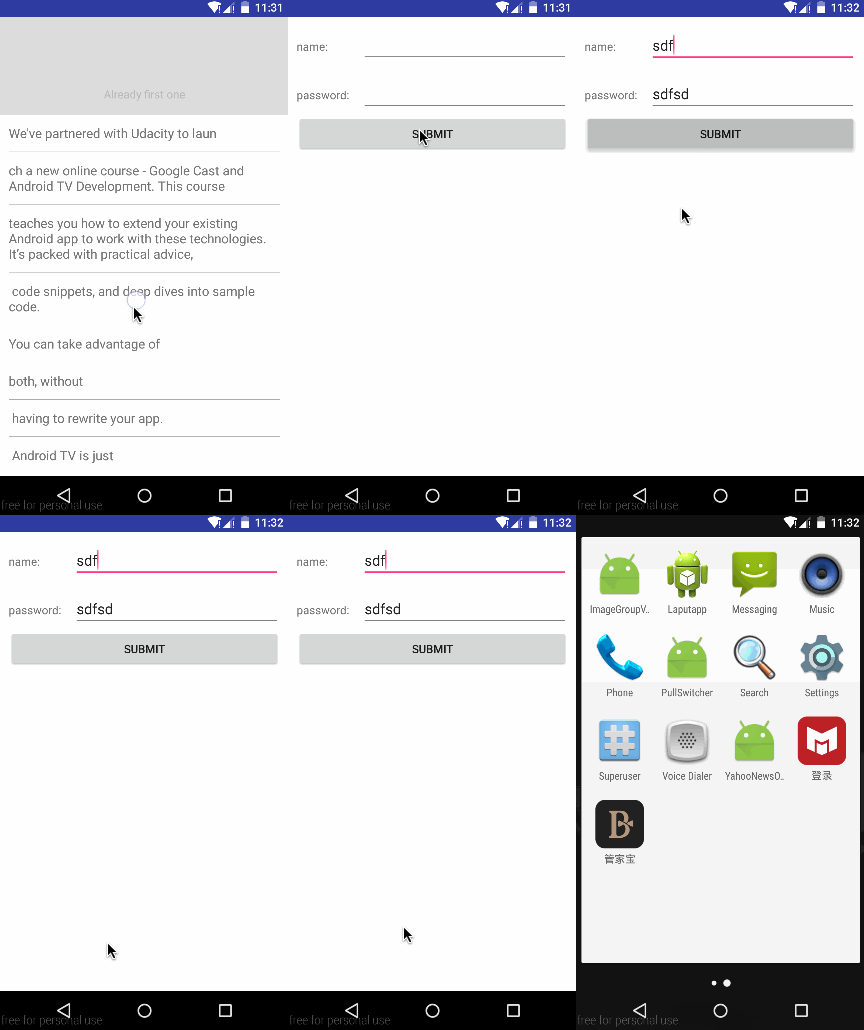 Installation ==== ```groovy dependencies { compile 'com.loopeer.library:pullswitcherview:1.0.6' } ``` Usage ==== ###1. Add adapter and holder in activity ```java private SwitcherAdapter adapter; private SwitcherHolder mSwitchHolder; ...{ mSwitchHolder = new SwitcherHolder(containerLayout); adapter = new TestSwitcherAdapter(getSupportFragmentManager()); mSwitchHolder.setAdapter(adapter); } ``` Then, create your custom switcher adapter. ```java public class TestSwitcherAdapter extends SwitchFragmentAdapter { public TestSwitcherAdapter(FragmentManager fm) { super(fm); } @Override public Fragment getItem(int position) { Fragment fragment; switch (position) { case 0: fragment = TestFragment1Recycler.newInstance(getSwitcherHolder()); break; case 1: fragment = TestFragment2Scroll.newInstance(getSwitcherHolder()); break; case 2: fragment = TestFragment3ViewPager.newInstance(getSwitcherHolder()); break; default: fragment = null; } return fragment; } @Override public int getCount() { return 3; } } ``` ###2. Create cutom fragment You can create the single fragment or view by the **PullSwitchView**, add the layout. set the **PullSwitchView** as your layou which layout you want to move. PullSwitchView can host only one direct child. And the footer and header must implements FooterImpl or HeaderImpl. The pullSwitchView will add header and footer for you by default. But you can set your custom view which must implements the Impl. ```xml <?xml version="1.0" encoding="utf-8"?> <com.loopeer.android.librarys.PullSwitchView xmlns:android="http://schemas.android.com/apk/res/android" android:id="@+id/switcher" android:layout_width="match_parent" android:layout_height="match_parent" android:background="#dddddd"> <LinearLayout android:id="@+id/text_wrapper" android:layout_width="wrap_content" android:layout_height="wrap_content" android:orientation="vertical"> <android.support.v7.widget.RecyclerView android:id="@+id/my_recycler_view" android:scrollbars="vertical" android:layout_width="match_parent" android:layout_height="match_parent"/> </LinearLayout> </com.loopeer.android.librarys.PullSwitchView> ``` init your pullswitchview ```java private void initSwitchView(View view) { pullSwitchView = (PullSwitchView) view.findViewById(R.id.switcher); pullSwitchView.setSwitcherHolder(switcherHolder); } ``` If you want go back by press the back key, you should add this in activity: ```java @Override public void onBackPressed() { mSwitchHolder.doBack(); } ``` ####You can add switcher listener ```java public class TestFragment1Recycler extends Fragment implements PullHandler, SwitchListener { ... @Override public void onPagePause() { Toast.makeText(getActivity(), "test recycler pause", Toast.LENGTH_SHORT).show(); } @Override public void onPageResume() { Toast.makeText(getActivity(), "test recycler resume", Toast.LENGTH_SHORT).show(); } } ``` ####You can add your custom footer and header view create your custom view and implements the footer ```java pullSwitchView.setFooterView(new TestCustomFooterView(getActivity())); ``` and the custom footer can set your pull tips ```java public class TestCustomFooterView extends TextView implements Footer{ public TestCustomFooterView(Context context) { this(context, null); } public TestCustomFooterView(Context context, AttributeSet attrs) { this(context, attrs, 0); } public TestCustomFooterView(Context context, AttributeSet attrs, int defStyleAttr) { super(context, attrs, defStyleAttr); setPadding(20, 20, 20, 20); setGravity(Gravity.CENTER); } @Override public void onMoveStart(int currentPosY, int startSwitchOffset, CharSequence string) { setText("Test custom footer text onMoveStart"); } @Override public void onCanStartSwitch(int currentPosY, int startSwitchOffset, CharSequence string) { setText("Test custom footer text onCanStartSwitch"); } } ``` License ==== <pre> Copyright 2015 Loopeer Licensed under the Apache License, Version 2.0 (the "License"); you may not use this file except in compliance with the License. You may obtain a copy of the License at http://www.apache.org/licenses/LICENSE-2.0 Unless required by applicable law or agreed to in writing, software distributed under the License is distributed on an "AS IS" BASIS, WITHOUT WARRANTIES OR CONDITIONS OF ANY KIND, either express or implied. See the License for the specific language governing permissions and limitations under the License. </pre>
