KO
|
EN
gitlite — search
Search
#javascript
#python
#hacktoberfest
#react
#ai
#typescript
#llm
#go
#golang
#android
#machine-learning
#rust
#deep-learning
#linux
Luma11y
★ 25
Open GitHub ↗
Colour contrast analyser tool
Download README (.md)
Explore Similar Repositories
FOOTPASS
:
Baselines for the SoccerNet Player-Centric Ball-Action Spotting Challenge 2026
St0r
:
St0r is a addon web gui for Urbackup Server | Project managed by MIA the GSD 🐾
york
:
No description available.
oas3-gen
:
Rust OpenAPI 3.1 Type Generator
claude-skills-collection
:
Collection of useful skills for Claude Code - AI agents, frontend design, and more
// repository documentation
Was this content helpful?
★ 0
(0 ratings)
Select Rating:
★
★
★
★
★
Submit Feedback
Recent Feedback
×
Download README
Do you want to download the
README.md
file for
Luma11y
?
Download (.md)
<div align="center"> # Luma11y  **Determine the legibility of text and the contrast of visual elements, such as graphical controls and visual indicators.** [](https://github.com/WebAccessibilityTools/Luma11y/releases) [](https://raw.githubusercontent.com/WebAccessibilityTools/Luma11y/main/LICENSE) [](https://tauri.app/) [](https://www.rust-lang.org/) *Read this in other languages: [English](README.md) | [Français](README.fr.md)* </div> --- This repository contains the source code for Luma11y, a colour contrast analyser tool for Windows and MacOS. Build with Rust and [Tauri](https://tauri.app/). <div align="center"> 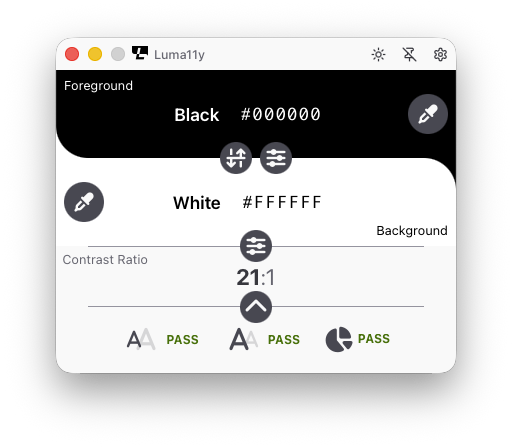 </div> ## ❤️ Support this project This project is something I build entirely on my own free time, driven by the belief that accessibility tooling should be open, and available to everyone. To keep it trustworthy and easy to install, I need code signing certificates for both Windows and macOS — which come with a real annual cost. If this tool saves you time or helps your team ship more accessible products, consider sponsoring this project. Even a small contribution goes a long way toward keeping it signed, maintained, and free. [](https://github.com/sponsors/WebAccessibilityTools) Or, if you prefer, buy me some coffe for further improve this tool even more. <a href="https://www.buymeacoffee.com/ctrevisan" target="_blank"><img src="https://cdn.buymeacoffee.com/buttons/v2/default-yellow.png" alt="Buy Me A Coffee" height=48 ></a> ## Table of Contents - [Features](#features) - [Installation (macOS)](#installation-macos) - [Contributing](#contributing) - [Contact](#contact) - [License](#license) ## Features ### For Beta 2 | Feature | Status | |---|:---:| | Accessibility | In progress | | Alpha colour component | Planned | | New colour formats | done | | Free text entry | Done | | Windows/macOS installer | Planned | | Auto-update | Planned | | Signed certificates | Planned | ### Future | Feature | Status | |---|:---:| | Linux version | Planned | | Reduced/menubar mode | Planned | | Colour blindness simulator | Planned | ## Installation (macOS) > [!NOTE] > The app is not yet signed with an Apple Developer certificate. You will need to bypass Gatekeeper using one of the options below. ### Option 1 — Disable Gatekeeper (recommended) 1. Download the latest release from the [Releases](https://github.com/WebAccessibilityTools/Luma11y/releases) page. 2. Move the unzipped `Luma11y.app` to your **Applications** folder. **Do not double-click yet.** 3. Open **Terminal** and run: ```shell sudo spctl --master-disable ``` 4. Go to **System Settings** > **Privacy & Security** > **Security** and choose **Anywhere**. 5. Double-click `Luma11y.app` to launch it. Accept the prompt if asked. ### Option 2 — Without disabling Gatekeeper 1. Download the latest release from the [Releases](https://github.com/WebAccessibilityTools/Luma11y/releases) page. 2. Enable **System Settings** > **Privacy & Security** > **Security** > **App Store and identified developers**. 3. Double-click `Luma11y.app`. It will be blocked. 4. Go to **System Settings** > **Privacy & Security** > **Security** and click **Open Anyway**. 5. If prompted, allow the application to run. ### Option 3 — Remove quarantine for Luma11y only 1. Download the latest release from the [Releases](https://github.com/WebAccessibilityTools/Luma11y/releases) page. 2. Move the unzipped `Luma11y.app` to your **Applications** folder. **Do not double-click yet.** 3. Open **Terminal** and run: ```shell sudo xattr -cr ~/Applications/Luma11y.app ``` ## Contributing If you have an idea for a new feature or found a bug, please [open an issue](https://github.com/WebAccessibilityTools/Luma11y/issues). Search existing issues first to prevent duplicates. Pull requests are welcome! Please follow the [Contribution Guidelines](CONTRIBUTING.md) before submitting. ## Contact If you have any questions, feel free to [open an issue](https://github.com/WebAccessibilityTools/Luma11y/issues) here on GitHub. ## License [](http://www.gnu.org/licenses/gpl-3.0.en.html) Luma11y is Free Software: you can use, study, share and improve it at your will. Specifically you can redistribute and/or modify it under the terms of the [GNU General Public License](https://www.gnu.org/licenses/gpl.html) as published by the Free Software Foundation, either version 3 of the License, or (at your option) any later version. > This program is distributed in the hope that it will be useful, but **WITHOUT ANY WARRANTY**; without even the implied warranty of **MERCHANTABILITY** or **FITNESS FOR A PARTICULAR PURPOSE**. See the [GNU General Public License](https://www.gnu.org/licenses/gpl.html) for more details.
