KO
|
EN
gitlite — search
Search
#javascript
#python
#hacktoberfest
#react
#ai
#typescript
#llm
#go
#golang
#android
#machine-learning
#rust
#deep-learning
#linux
DragonCity-Bot
★ 13
Open GitHub ↗
No description available.
Download README (.md)
Explore Similar Repositories
backend_benchmark
:
Backend benchmarking of Python, Node, and Dart frameworks
note_app_pro-master
:
No description available.
BLEDiff
:
BLEDiff is an automated, scalable, property-agnostic, and black-box protocol noncompliance checker for BLE devices.
Talks-Keynotes-slides
:
My invited Keynote/Talk at Conferences, Universities, Companies, etc.
FKGC-CIAN
:
This repo shows the source code of EMNLP 2022 paper: Learning Inter-Entity Interaction for Few-Shot Knowledge Graph Completion.
// repository documentation
Was this content helpful?
★ 0
(0 ratings)
Select Rating:
★
★
★
★
★
Submit Feedback
Recent Feedback
×
Download README
Do you want to download the
README.md
file for
DragonCity-Bot
?
Download (.md)
## Dragon City Bot ### Why this tool? - There is plenty of tedious tasks, like: `collect gold`, `collect/grow food`, `collect daily gem`, `fighting other oponents`, etc - There is not time to do all the above tasks - Learn `Python` - ### Goal - The goal is to automate as much as possible the game play. - Since I have no access to their APIs (at least I don't know how to access them from windows, android or iOS), I created a script that will play for me (collecting resources, fighting, identifying the resources where it needs to click, etc) ### Technology stack - The project started with autohotkey `https://www.autohotkey.com/` but due to it's limitations I switched the language to Python. `NOTE`: I am new with python, I am a based JavaScript developer, I am adapting the code to the community guidelines as soons as I am learning new things in Python ### Platforms - Works only for windows right now but it can also work with `bluestacks` - I think it can be adapted to other Operating Systems, but since the game is available for Windows and it happens to have a computer with windows, it is built only for windows. - If someone wants to contribute, feel free. ### Limitations - The games is **optimized/works** for a single resolution. 2600/1440 px. (The images from the games used to identify the position of the resources are taken at this resolution) - Dragon City team, changed the way dragons fight (doing and taking damage). Everything was on user's machine, but now is validated on server. This means that we cannot use `pytesseract` any more to find out the dragon life points and use a memory editing tool to modify this values. - I have a different map, some of the habitats are stacked one over another. Did this in the past when DC was available in browser. **www.ditlep.com** So for me is more easy to collect gold. - The map it is centered around an object, in mycase an artifact. See picure below (red circle) 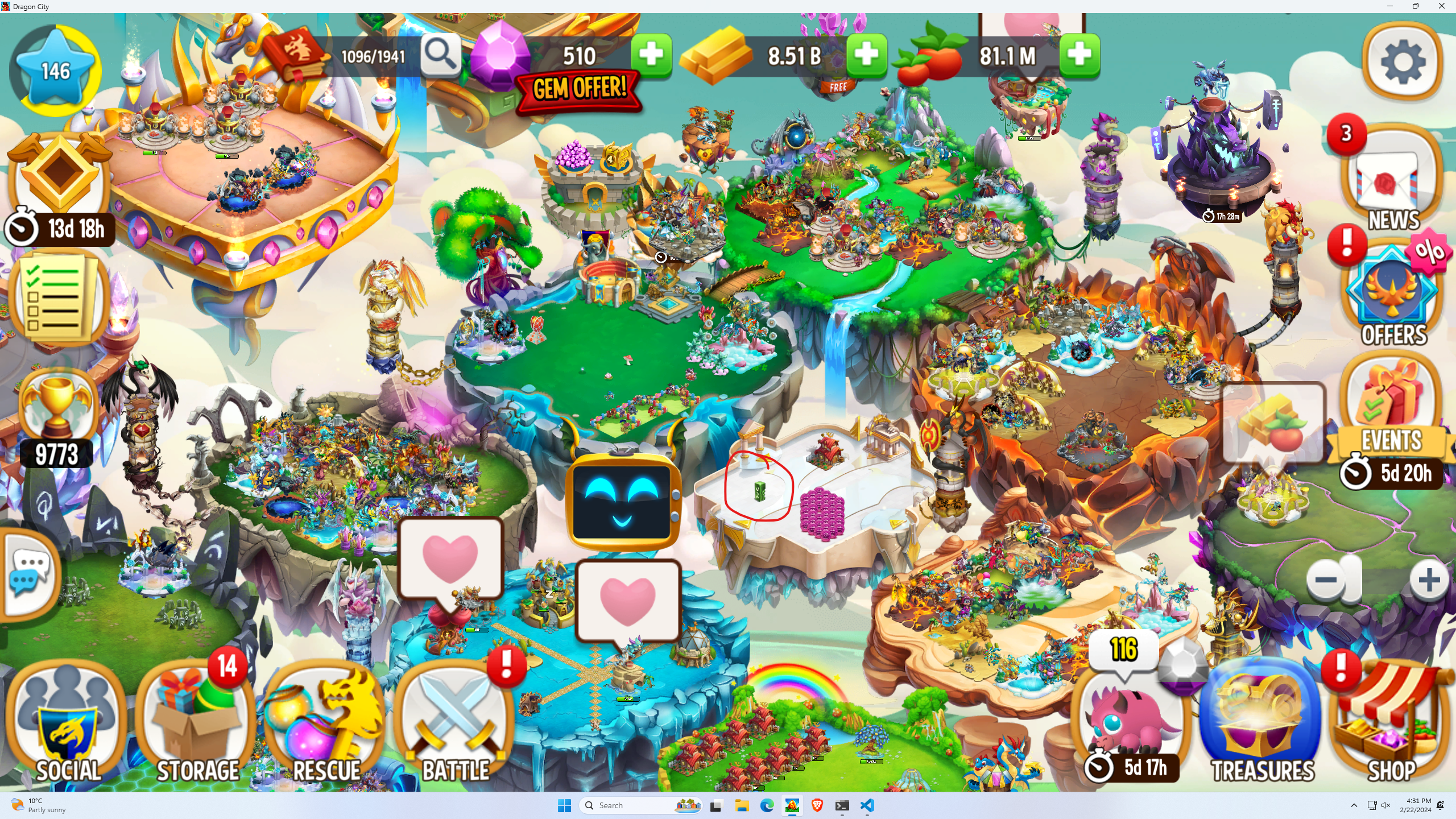 - The map is moved only in 2 direction up/down for simplicity reasons - The game cannot run on background, basically it needs to open the game and do mouse move and click all over the screen. ## How it works - I use Python3 to identify resources on screen. For this I need to take a screenshot (this one is not automated, it has to be manually) and I am using the `imagesearch` [https://pypi.org/project/python-imagesearch/] to get the coordinates on screen. - Once the resources are identified I am clicking on this coordinates or I am moving forward with other screenshots. - The application needs a starting point (in my case the center of the map) and drag the map up and down to collect gold and food. - The application is zoomed out to maximum. - The application has a lot of screenshots with buttons, resources and this is happening because some of the screenshots looks the same at first view but in reality are not the same (have extra shadows, borders, maybe different colors) and `imagesearch` will fail - `The application works for 2600/1440 resolution`. There is a possibility that the `imagesearch` package to return true for some screenshots, but is not guaranteed - The entry file into the game is `scheduler.py` that will run other files like: collect god, activate towers, collect/grow food, fight in the arena, watch adds for you. ## Hot to run the project - make sure you have python and pip installed - pip install -r requirements.txt - In order to open it you need to find out the AppUserModelID - Open power shell with admin right and type `Get-StartApps | select Name, AppID` - copy the appId into open.py, `app_model_id` variable. now you can start the game. - python start scheduler.py # The current project goes through a refactoring phase and code removal. The sections below will be updated once the refactoring to those functionalities is performed. ### Features - Collect gold - Collect and farm food - Breeding and hatching - Battles: (TODO update with links and more documentation) - Arena battles - Quest battles - League battles - Divine Tree: - recall dragons - trading hub - summon new dragons - empower (to be implemented) - Watching rewards and automatically close them - Buying orbs (only the one with gold) - Heroic Race (Work in progress) - Battle - Action based on need (Breeding, Hatching, or Feeding) ### Center Island - In order to collect resources and be sure that we minimize the number of miss clicks the application needs a starting point. - Before starting an action, the map will always be centered and based on action it can move the map up and down (collect gold and collect food) ### Collect gold - TODO attach screenshot - Since the search for gold is not always accurate, the number of searches if limited to 20. - Once a cycle of 20 searches finishes, the Map is moved upwards and try again to collect the gold. - After the 2 cycles are finished the application moves forward - TODO. Attack link: If there is no gold found, we always run the `check for wrong windows` or pushed popups ### Collect food - For the current level there are 15 farms that can be collected. - The collection is very simple and very accurate - Farming can cause some problems, therefore, a farm it is added to a central point on the map in order to decrease the number of fails when searching for it. - There can be 2 types of regrow food: - regrow all (always check for this first) - regrow (will regrow a single farm) - First we try to collect gold and afterwards farm (regrow food) - After collection and farming is done, a check for `check for wrong windows` or pushed popups if performed ### Battle - Battle opponents is maybe the most important feature of the game - There are 3 types of battle: - League: - There are 3 tries available from 6 to 6 hours. - There are 8 opponents - Once there are no opponents the game will give an award which is always collected - After each battle, the application will try to watch the video in order to increase the reward - If Watching the video will fail, it will just claim the default reward and move further - Quest: - The application will look for quests - Sometimes there are more quests available and a scroll is necessary. - Scroll happens even though there is not quest available (it's a little bit slow but is very accurate and works) - Arenas: - This is the most challenging part and more interesting - The opponents are 99% stronger and losing a fight will cause a delay in using the same dragons again - In order to make sure that we have a chance even with lower dragon, the library use the memory edit library that will search for the dragon health and edit it. - There are 3 problems here: - Very hard to identify the dragon health since arena fights are changing very often. The value is hardcoded right now - Opponent dragons can have the same value, therefore will change the life of those dragons which will lead to an infinite fight - The game might crash if the number of addresses returned after a search if very large. - `pytesseract` fails to identify correctly the dragon's health - Once the battles are finished the game moves on - A single fight will take place even thought there are multiple available ### Rewards and collect treasure - In order to increase the number of resources, the application will automatically watch rewards for you and collect them. - On windows, the videos are more easy to start and watch than android but sometimes watching a video can throw an error - When error is thrown the game will recover by closing that window and proceed - Sometimes the videos can lead to infinite watching (the collect reward message won't appear) - The game recovers by closing the video after 50s (`This feature was not tested`) - After watching the rewards, the script will try to collect the chest treasure (It's available once per 24h) - Collecting the chest treasure happens continuously even though will be available after a very large amount of time (hard to predict when will happen since the bot is still in development. It can be scheduled in the future) ### Orbs shop - There are 5 chances to buy orbs for gold per 12h - The bot will do it for you. ### Divine Tree - The bot will try to trade necessary orbs with the first dragon that will appear (top left corner, usually it has the most orbs available) - The trading orbs will be always for new dragons, therefore the application will scroll for dragons with the `new` label - Recall dragon, will happen always by searching for `common`, `rare`, `very rare` dragons. - The application will search for the 40 value which is the default for dragons - Pay attention to powered dragons which can be recalled by mistake(in case it has a 40 at the end) - Don't use it for legendary - Summon dragon, will always search for the dragon with the `new` label - Orbs shop is performed on a previous step so the window will be closed. ### Heroic - `Still in development` - Automatically opens the arena and tries to identify `actions` that should be performed - The application will battle for you and will try to collect resources after each lap - Current `actions` are: - Feed dragons - Breed dragons - Hatch dragons - Collect food dragons -<del> collect gold is omitted since can occur a lot - Once the action are identified the application will prioritize that (20 times per action) - E.g if the action is `['food', 'feed']` - Will farm and collect food for 20 times and moves forward to `feed` - If action is `feed` in order to avoid the food drainage, the application will breed a terra egg, hatch it and feed the dragon to level 3 and sell it. The food consumed will be `60` which is not a big deal. - `Note`: The `Tree` is used for breeding, `hatchery` is very closed to the `Tree` and the `Terra habitat` is very close to the hatchery. Since the game will display all the available places to put the dragon, the best way is to have the habitat very close to the `hatchery` and calculate the position relative to the `Tree` or to the `hatcher` or any other point that is easy to find. ### Heroic Race - Lap1: minTime = 25 minutes - Lap2: minTime = 58 minutes - Lap3: minTime = 1h 30 min - Lap4: minTime = 5h 50min ##### 9h - Lap5: minTime = 7h (battle dragons) - Lap6: minTime = 11h (battle dragons) - Lap7: minTime = 10h - Lap8: minTime = 10h 15min - Lap9: minTime = 11h - Lap10: minTime = 14h - Lap11: minTime = 19h 40 min - Lap12: minTime = 19h 40 min - Lap13: minTime = 20h 40 min - Lap14: minTime = 31h 40 min - Lap15: minTime = 26h - Lap15: minTime = 30h - ## TOTAL ============================ ### Level Up - legendary habitat 30M gold, 5M XP - level 2 levendary habitat: 60M 7M XP conclusion. for 6M, I can have 10M XP. TODO - automate this.
