KO
|
EN
gitlite — search
Search
#python
#java
#python3
#arduino
#golang
#machine-learning
#rust
#html
#flask
#javascript
#seismology
#nodejs
cli
★ 19
Open GitHub ↗
No description available.
Download README (.md)
Explore Similar Repositories
CC1200_HAT-fw
:
CC1200 HAT - firmware
Testnet
:
Testnet guide
interaction_aware_mppi
:
Pytorch re-implementation of the paper "Multi-agent path integral control for interaction-aware motion planning in urban canals" by Lucas Streichenberg, Elia Trevisan, Jen Jen Chung, Roland Siegwart, and Javier Alonso-Mora
Hamadabcn
:
Config files for my GitHub profile.
SKSAppManifestGenerator
:
No description available.
// repository documentation
Was this content helpful?
★ 0
(0 ratings)
Select Rating:
★
★
★
★
★
Submit Feedback
Recent Feedback
×
Download README
Do you want to download the
README.md
file for
cli
?
Download (.md)
# Coinset CLI This command-line interface gives you quick access to the Chia blockchain information. The CLI can be used with the Full Node RPC provided by coinset.org, or any full node. 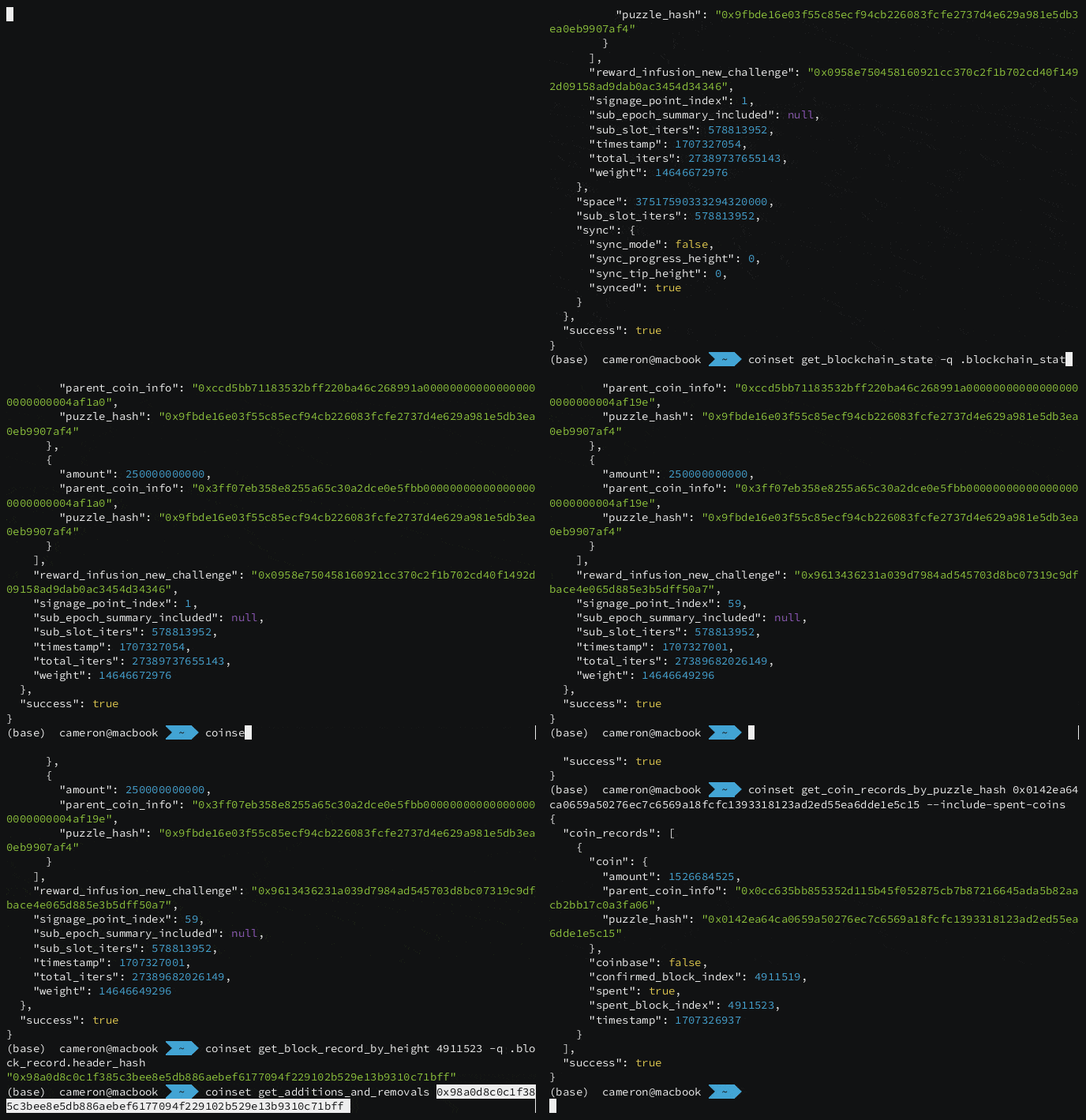 ## Installation Prebuilt binaries can be downloaded from the [Releases](https://github.com/coinset-org/cli/releases) page, or installed with *brew* or *go*. ### Using Homebrew ```bash brew install coinset-org/cli/coinset ``` ### Go Install ```bash go install github.com/coinset-org/cli/cmd/coinset@latest ``` ### Build from Source See the detailed instructions for your operating system: * [MacOS](docs/install_from_source.md#macos) * [Linux](docs/install_from_source.md#linux) * [Windows](docs/install_from_source.md#windows) ## Usage Once installed you can access the Full Node RPC hosted at coinset.org. The first argument is the RPC name and output is automatically pretty printed. For example ```bash $ coinset get_network_info ``` ```json { "network_name": "mainnet", "network_prefix": "xch", "success": true } ``` Required RPC parameters can be passed in as arguments and optional parameters can be set with flags. For example: ```bash $ coinset get_coin_records_by_parent_ids 0xa908ee64a5821b7bda5d798c053a79c8b3d7c608bb7735f4cefc7833ead4f6cd --include-spent-coins ``` ```json { "coin_records": [ { "coin": { "amount": 300000, "parent_coin_info": "0xa908ee64a5821b7bda5d798c053a79c8b3d7c608bb7735f4cefc7833ead4f6cd", "puzzle_hash": "0x5e2bb312cff523f00b286865fedf78209755109c627022d68ccc891ede1d5da9" }, "coinbase": false, "confirmed_block_index": 4907529, "spent": true, "spent_block_index": 4907534, "timestamp": 1707250407 }, { "coin": { "amount": 10000, "parent_coin_info": "0xa908ee64a5821b7bda5d798c053a79c8b3d7c608bb7735f4cefc7833ead4f6cd", "puzzle_hash": "0x352928569cc16f72c212d95912adca3e634a3de136b85ed396a76b19e684e2f6" }, "coinbase": false, "confirmed_block_index": 4907529, "spent": false, "spent_block_index": 0, "timestamp": 1707250407 } ], "success": true } ``` ### Spend inspection (`--inspect`) If an RPC response contains spend data (spend bundles / coin spends), you can add `--inspect` to replace the output with a best-effort interpreted view: cost, conditions, additions/removals, signatures, and optional CLVM disassembly. Example: ```bash coinset get_block_spends 5000000 --inspect ``` `--inspect` is supported when the returned JSON contains one of these shapes: - `mempool_item` - `spend_bundle` / `spend_bundle_bytes` - `coin_spends` / `block_spends` - `coin_spend` (single spend) Notes: - Release/brew installs include `--inspect`. - Building from source requires the Rust static library. The easiest path is `make build` (see `Makefile`). ### CLVM tools (`coinset clvm`) Local CLVM helpers are available under `coinset clvm`: - Inputs accept **either** hex bytes (e.g. `0xff0101`) **or** a readable s-expression (e.g. `"(q . 1)"`). - Outputs are JSON so you can pipe through `--raw -q` / `jq`. ```bash coinset clvm decompile 0xff0101 coinset clvm compile "(q . 1)" coinset clvm run "(q . 1)" "()" --cost coinset clvm tree_hash "(q . 1)" coinset clvm curry "(q . 1)" 42 75 coinset clvm uncurry 0xff02ffff01ff0101ffff04ffff0142ffff04ffff0175ff01808080 ``` #### `coinset clvm tree_hash` Compute a program's tree hash. ```bash coinset clvm tree_hash "(q . 1)" coinset clvm tree_hash 0xff0101 ``` #### `coinset clvm curry` Curry arguments into a module. Arguments are provided as **individual CLI parameters**. ```bash coinset clvm curry "(q . 1)" 42 75 coinset clvm curry 0xff0101 0x2a 0x4b ``` #### `coinset clvm uncurry` Attempt to parse a curried program and return the original module + arguments. ```bash coinset clvm uncurry 0xff02ffff01ff0101ffff04ffff0142ffff04ffff0175ff01808080 coinset clvm uncurry "(a (q . 1) (c (q . 42) (c (q . 75) 1)))" ``` ## Available Commands The following table shows all available CLI commands organized by functionality: | Category | Command | Description | |----------|---------|-------------| | **Address Operations** | `address encode <puzzle_hash>` | Encode puzzle hash to address | | | `address decode <address>` | Decode address to puzzle hash | | **Coin Operations** | `coin_id <parent_coin_id> <puzzle_hash> <amount>` | Compute a coin ID from parent, puzzle hash and amount | | | `get_coin_record_by_name <coin_name>` | Retrieve a coin record by its name | | | `get_coin_records_by_hint <hint>` | Retrieve coin records by hint | | | `get_coin_records_by_hints <hints>` | Retrieve coin records by multiple hints | | | `get_coin_records_by_names <coin_names>` | Retrieve coin records by multiple names | | | `get_coin_records_by_parent_ids <parent_ids>` | Retrieve coin records by parent IDs | | | `get_coin_records_by_puzzle_hash <puzzle_hash_or_address>` | Retrieve coin records by puzzle hash or address | | | `get_coin_records_by_puzzle_hashes <puzzle_hash_or_address> ...` | Retrieve coin records by multiple puzzle hashes or addressees | | **Block Operations** | `get_block <header_hash>` | Retrieve a full block by header hash | | | `get_blocks <start_height> <end_height>` | Retrieve multiple blocks in a height range | | | `get_block_record <header_hash>` | Retrieve a block record by header hash | | | `get_block_records <start_height> <end_height>` | Retrieve multiple block records in a height range | | | `get_block_record_by_height <height>` | Retrieve a block record by height | | | `get_block_spends <header_hash>` | Retrieve block spends by header hash | | | `get_block_spends_with_conditions <header_hash>` | Retrieve block spends with conditions by header hash | | | `get_unfinished_block_headers` | Retrieve unfinished block headers | | **Blockchain State & Network** | `get_blockchain_state` | Retrieve the current blockchain state | | | `get_network_info` | Retrieve information about the current network | | | `get_network_space <newer_block_header_hash> <older_block_header_hash>` | Retrieve network space between two blocks | | | `get_block_count_metrics` | Retrieve block count metrics | | **Mempool Operations** | `get_all_mempool_items` | Retrieve all mempool items | | | `get_all_mempool_tx_ids` | Retrieve all mempool transaction IDs | | | `get_mempool_item_by_tx_id <tx_id>` | Retrieve a specific mempool item by transaction ID | | | `get_mempool_items_by_coin_name <coin_name>` | Retrieve mempool items by coin name | | **Transaction Operations** | `push_tx [spend_bundle_json]` | Push a spend bundle to the mempool | | | `get_fee_estimate <target_times> <cost>` | Get fee estimate for transaction | | | `get_additions_and_removals <header_hash>` | Get additions and removals for a block | | | `get_aggsig_additional_data <spend_bundle>` | Get aggregate signature additional data | | **Puzzle & Solution** | `get_puzzle_and_solution <coin_name> <height>` | Retrieve puzzle and solution for a coin | | | `get_puzzle_and_solution_with_conditions <coin_name> <height>` | Retrieve puzzle and solution with conditions for a coin | | **Memos & Metadata** | `get_memos_by_coin_name <coin_name>` | Retrieve memos associated with a coin | | **Events & Real-time** | `events [type]` | Connect to WebSocket and display events (peak, transaction, offer) | | **Utility** | `version` | Display the version number of coinset | ### JQ Filtering Using the `-q` option you can pass in a jq filter to be used on the output. For example: ```bash coinset get_blockchain_state -q .blockchain_state.peak.height ``` ```json 4911276 ``` ### Autocomplete Autocompletions are provided and can be generated with `coinset completion <shell>`. Completions are automatically installed when using *brew* but brew completions for your shell need to be enabled. [Instructions can be found here](https://docs.brew.sh/Shell-Completion). Manual installation instructions can be found with the help flag. For example: ```bash coinset completion zsh --help ``` ``` Generate the autocompletion script for the zsh shell. If shell completion is not already enabled in your environment you will need to enable it. You can execute the following once: echo "autoload -U compinit; compinit" >> ~/.zshrc To load completions in your current shell session: source <(coinset completion zsh); compdef _coinset coinset To load completions for every new session, execute once: #### Linux: coinset completion zsh > "${fpath[1]}/_coinset" #### macOS: coinset completion zsh > $(brew --prefix)/share/zsh/site-functions/_coinset You will need to start a new shell for this setup to take effect. ```
