KO
|
EN
gitlite — search
Search
#javascript
#library
#nodejs
#css
#game
#animation
#hacktoberfest
#dotnet
#java
#golang
#epub
#cli
PianoLED
★ 36
Open GitHub ↗
No description available.
Download README (.md)
Explore Similar Repositories
calendar_view_widget
:
Calendar View Widget package for Flutter
Artemis
:
No description available.
gluonrank
:
Ranking made easy
ws-unix-framed-bridge
:
A simple proxy that forwards Websocket messages to Unix sockets and vice versa.
csv-to-xlsx
:
Convert CSV files to XLSX (Excel 2007+ XML Format) files.
// repository documentation
Was this content helpful?
★ 0
(0 ratings)
Select Rating:
★
★
★
★
★
Submit Feedback
Recent Feedback
×
Download README
Do you want to download the
README.md
file for
PianoLED
?
Download (.md)
# **Piano MIDI LED Controller** # # Summary This is a ESP8266 based LED controller for key instruments. It can be used as a cool gadget when playing piano or as a piano learning tool when connected to Synthesia that can light up correct keys. # Demo [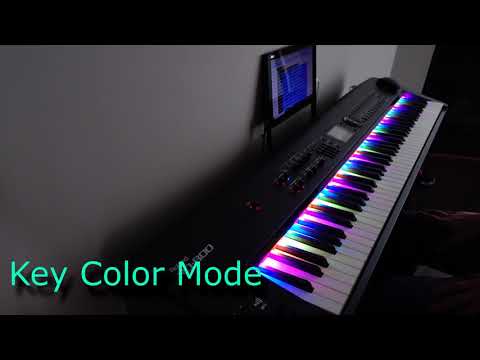](https://www.youtube.com/watch?v=5f_Rrz4XK5c) # Features - up to 2 selectable MIDI inputs - up to 176 RGB WS2812 LED (2 LED per key) - automatic standby mode (5 animations available in UI) - velocity based mode (color depend on key velocity) - 3 non velocity modes - special effect for Frozen - ripple effect - included web IDE for lua code - rboot for easy firmware upgrades using web IDE # Source code NodeMCU ANSI C code is included in [NodeMCU code](https://github.com/NodeMCUProjects/nodemcu-firmware/tree/midi) . # Assembly ## Requirements ESP8266 module with qio and at least 4MB of flash. ## Hardware The MIDI inputs are compatible with TTL logic signal. To connect standard MIDI you will need to use circuit to create TTL signal (e.g. using optocoupler). 2 meters of 144 LED WS2812 strip almost perfectly matches standard piano keyboard, to make it match perfectly you can cut the strip into octaves (24 LEDs) and solder it using correct distance. ## Firmware 1. Download and flash firmware [MIDI firmware](https://github.com/NodeMCUProjects/nodemcu-firmware/releases/tag/midiPoC) 2. Upload lua and supporting code from directory `src/nodemcu/` see: https://nodemcu.readthedocs.io/en/master/en/upload/
