KO
|
EN
gitlite — search
Search
#python
#java
#python3
#arduino
#golang
#machine-learning
#rust
#html
#flask
#javascript
#seismology
#nodejs
tesla-model-x
★ 26
Open GitHub ↗
Tesla Model X Flutter Mobile app
Download README (.md)
Explore Similar Repositories
Dorisoy.SE
:
基于Blazor的.Net 6.0 新零售快消进销存系统
Uniswap-V3-Quoter
:
On-chain spot and time-weighted quoter for UniswapV3
scATACpipe
:
No description available.
ZheTian
:
遮天免杀
rho
:
Optimizing density function compiler
// repository documentation
Was this content helpful?
★ 0
(0 ratings)
Select Rating:
★
★
★
★
★
Submit Feedback
Recent Feedback
×
Download README
Do you want to download the
README.md
file for
tesla-model-x
?
Download (.md)
# Model X A companion app for the Tesla Model X. Shows live vehicle state and puts climate, charging and security controls one thumb away. Flutter 3.35 · Dart 3.9 · Android and iOS · light and dark. ```bash flutter pub get flutter run ``` | Car | Climate | Charge | | --- | --- | --- | | 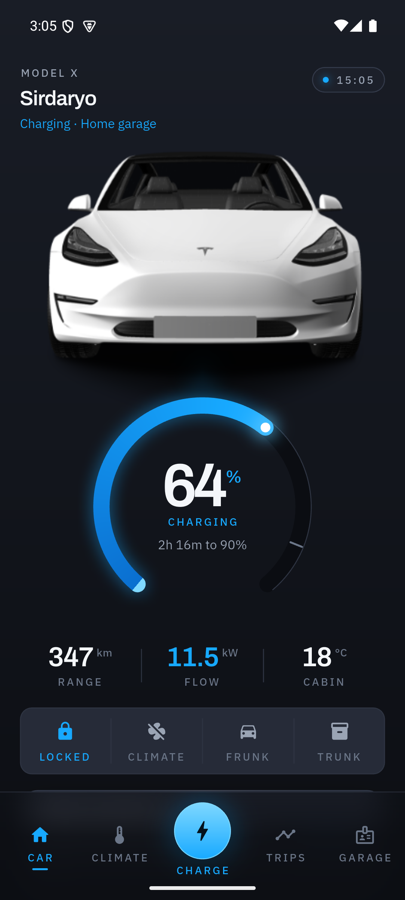 | 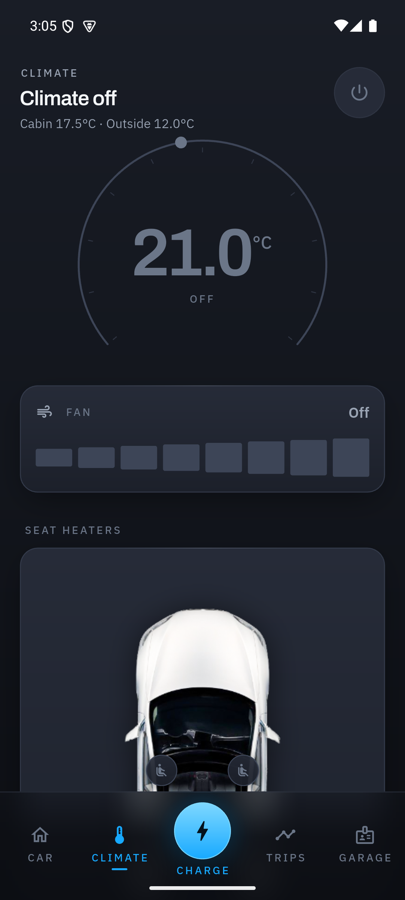 | 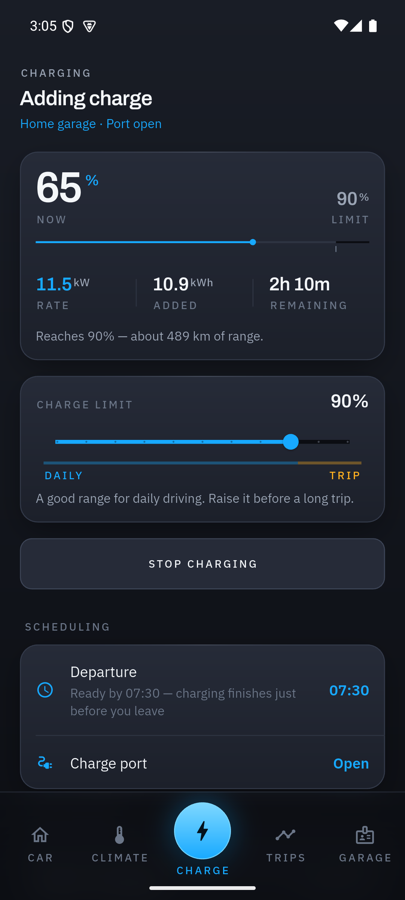 | | Trips | Garage | Home, light | | --- | --- | --- | | 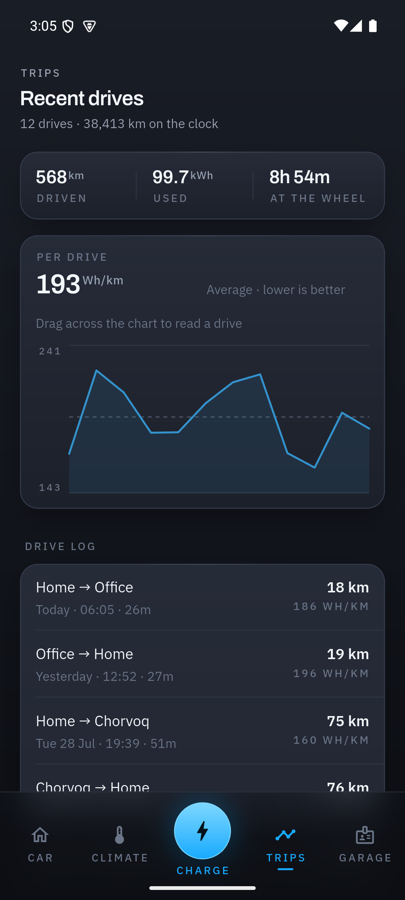 | 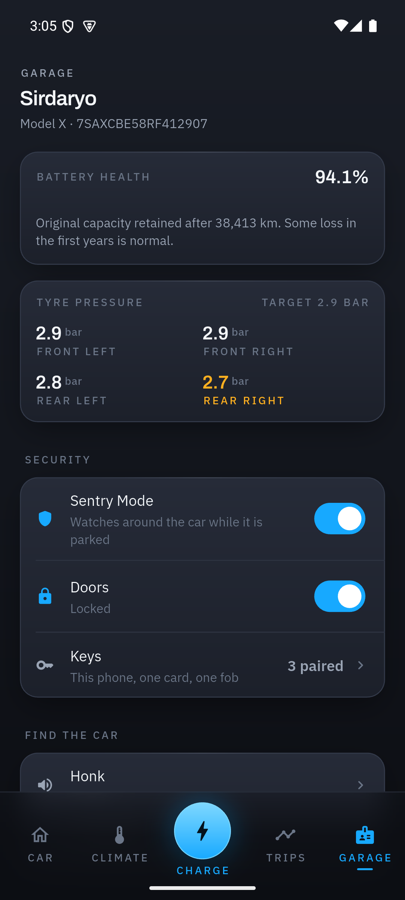 | 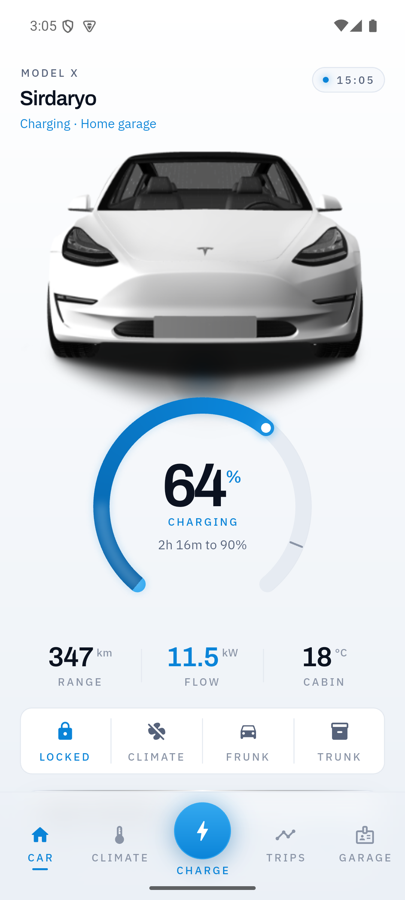 | Same build on iOS: | iOS dark | iOS light | | --- | --- | | 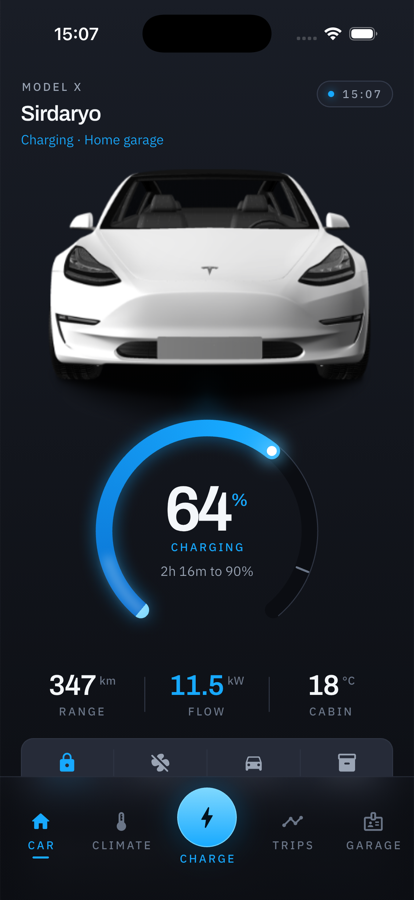 | 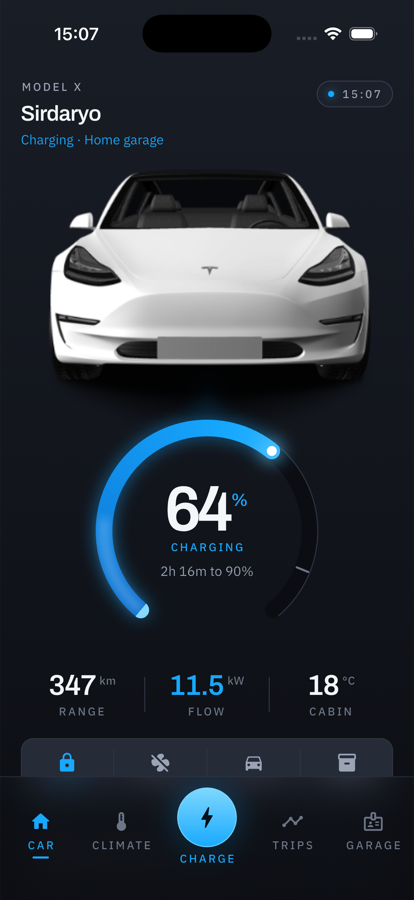 | --- ## What it does Five tabs. Each keeps its own navigation stack and scroll position. | Tab | What it answers | | --- | --- | | **Car** | Is the car alright, and can I leave now? State of charge on the ring, range, flow, cabin temperature, what is open, quick lock/climate/trunk controls, one row per system. | | **Climate** | Cabin temperature on a drag dial, fan in eight steps, seat heaters tapped on a top-down view of the car, Dog Mode, window venting, departure preconditioning. | | **Charge** | The live session, the charge limit with its daily and trip bands, the schedule, and 21 days of session history. | | **Trips** | Consumption per drive against the average, and a log of recent drives. | | **Garage** | Battery health, tyre pressures, keys, horn and lights, software updates, and display preferences. | Every control reports what it is currently set to, so a list answers "how is the car configured" without being opened. Commands take real time and say so: the control that triggered one shows as busy, and the outcome arrives as a confirmation written in the past tense of the control's own label. ## Design Dark graphite-navy canvas with a slow vertical gradient, glass panels, and one electric blue that means energy. **Depth is composed, not delegated.** Material's elevation model is switched off. A panel is lifted by three things together — a gradient fill that is lighter at the top, a 1px inner highlight along the top edge only, and one wide soft shadow. Remove any of the three and it flattens. **The ring is the hero.** A thick arc with a sweep gradient, an outer bloom, a bright head marking the exact value, and a tick for the charge limit. While charging, a highlight travels around the fill toward the head. The car render sits directly above it in the same pool of light, so the two read as one object. **Typography.** Telemetry is set in oversized Archivo with tabular figures, so digits never shift width as values tick. Labels are etched: small, uppercase, widely tracked IBM Plex Sans. Both are bundled as variable fonts with the weight axis pinned via `FontVariation`, so weights are exact rather than snapped to the nearest static cut. **The navigation bar is blurred, not tinted.** Content scrolls under it, and the charge tab is raised out of the bar and lit — it doubles as a status light, so the bar reports whether power is flowing from any screen. ### Chart colours Charts use their own tokens rather than reusing the accent. `charge` is tuned as a bright accent and glares when it fills a bar on a dark surface. The chart steps sit inside the OKLCH lightness band for their mode and were checked for colour-vision separation: | | Home energy | Rapid energy | protan ΔE | tritan ΔE | | --- | --- | --- | --- | --- | | Dark | `#3392CC` | `#B87A28` | 22.0 | 22.9 | | Light | `#0E72BC` | `#8F5600` | 23.0 | 21.7 | Blue against amber, and both series are named in a legend so identity is never carried by colour alone. ## Architecture ```text lib/ main.dart the only file that knows where data comes from app.dart providers, themes, router core/ theme/ palette, typography, metrics, ThemeData router/ the five tab branches format/ units and every number the app displays data/ models/ immutable snapshot, sessions, trips vehicle_command.dart sealed hierarchy of everything the app can ask vehicle_repository.dart the interface simulated_vehicle_repository.dart state/ vehicle_controller.dart snapshot, per-control pending, messages preferences_controller.dart theme and units, persisted widgets/ ring gauge, glass panel, charge rule, readouts features/ one folder per tab ``` `VehicleSnapshot` is immutable and emitted whole, so a widget that rebuilds always sees a self-consistent set of values — the range can never be from a different moment than the battery percentage. Derived figures like `remainingRangeKm` are computed rather than stored, so they cannot contradict their inputs. `SimulatedVehicleRepository` models the car in memory with simplified but consistent physics: energy in raises the state of charge against a real 100 kWh pack, the charge rate tapers past 80% the way a lithium pack does, and cabin temperature approaches its target instead of snapping to it. One simulated minute passes per real second so a charging session is watchable in a demo. --- ## Connecting a real Tesla **Short version:** it works, the app is already shaped for it, and every control here maps to a real Fleet API endpoint. But it is a real project — a registered developer account, a domain you control, a signing proxy, and per-request billing. ### What the app needs from you One more implementation of `VehicleRepository`, and one line changed in `lib/main.dart`: ```dart // Now final VehicleRepository repository = SimulatedVehicleRepository(); // Then final VehicleRepository repository = FleetApiVehicleRepository( client: teslaClient, ); ``` Nothing above that line — no screen, widget or controller — touches the transport. The commands in `lib/data/vehicle_command.dart` already correspond one-to-one with Fleet API endpoints: | App command | Fleet API endpoint | | --- | --- | | `SetLocked` | `door_lock` / `door_unlock` | | `SetFrunkOpen`, `SetTrunkOpen` | `actuate_trunk` (`front` / `rear`) | | `SetChargePortOpen` | `charge_port_door_open` / `_close` | | `SetCharging` | `charge_start` / `charge_stop` | | `SetChargeLimit` | `set_charge_limit` | | `SetClimateOn` | `auto_conditioning_start` / `_stop` | | `SetClimateTarget` | `set_temps` | | `SetSeatHeater` | `remote_seat_heater_request` | | `SetSteeringWheelHeater` | `remote_steering_wheel_heater_request` | | `SetWindowsVented` | `window_control` (`vent` / `close`) | | `SetSentry` | `set_sentry_mode` | | `SetDepartureSchedule` | `set_scheduled_departure` | | `HonkHorn`, `FlashLights` | `honk_horn`, `flash_lights` | | `InstallUpdate` | `schedule_software_update` | State comes from `vehicle_data`, which returns `charge_state`, `climate_state`, `vehicle_state` and `drive_state` — enough to fill `VehicleSnapshot` directly. **One thing the public API does not expose:** opening the falcon-wing doors. You can lock and unlock, and you can actuate both trunks, but there is no documented endpoint that swings the rear doors up. ### The setup, in order 1. **Register as a developer** at [developer.tesla.com](https://developer.tesla.com/) and create an application. You get a client ID and secret. 2. **Host a public key on a domain you control.** Generate an EC key on the `secp256r1` (`prime256v1`) curve and serve the PEM, unauthenticated, at: ```text https://<your-domain>/.well-known/appspecific/com.tesla.3p.public-key.pem ``` Tesla fetches this anonymously to validate registration, and it must stay up. The domain has to match the root domain of your registered `allowed_origins`. 3. **Register the partner account** against that domain via the partner endpoints. 4. **OAuth the owner.** Standard authorization-code flow, with the scopes you need (`vehicle_device_data`, `vehicle_cmds`, `vehicle_charging_cmds`). 5. **Get the virtual key onto the car.** The owner opens `https://tesla.com/_ak/<your-domain>`, and the Tesla app asks them to approve your application and enrols your public key on the vehicle. 6. **Run the command proxy.** 2021-and-later Model S/X and newer 3/Y require end-to-end signed commands. [`teslamotors/vehicle-command`](https://github.com/teslamotors/vehicle-command) provides `tesla-http-proxy`, which signs with your private key and forwards to Fleet API. An unsigned command is rejected by the car. Pre-2021 S/X do not use this protocol. ### What it costs Pay-per-use, since 1 January 2025: | | Price | | --- | --- | | Commands | $1 per 1,000 | | Data requests | $1 per 500 | | **Wake-ups** | **$1 per 50** | | Streaming signals | $1 per 150,000 | Every account gets **$10 of monthly credit**. Tesla's own guidance is that this covers data streaming, ~100 commands and 2 wake-ups a day for two vehicles. The practical consequence: **your own car is effectively free, a multi-user app is not.** Wakes are the expensive call, which is why a polling-heavy design burns money and why this app makes freshness explicit (the timestamp pill on Home) rather than waking the car on every open. ### Is this app worth running against a real car? Honestly: **as a control app, no — the official Tesla app is free, has the virtual key built in, and does all of this.** The third-party apps that survive do things Tesla does not: - **[TeslaMate](https://github.com/teslamate-org/teslamate)** — self-hosted long-term logging and Grafana dashboards. Free, open source, technical to set up. - **[Tessie](https://tessie.com/)** — Sentry movement and alarm push alerts, plus Home Assistant, HomeKit, Alexa and IFTTT integrations. Paid, very polished. - **TezLab** — charging carbon intensity and community statistics. - **ABRP** — route planning. So the real value is in **analytics, alerts and automation**, not in duplicating the buttons. If you want to point this app at your own car, do it as a single-vehicle, self-hosted setup — that fits inside the $10 credit and needs no business model. --- ## Running ```bash flutter pub get flutter run # any attached device flutter test # 43 unit and widget tests flutter analyze # clean ``` ### Android ```bash flutter build apk --release --split-per-abi ``` Kotlin DSL build files, AGP 8.9, Kotlin 2.1, Gradle 8.12, `minSdk` 24, R8 enabled for release. The launch window colour is night-qualified and matches the app canvas, so there is no white flash on a cold start. Release currently signs with the debug keystore so `--release` works out of the box. Replace `signingConfig` in `android/app/build.gradle.kts` with a real config before publishing. ### iOS Needs CocoaPods, because the app uses plugins: ```bash brew install cocoapods flutter run -d iphone ``` Deployment target is iOS 13, up from the 9.0 the project was pinned to. The checked-in `Podfile` states the platform explicitly and omits the `RunnerTests` block Flutter's generator adds — this Xcode project predates that target, and CocoaPods fails outright on a target it cannot find. ## Tests `flutter test` covers three things worth guarding: - **The simulation's rules** — the charge never overshoots the limit the owner set, lowering the limit ends a session and raising it restarts one, charging an unplugged car is refused, range stays consistent with the state of charge. - **The controller's contract** — a command is pending under its own key so heating one seat does not blank out every other control, a repeated tap on a busy control is dropped rather than queued, and history is fetched once even when several widgets ask at the same time. - **Layout at real widths** — every screen renders at 320, 390 and 430 points in both themes. A Flex overflow throws during layout, so this is the cheapest guard against the class of bug that only appears on a small phone. Tests run with animations disabled: the ring's travelling highlight repeats for as long as the car is charging, so `pumpAndSettle` would never return with it running. That also exercises the reduced-motion path every animation in the app checks. ## Accessibility - Reduced motion is respected. The entrance sequence jumps to its end state and the charging highlight does not run. - Text scaling is honoured up to 1.3×, above which the oversized telemetry numerals stop fitting their rows. Readouts scale down rather than clip. - Controls report as buttons, switches and sliders with their current value; the temperature dial supports increase and decrease actions. - Both themes clear 4.5:1 for text against their surfaces. ## Assets - `model_x_front.png`, `model_x_top.png` — the vehicle renders, carried over from the original version of this project. - `model_x_photo.jpg` — a Tesla Model X Plaid photograph from Wikimedia Commons, released under **CC0** (public domain, no attribution required). Not currently used on any screen; kept for a future detail view. - **Fonts** — Archivo (© The Archivo Project Authors) and IBM Plex Sans (© IBM Corp.), both under the SIL Open Font License 1.1. The licence text ships beside them in [`assets/fonts/`](assets/fonts/), as the OFL requires. ## Known gaps - Key management is a row that says it is not in this build yet, rather than a control that silently does nothing. - Vehicle data is simulated. See "Connecting a real Tesla" above. ## Licence MIT — see [LICENSE](LICENSE).
