KO
|
EN
gitlite — search
Search
#javascript
#python
#hacktoberfest
#react
#ai
#typescript
#llm
#go
#golang
#android
#machine-learning
#rust
#deep-learning
#linux
team_mit
★ 23
Open GitHub ↗
MIT
Download README (.md)
Explore Similar Repositories
FatCatMOD
:
MinecraftのデブネコMODです
countdown
:
Setting up a fastlane development environment
node-google-id-token-verifier
:
No description available.
atom-diary
:
Create diary entries in AsciiDoc using the Atom editor
bolt
:
[DEPRECATED] an opinionated meta task runner for components.
// repository documentation
Was this content helpful?
★ 0
(0 ratings)
Select Rating:
★
★
★
★
★
Submit Feedback
Recent Feedback
×
Download README
Do you want to download the
README.md
file for
team_mit
?
Download (.md)
MIT Amazon picking challenge === Challenge Website (http://amazonpickingchallenge.org/) This is the system used by Team MIT in the 2015 APC. We hope that by releasing this software, the community can benefit from having an working infrastructure, and move forward to focus on the key challenging problem such as object classification, pose estimation, and novel picking strategies etc. Although we try to share as much as we can, the whole system contains some non-free software so you may need to work around it by yourself. Now we are working toward APC 2016, so we won't have extra effort to maintain this repo. Shelving System ---------------  Items ---------------  Directory structure ------------------ * catkin_ws: packages that are related to ROS, or follow catkin build system * ros_ws: packages that are related to ROS, or but do not follow catkin build system * software: packages that do not follow catkin build system * doc: documentation related to each software/hardware components * design: mechanical design like solidworks files. System Requirements ------------------- These instructions are written for Ubuntu 14.04.01 64-bit. Don't use 14.04.02, or you'll get lots of dependency issues using apt-get install. If something fails on your machine due to dependency issues, consider trying a machine with clean install of Ubuntu. Rviz won't work well inside virtualbox, so try to use a real machine. Download Instructions ===================== Getting Access --- Add your public SSH key to your GitHub account so that you can easily push and pull over SSH. Read the [generating ssh keys](https://help.github.com/articles/generating-ssh-keys) article for instructions to generate and link an ssh key to your account. Install Git ----------- The APC source code is stored in a Git repository. To download the source code you may need to first install Git on your system: ``` sudo apt-get install git gitk git-gui ``` Download the source code ------------------------ Download the repository with the *git clone* command. It is recommended to clone the apc repo to your home directory: ``` git clone git@github.com:amazon-picking-challenge/team_mit.git apc ``` Initialize the submodules: ``` cd apc git submodule update --init --recursive ``` Environment Setup ------ The behavior of certain build steps can be affected by environment variables, so you should setup your environment before starting the build. The APC environment is setup by sourcing the file *apc/software/config/apc_environment.sh*. Typically, users will source this file automatically in their ~/.bashrc (~/.bash_profile for mac) file by adding this line to ~/.bashrc: ``` source $HOME/apc/software/config/apc_environment.sh ``` or simply ``` echo 'source $HOME/apc/software/config/apc_environment.sh' >> ~/.bashrc ``` If you have already done this, make sure your ~/.bashrc contains the correct path to the apc_environment.sh file in the apc source code directory that you just cloned with git. The script file apc_environment.sh initializes environment for: * ROS official packages * catkin workspace (catkin_ws/) * ros workspace (ros_ws/) * pod_build workspace (software/) And also set the environment variable $APC_BASE to a path to the root of the apc repo. It also defines some useful bash commands. In matlab to find files relative to the APC_BASE, you do like: ``` [getenv('APC_BASE'),'/software/'] ``` ``` import os os.environ['APC_BASE']+'/software/' ``` Install Prerequisite --- Stay at the apc directory ``` cd apc; source ~/.bashrc ``` Install some useful packages ``` ./install.sh APT ``` Install MATLAB: Download [Matlab r2015a] (http://www.mathworks.com/downloads/web_downloads/select_products?dl_action=download_installer&platform_id=57&release_name=R2015a&tab=f) from Mathworks.com to ~/Downloads/matlab_R2015a_glnxa64.zip In the install wizard: 1. Install the matlab to your home folder e.g. /home/mcube/MATLAB/R2015a. 2. No need to create symbolic links 3. Select only the required products: MATLAB, Simulink, Instrument Control Toolbox. This will help speedup matlab loading process. [Activation key](https://ist.mit.edu/matlab/all/student/license) (MIT Only) ``` ./install.sh MATLAB # select license: Total Academic Headcount Student ./install.sh MATLABCOMPILER ``` Install ROS Indigo ``` ./install.sh ROS ``` Install ABB node to control the robot (Skip it if you don't have the robot) ``` ./install.sh ABB ``` Install CUDA7 (for Capsen) (Skip it if you don't have nVidia GPU) ``` ./install.sh CUDA7 ``` Install external software ``` ./install.sh SOFTWARE ``` Install Kinect v2 system (Skip it if you don't Kinect2) ``` ./install.sh KINECT ``` Install WSG hand ``` ./install.sh HAND ``` Install Labjack for suction control ``` ./install.sh LABJACK ``` Install FFMPEG so that you can compile drake movies (Optional) ``` ./install.sh FFMPEG ``` Install Our Code --- Stay at the apc directory ``` cd apc; source ~/.bashrc ``` Make Ros Catkin packages ``` ./install.sh CATKIN ``` Config files ============== Any config files like calibration data, launch files, that are specific to APC. Please put them in ```$APC_BASE/catkin_ws/src/apc_config``` Use procman to manage launches (Run the system) ============== ``` pman ``` You can start/stop the commands by right clicking individual commands. More quickly, you can go to menu/scripts * ```run_virtual``` is for running without connecting to real robot * ```run_real``` is for running with real robot 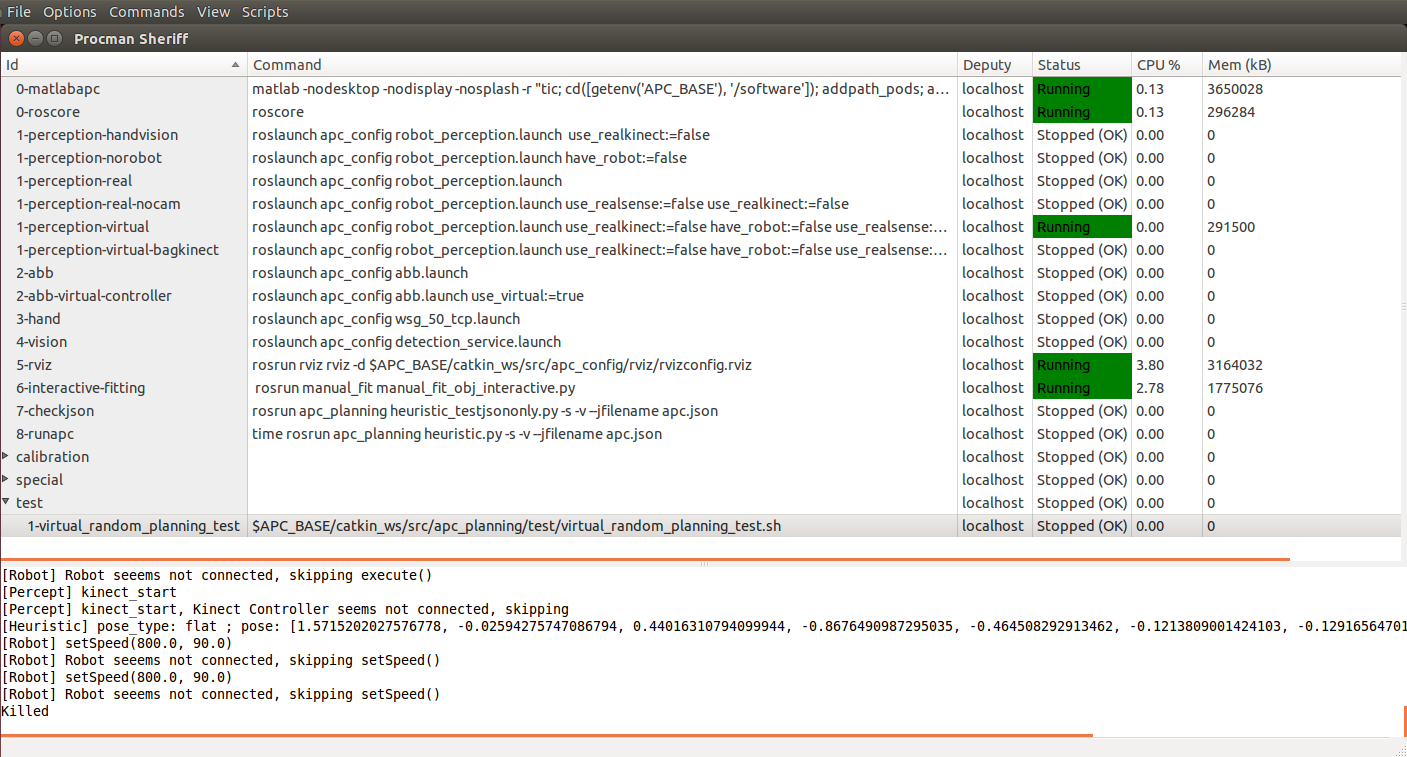 Run a test ============== Because we use a proprietary vision software, cameras, and the robot hardware like ABB 1600ID is not easy to get and setup, we have a test that skips the vision and hardware communication so that you can still test it. 1. In command line, run ```pman``` 2. Under menu/scripts ```run_virtual```. Wait until the ```0-matlabapc``` shows ```Waiting for client at localhost:30000...``` 3. Start the ```test/1-virtual_random_planning_test``` procedure.
