KO
|
EN
gitlite — search
Search
#javascript
#python
#hacktoberfest
#react
#ai
#typescript
#llm
#go
#golang
#android
#machine-learning
#rust
#deep-learning
#linux
DSSG19-Cochrane-PUBLIC
★ 8
Open GitHub ↗
No description available.
Download README (.md)
Explore Similar Repositories
update-homebrew-action
:
A GitHub Action for pushing new releases to your Homebrew tap
SDR-Resources
:
This is a list of SDR resources for newbies.
spring-logging-filter
:
No description available.
ng-accordion-tutorial
:
No description available.
nsims
:
护士站管理系统(后端基于ssm框架,前端使用bootstrap)
// repository documentation
Was this content helpful?
★ 0
(0 ratings)
Select Rating:
★
★
★
★
★
Submit Feedback
Recent Feedback
×
Download README
Do you want to download the
README.md
file for
DSSG19-Cochrane-PUBLIC
?
Download (.md)
# Contents 1. [Introduction](#intro) a) [The Problem](#prob) b) [Why Machine Learning?](#why_ml) c) [Product Description](#prod_desc) 2. [Machine Learning Pipeline](#ml_pipe) a) [Initialization](#init) b) [Running an algorithm](#run_algo) c) [Creating a new algorithm](#create_algo) d) [What is the pipeline doing?](#what_pipe_do) e) [Interpreting the results](#interpret) f) [Exploring a final model for production](#export_ml) 3. [Production Pipeline](#prod_pipe) a) [Executing the production pipeline](#exec_prod) 4. [Misc](#misc) a) [Versioning](#versioning) b) [Team](#team) c) [Contact](#contact) --- <a name="intro"></a> # __Introduction__ This project is conducted in partnership with the Cochrane Institute during the 2019 Data Science for Social Good Fellowship hosted jointly by The Alan Turing Institute and the University of Warwick. <a name="prob"></a> ## The Problem - Doctors face daily decisions about the best care for their patients, and their own clinical experience can be enhanced using evidence-based medicine, such as through clinical trial data. - One of the most robust ways of synthesizing research evidence across healthcare trials is through a systematic review. - Cochrane is a not-for-profit organization that creates, publishes and maintains systematic reviews of healthcare interventions, with more than 37,000 contributors working in 130 countries. - Systematic reviews begin with an extensive search for relevant literature with high recall required, leading to a deluge of studies which must be manually sorted. - This process is extremely time-consuming. - Research has shown that while the conclusions of most reviews might be valid for five years, the findings of about a quarter might be out of date within two years, and 7% were outdated at the time of their publication. <a name="why_ml"></a> ## Why Machine Learning? To update systematic reviews, authors typically search for papers across a number of different sources. In an attempt to make this process more streamlined, Cochrane wants to predict which review group new papers belong to so that review authors can look at only one place to find papers relevant to their review. This problem can be framed as a classification problem: we want to predict which of Cochrane's 54 review groups a new paper belong to. Additionally, our problem is a multi-label problem, as one paper can belong to multiple review groups. To do this, we build a multi-class classifier by training 54 binary classifiers (one for each review group) that predict whether a paper belongs or does not belong to that review group. <a name="prod_desc"></a> ## Product Description The product is split between `ML` and `Production`. The `ML` pipeline uses the current data to train an optimal model for each class (i.e. review group). The `Production` pipeline stores these optimal models per class and then creates a process through which new papers may be properly tagged, have features creates and classified using the optimal models. --- <a name='ml_pipe'></a> # Machine Learning Pipeline <a name='init'></a> ## Initialization 1) Pull the latest stable release from `master` 2) Create a `local_paths.yaml` file in `./src/pipeline/` which contains the following paths (each path should be in exactly as described below with proper forward slashes) : - `pgpass_path: /path/to/sql/cred/file` : location of file containing information about credentials for accessing the database - `reviews_dir: /path/to/reviews/information/folder/` : location of folder containing all reviews - `citations: /path/to/citations/file` : location of file containing citations - `recordid_paperid: /path/to/citations/linking/file` : location of file containing citations linked to Cochrane ID - `store_train_data: /path/to/folder/to/persist/train` : location of folder where we save persist training data - `store_train_data: /path/to/folder/to/persist/train` : location of folder where we save persist training data - `store_misc: /path/to/misc/folder/` : location of folder which saves misc information - `store_models: /path/to/models/folder/` : location of folder which saves models - `store_models: /path/to/preds/folder/` : location of folder which saves predictions - `ignition_path: /path/to/repo/folder` : location of repo in local directory - `store_visualizations: /path/to/results/folder` : location of folder which saves results - `word2vec_model: /path/to/w2v/PubMed-and-PMC-w2v.bin` : location of the pre-trained word2vec model which can be found [here](http://bio.nlplab.org/#word-vector-tools) - `store_features: /path/to/features/folder/features_table.pkl` : location and name of pickle file for nearly ML-ready features; we have found it best to store these on disk rather than in SQL due to complex data types - `store_production_models: /path/to-/production/models/folder` : location of folder which saves trained models for production - `store_scored_papers: /path/to/scored/papers/folder` : location of folder in which to store newly scored papers - `store_test_for_scoring: /path/to/papers/to/be/scored/folder` : location of folder with a `.csv` of papers to score 3) Create a conda environment with the appropriate dependencies. If working with Mac, run `conda env create --file=environment_mac.yaml`. If working with Linux, run `conda env create --file=environment_linux.yaml`. <a name='run_algo'></a> ## Running an algorithm Running an algorithm needs the pipeline and an ignition file. Examples of the ignition yaml files can be found in `/src/config/keybox`. Inside `/src/config` you will also find a file called `static.yaml`. The `static.yaml` file contains configurations which generally do not change between pipeline runs, but can still be adjusted. These include varialbes such as classes (review groups) and thresholds. To see a full list please see the readme in `/src/config/`. Individual files within `/src/config/keybox` are merged with the `static.yaml` configurations to create the `ingition` file and define metrics that define a specific run through the pipeline. To run a certain series of functions through the pipeline simply change the working directory to `/src/pipeline` and run `python pipeline_ML.py --ignition_file=____.yaml`, where the `.yaml` file is stored in `src/config/keybox/`. You can run `python pipeline_ML.py -h` to get more information. <a name='create_algo'></a> ## Creating a new algorithm Any model that is defined in a file within `/src/config/keybox/` needs to have a complementing class in `/src/models/` and also needs to be defined in `/src/models/select_classifier.py`, so that it can be referenced directly from the `ignition` file. <a name='what_pipe_do'></a> ## What is the pipeline doing? Each `ignition` file defines a single algorithm and a search grid over a large combination of hyperparameters. By iterating over all the `ignition` files in the `keybox` folder, the user is able to systematically search across a series of algorithms and a large hyperparameter space. Given a specific `ignition` file, the pipeline: - Creates a grid of all possible combinations of the hyperparameters - Initializes a model Then for each model and hyperparameter combination the pipeline: - Creates k folds (k is defined in `static.yaml`) - Performs cross-validation across each fold for all the papers in each fold - Calculates the maximum precision at each threshold of recall defined in `static.yaml` - Averages and then returns these maximum precisions All of these results are stored in the evaluations database for each algorithm + hyperparameter combination. 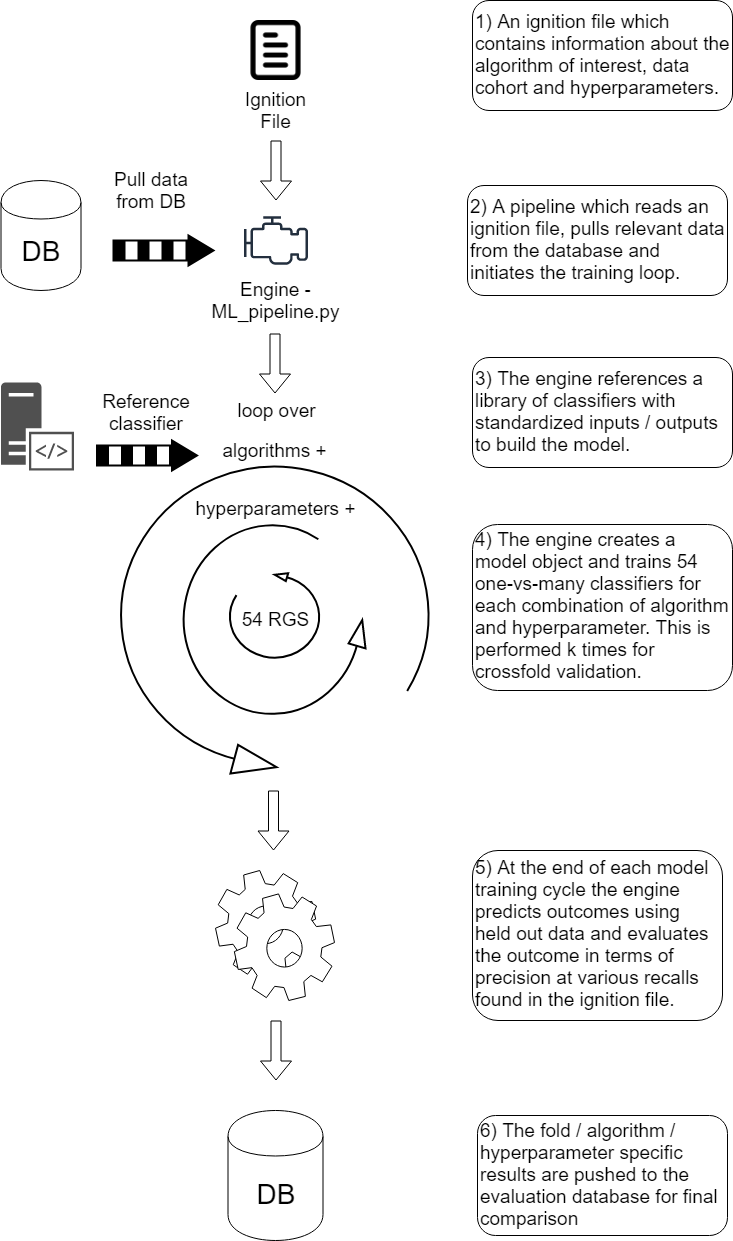 <a name='interpret'></a> ## Interpreting the results A recall threshold is specified in `/src/config/static.yaml`. For each fold, the pipeline calculates the maximum precision that corresponds to this recall value (or a higher one). Then, these values are averaged among all the k folds at that specific threshold and returns the precision. These values are stored in the evaluation database. After training with a set of ignition files, the next step is to identify the best hyperparameter + algorithm combination for **each review group**. This process is automated by `pipeline_model_selection.py`. - Identify the combination of hyperparameters that work best for each algorithm as defined by the highest recall/precision combination with priority for higher recall. - Compare between the algorithms using the best hyperparameter combination for each one and reach a final decision for hyperparameter + algorithm combination which maximizes recall/precision with a priority for higher recall. - Make a note of the `review group`, `hash_id`. <a name='export_ml'></a> ## Exporting a final model for production To automatically identify the best model for each review group (i.e., the one which maximizes precision at a given recall threshold) and train that model, run the `pipeline_model_selection.py` script, found in the directory `src/pipeline/`. This script relies on a `prod_config.yaml` file to be specified in the `src/prod` directory. See the directory for an example of what this file looks like. The most important piece that should be edited is the `group_min_recalls` section - this section specifies the minimum acceptable recall for each review group. Each group's value can be selected independently. Executing this script does a few things: 1. Pulls model evaluation data from the SQL database and grabs the algorithm and hyperparameter combination that yields the highest precision based on each group's minimum acceptable recall values 2. Trains each of these models on the full training data set and stores them in a user-specified directory for production models 3. If specified, conducts evaluations of how these models perform on held-out test data, similar to what happens during the execution of `pipeline_ML.py`, and stores these in the database 4. Stores thresholds for each review group in order to categorize papers based on their scores. By default, papers are classified as 'keep' if their score is above the threshold where the expected precision is 95%; papers are classified as 'discard' if their score is below the threshold where expected recall is 99%; and papers are classified as 'consider' if their scores fall between these two thresholds. Currently, it is possible to change the `minimum_recall` and `minimum_precision` thresholds to alter these by specifying them in the `get_thresholds()` function in `pipeline_model_selection.py`. --- <a name='prod_pipe'></a> # Production Pipeline Our general development structure is described below. Here the ML pipeline is in purple, the production pipeline is in green and the existing CRS and data pipeline at Cochrane is in blue. The ML pipeline is used to generate the final classification model for review groups which acts as a function in the production pipeline. In production, new papers enter the classifer from the CRS at Cochrane and then are placed back into CRS once classified. If the models no longer perform, they can be retrained with new data from CRS. 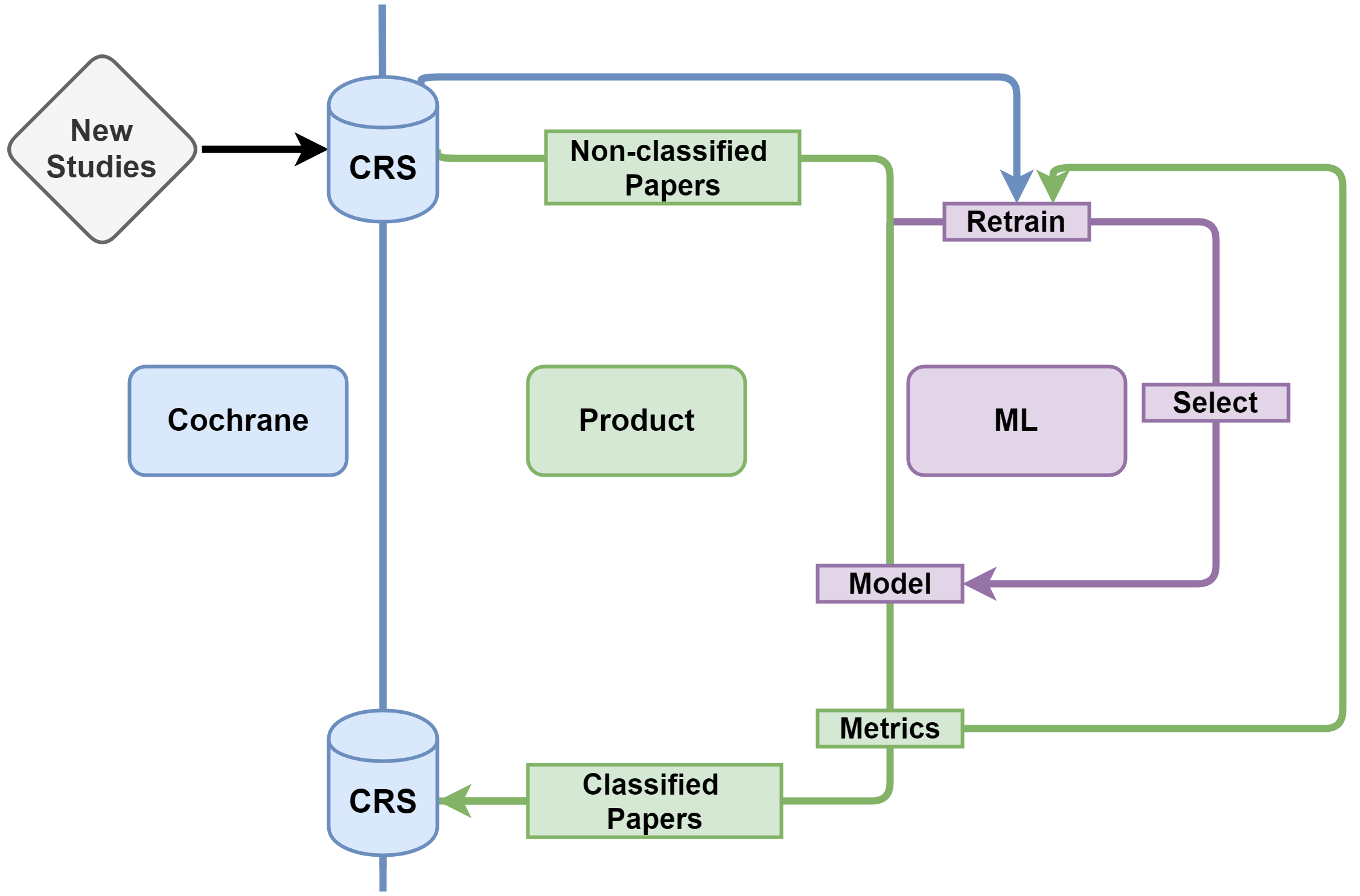 <a name='exec_prod'></a> ## Executing the production pipeline In order to get predictions for new papers, store a compressed `.csv` file (using gzip) with at least columns for the recordid, title, abstract, and journal. To score the papers, execute `python pipeline_scoring.py --path=/path/to/folder --file_name=_____` from the `src/pipeline/` directory. For an example of what the file should look like, see `new_papers_to_score_example`. If you upload the compressed csv to `src/pipeline/`, simply specify `... --path=. ...` during the execution call. This script: 1. Performs requisite preprocessing and feature creation 2. Scores the papers using the production models stored during the execution of `pipeline_model_selection.py` 3. Categorizes the papers into the recommended action for each review group based on these scores and the thresholds calculated during the execution of `pipeline_model_selection.py` 4. Stores a new compressed `.csv` with the scored papers; each row contains that paper's recordid, features, 54 columns containing the model scores for each review group, and another 54 columns corresponding to the recommended action for each paper: ['keep','consider','discard']. Papers are saved to the `store_scored_papers` path specified in the `local_paths.yaml` file. --- <a name='misc'></a> # Misc <a name='versioning'></a> ## Versioning - `master`: Contains the stable version of the ML pipeline - `dev`: Contains a bleeding edge version of the latest functions and processes, not guaranteed to be functional - Versioning is defined as `major_release.minor_release.bug_fix` and can be found in releases <a name='team'></a> ## Team **Fellows** - [Kim de Bie](https://www.linkedin.com/in/kimdebie/), University of Amsterdam - [Nishant Kishore](https://www.linkedin.com/in/nishant-kishore-17750312/), Harvard University - [Anthony Rentsch](https://www.linkedin.com/in/anthony-rentsch/), Harvard University **Mentors** - [Andrea Sipka](https://www.linkedin.com/in/andreasipka/), Project Manager - [Pablo Rosado](https://www.linkedin.com/in/pabloarosado/), Technical Mentor <a name='contact'></a> ## Contact
