KO
|
EN
gitlite — search
Search
#python
#typescript
#javascript
#react
#tailwindcss
#django
#csharp
#redux
#cpp
#mongodb
#machine-learning
#frontend
vscode-tfsec
★ 31
Open GitHub ↗
vscode extension for tfsec
Download README (.md)
Explore Similar Repositories
action-tfsec
:
Run tfsec with reviewdog on pull requests to enforce security best practices
tfsec-sarif-action
:
No description available.
tfsec-action
:
Vanilla GitHub action to run tfsec
simple-terraform-template
:
Fast track the creation of Terraform repositories by using this simple terraform template
vim-tfsec
:
List your tfsec issues in the QuickFix window with this plugin.
// repository documentation
Was this content helpful?
★ 0
(0 ratings)
Select Rating:
★
★
★
★
★
Submit Feedback
Recent Feedback
×
Download README
Do you want to download the
README.md
file for
vscode-tfsec
?
Download (.md)
# tfsec  This VS Code extension is for [tfsec](https://aquasecurity.github.io/tfsec/latest). A static analysis security scanner for your Terraform code that discovers problems with your infrastructure before hackers do. ## Features ### Findings Explorer The Findings Explorer displays an an organised view the issues that have been found in the current workspace. The code runs tfsec in a VS Code integrated terminal so you can see the the output - when it is complete, press the refresh button to reload. Right clicking on an tfsec code will let you view the associated page on [https://aquasecurity.github.io/tfsec/latest](https://aquasecurity.github.io/tfsec/latest) Issues can be ignored by right clicking the location in the explorer and selecting `ignore this issue`. 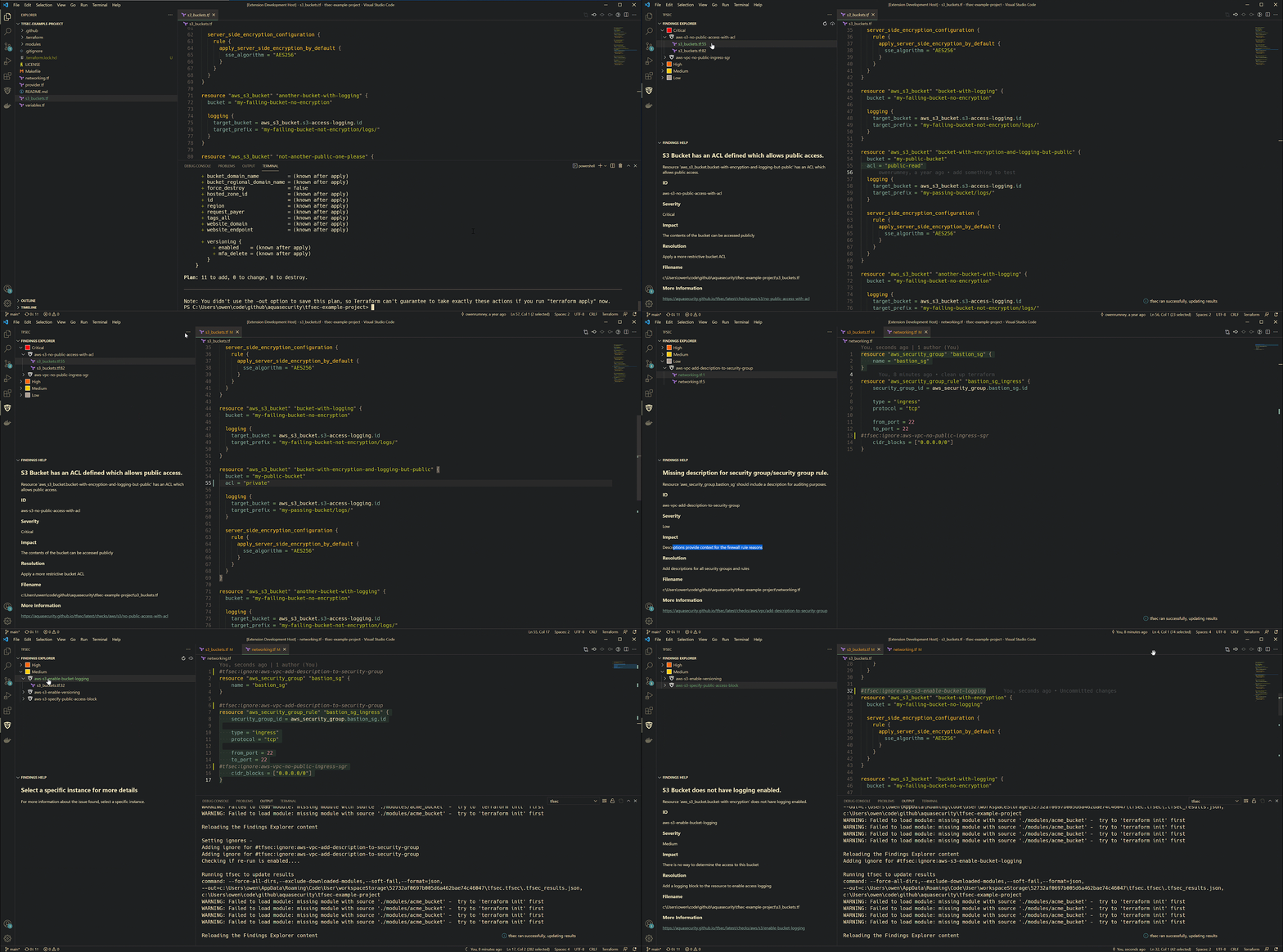 ### Ignore Code Resolution Ignore codes will be automatically resolved and the description of the error will be displayed inline.  ### Ignoring filepaths In the Explorer view, you can right click on a folder or .tf file and select `Ignore path during tfsec runs`. This will pass the path to `--exclude-path` when running tfsec and is only applicable to this workspace on this machine. To remove ignores, edit the `tfsec.excludedPath` in the `.vscode/settings.json` file of the current workspace. ## Release Notes ### 1.11.0 - Add findings to the Problems tab ### 1.10.1 - Fix Windows filepaths ### 1.10.0 - Fix issue with file path names in the explorer - Add context support for locally ignoring files and directories ### 1.9.0 - Support new tfsec filesystem (relative path resolution) - Maintain support older versions of tfsec ### 1.8.0 - Add snippets support - using `tfsec-check-file` in a yaml file to create custom check - using `tfsec-custom-check` in the existing check file to add a new custom check - Add icon on toolbar to get the version ### 1.7.5 - Update the severity icons inline with Aqua colours ### 1.7.4 - Fix the icons for Severity and tfsec checkname ### 1.7.3 - Fix issue with tfsec `v1.0.0-rc.2` ### 1.7.2 - Fix issue with glob ### 1.7.1 - Minify the extension ### 1.7.0 - Support multi folder workspaces - Save results in a folder with unique names ### 1.6.2 - Refactor the runner to clean up extension code - clean up some redundant code #### See Change log for more information
