KO
|
EN
gitlite — search
Search
#javascript
#python
#hacktoberfest
#react
#ai
#typescript
#llm
#go
#golang
#android
#machine-learning
#rust
#deep-learning
#linux
bota
★ 23
Open GitHub ↗
🤖 A discord bot for Dota2 community
Download README (.md)
Explore Similar Repositories
dota2-expert-demo
:
Dota 2 bot that is trained by Deep RL with expert demonstrations
Dota2LobbyBot
:
Bot for creating lobbies in Dota2 game
Dota2SentinelBot
:
Dota 2 lobby hosting bot with banlist and leaver detection
Dota2_DPPO_bots
:
No description available.
intolerable-bot
:
bot for replying to "i'm new" posts on /r/dota2
// repository documentation
Was this content helpful?
★ 0
(0 ratings)
Select Rating:
★
★
★
★
★
Submit Feedback
Recent Feedback
×
Download README
Do you want to download the
README.md
file for
bota
?
Download (.md)
# BOTA<img align="right" src="/github_images/bota.png"/> [](https://discordapp.com/api/oauth2/authorize?client_id=501100945405378562&permissions=388176&scope=bot) [](https://discordapp.com/api/oauth2/authorize?client_id=501100945405378562&permissions=388176&scope=bot) BOT-A is a free Discord Dota 2 bot which provides comprehensive Information of every Dota 2 characters and exciting features for the community. Pull request are welcome and report any issues you find. The Bot is still in beta so I don't expect it to be perfect. <br/> **Website:** [https://bota.tech/](https://bota.tech/)<br/> [](https://discord.gg/a7QYPWd) [](https://discordapp.com/api/oauth2/authorize?client_id=501100945405378562&permissions=388176&scope=bot) ## Commands & Screenshots Commands List: `!help` 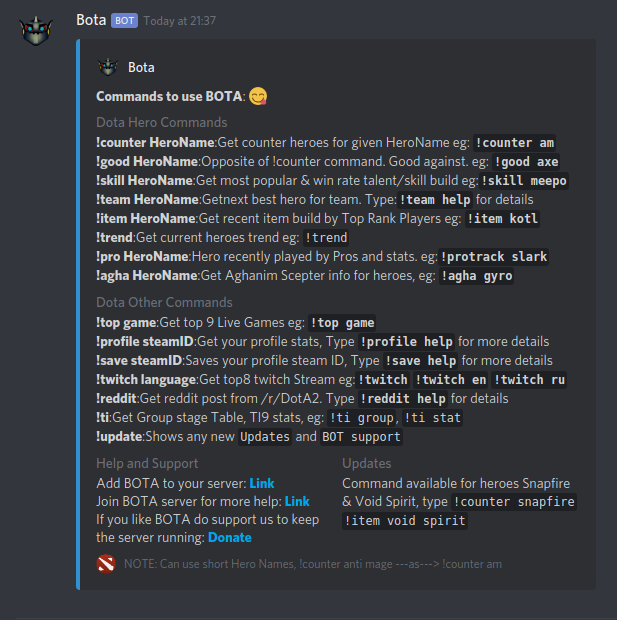 Screenshots: 1. Command: `!counter morphling` 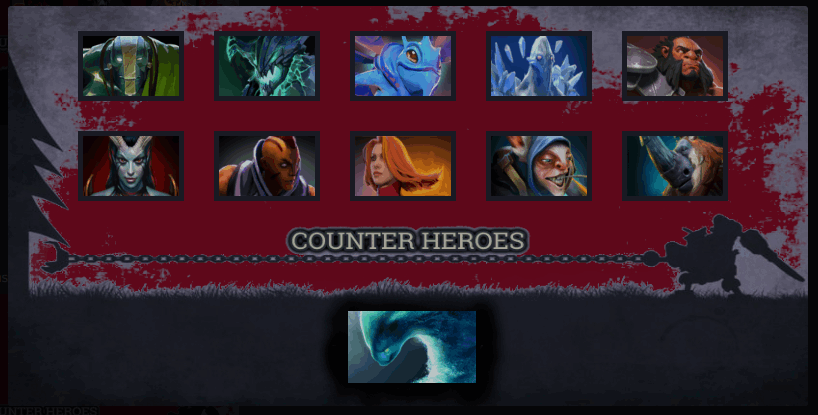 2. Command: `!item storm` 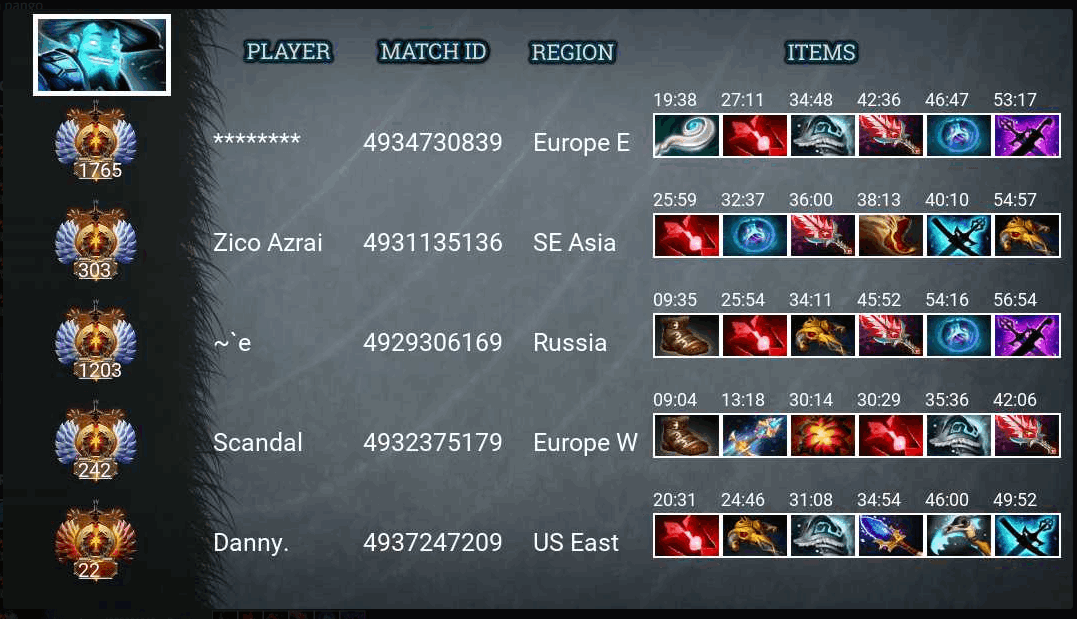 ## Pre-Requirements: Before setting up the environment we first need to get: 1. Discord Token 2. Discord Client ID 3. Dota2 API key 4. Twitch Client ID 5. Discord User (Optional) * To get `Discord Token` and `Discord Client ID` you can check [this](http://github.com/reactiflux/discord-irc/wiki/Creating-a-discord-bot-&-getting-a-token) * You can get your `Dota2 API key` from [here](https://steamcommunity.com/dev/apikey) * To get `Twitch Client ID` you need to register an application in Twitch developer. You can follow [this](https://dev.twitch.tv/docs/v5#getting-a-client-id) * You can get your `Discord User` by clicking on your profile in discord. It will look like `YourName#1234` eg: `bendang#3278` Once this is done you can assign all this key values in `bota/private_constant.py`. ## Setup Bota 1. Clone repo and Setup postgres DB ```bash # clone repo git clone https://github.com/bendangnuksung/bota.git cd bota # Install and setup PSQL # default password given, please check db_setup.sh to change password sh db_setup.sh ``` 1. Run the independent flask server which handles the log process. ```bash sh run_flask.sh ``` 3. Run the bot. There are two ways to run BOTA 1. Run using Docker. **(RECOMMENDED)** 2. Run directly from the Repository ### 1. Run using Docker **(RECOMMENDED)** 1. Download the docker image from [DockerHub](https://hub.docker.com/r/bendang/bota) or download directly using: ```bash docker pull bendang/bota:latest ``` 2. Run the docker image with the credentials which you got from Pre-Requirements: ```bash # docker run --rm -i -t --net=host --entrypoint=/bota/run_bota_docker.sh bendang/bota:latest "DISCORD_TOKEN" "DISCORD_CLIENT_ID" "DOTA2_API_KEY" "ADMIN_ID" "TWITCH_CLIENT_IDS" "LOG_PROCESS_IP_ADDRESS" docker run --rm -i -t --net=host --entrypoint=/bota/run_bota_docker.sh bendang/bota:latest 1234 ABCD 6789 YOU#67 FGHI http://0.0.0.0:5000 ``` ### 2. Run directly from Repository 1. Install requirements ```bash sudo sh setup.sh ``` 2. Create two Screen. 1. Screen 1: **Run the scrap process** ```bash sh run_scrap.sh ``` Detach 2. Screen 2: **Run the BOT process** ```bash sh run_bota.sh ``` Detach **CAUTION** : While running directly from repository if you are using chrome it will automatically close as the scrap process uses it and it kills once the scraping is done. ### Data Collection Source 1. [DotaBuff](https://www.dotabuff.com/) 2. [Reddit](https://www.reddit.com/r/DotA2/) 3. [Twitch](https://www.twitch.tv/) 4. [D2PT](http://www.dota2protracker.com/) 5. [DotaVoyance](http://dotavoyance.com/) 6. Dota2API
