KO
|
EN
gitlite — search
Search
#java
#php
#javascript
#python
#rust
#hacktoberfest
#c-plus-plus
#es6
#react
#redux
#nodejs
#r
ansible-HealthCheck
★ 33
Open GitHub ↗
ansible-playbook执行主机巡检,生成网页巡检结果
Download README (.md)
Explore Similar Repositories
sf_data_engineering_bootcamp
:
Exercises, source files and anything else related to Snowflake Data Engineering Bootcamp course on O'Reilly learning platform.
es-midway-admin
:
基于 midwayjs+typeorm 搭建的一套基础后台管理系统
acs712-esphome
:
ACS712 sensor component for esphome
S4ND-U-Net_speech_enhancement
:
No description available.
gpt-anki
:
Using Python, GPT4 and LangChain to Generate Custom Anki Decks
// repository documentation
Was this content helpful?
★ 0
(0 ratings)
Select Rating:
★
★
★
★
★
Submit Feedback
Recent Feedback
×
Download README
Do you want to download the
README.md
file for
ansible-HealthCheck
?
Download (.md)
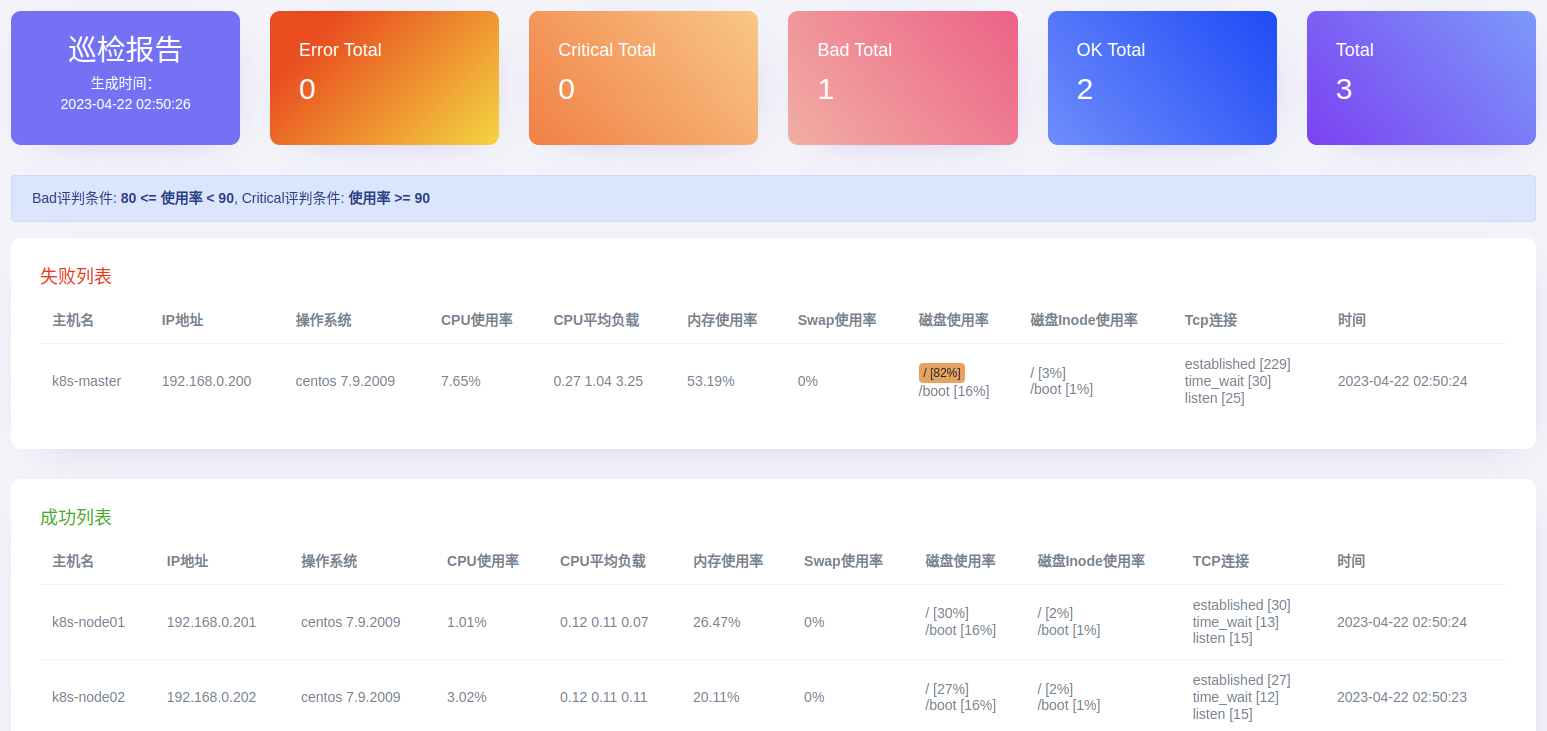
# Ansible Role: os-check 针对linux系统进行资源巡检,生成巡检报告后可以通过邮件发送给接收人 ## 要求 此角色仅在linux系统上执行。 ## 测试环境 ansible `2.7.0` os `Centos 7 X64` python `2.7.5` ## 角色变量 check_day: "{{ '%Y-%m-%d' | strftime }}" # 设置报告存储的目录 check_report_path: /tmp check_report_file_suffix: "-{{ check_day }}" # 设置smtp账号信息 check_mail_host: "" check_mail_port: "" check_mail_username: "" check_mail_password: "" check_mail_to: [] check_mail_subject: "System Check Report [{{ check_day }}]" ## 依赖 - 过滤器插件 `filter_plugins/os-check.py [get_check_data]` - 目标机`bash` ## Github地址 https://github.com/liushiju/Ansible-HealthCheck/tree/master/os-check ## Example Playbook --- - hosts: all gather_facts: false vars: check_report_path: /tmp check_mail_host: "smtp.lework.com" check_mail_port: "465" check_mail_username: "ops@lework.com" check_mail_password: "le123456" check_mail_to: ["ops@lework.com"] roles: - os-check > 这里注意下,check_mail_*的配置,这里使用的是ssl加密的配置方式,如果要其他的方式配置请使用`ansible-doc mail`查看使用方法,针对自身情况配置mail。 ## 执行流程 1. 使用脚本`files\check_linux.sh`在远端执行获取资源数据,并以json结构体返回。 2. 使用`jinja2`模板将获取的数据渲染到模板文件中`templates\report-cssinline.html`,生成的文件存放在指定的目录中。 - `report-cssinline.html` 是将css设置以`inline`的方式存储的html文件,`report.html`才是源模板文件,修改完源模板文件后,使用[Responsive Email CSS Inliner](https://htmlemail.io/inline/)进行转换下,才能更好的兼容邮件显示。 - 其中模板中使用的`get_check_data`过滤器是从`hostvars`中获取每台主机的脚本执行结果,进行分析整理传递给模板,使用传递回来的数据进行渲染。 3. 获取生成的模板文件内容,并通过smtp发送给接收人。 ### 统计的系统资源 - 主机名 - IP地址 - 操作系统 - CPU使用率 - CPU平均负载 - 内存使用率 - Swap使用率 - 磁盘使用率 - 磁盘Inode使用率 - Tcp连接 - 时间 ### 执行巡检 - 生成报告 ```bash # ansible-playbook roles/os-check.yaml PLAY [k8s] ********************************************************************************** TASK [os-check : Get system check data.] **************************************************** changed: [192.168.0.200] changed: [192.168.0.202] changed: [192.168.0.201] TASK [os-check : Generate report file.] ***************************************************** changed: [192.168.0.200] TASK [os-check : Get report file content.] ************************************************** ok: [192.168.0.200] TASK [os-check : Send a report by email.] *************************************************** skipping: [192.168.0.200] PLAY RECAP ********************************************************************************** 192.168.0.200 : ok=3 changed=2 unreachable=0 failed=0 skipped=1 rescued=0 ignored=0 192.168.0.201 : ok=1 changed=1 unreachable=0 failed=0 skipped=0 rescued=0 ignored=0 192.168.0.202 : ok=1 changed=1 unreachable=0 failed=0 skipped=0 rescued=0 ignored=0 ``` - 查看报告 ```bash cd /tmp report-2023-04-22.html # 通过浏览器打开查看 python -m SimpleHTTPServer 80 ``` - 网页查看