KO
|
EN
gitlite — search
Search
#python
#java
#python3
#arduino
#golang
#machine-learning
#rust
#html
#flask
#javascript
#seismology
#nodejs
MoneyPrinter-Enhanced
★ 19
Open GitHub ↗
No description available.
Download README (.md)
Explore Similar Repositories
piratengine
:
Python open source tools for Denon DJ hardware
PORTFLIO
:
No description available.
dart-flow
:
An Asynchronous data stream that emits events sequentially.
hnyuan
:
No description available.
cuasmrl
:
No description available.
// repository documentation
Was this content helpful?
★ 0
(0 ratings)
Select Rating:
★
★
★
★
★
Submit Feedback
Recent Feedback
×
Download README
Do you want to download the
README.md
file for
MoneyPrinter-Enhanced
?
Download (.md)
# MoneyPrinter 💸 Automate the creation of YouTube videos locally, simply by providing a video topic to talk about. 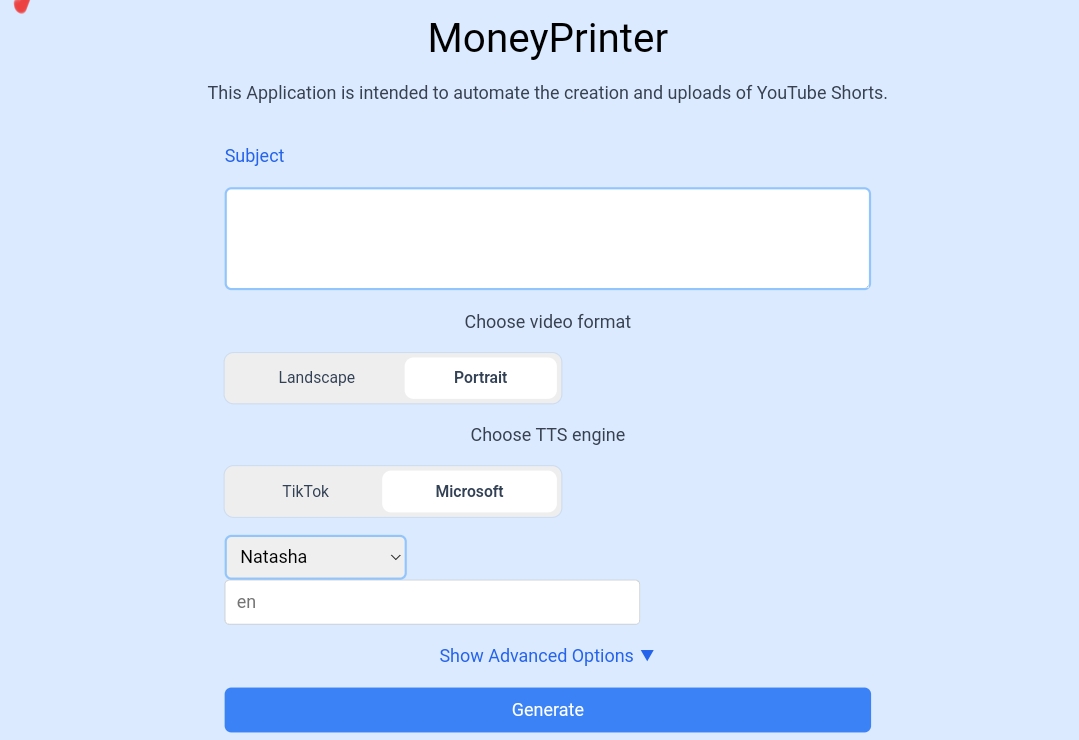 ## Installation 📥 `MoneyPrinter` requires Python 3.11 to run effectively. If you don't have Python installed, you can download it from [here](https://www.python.org/downloads/). After you finished installing Python, you can install `MoneyPrinter` by following the steps below: ```bash git clone https://github.com/Troptrap/MoneyPrinter-Enhanced.git cd MoneyPrinter-Enhanced # Install requirements pip install -r requirements.txt # Copy .env.example and fill out values cp .env.example .env # Run the server cd Backend python main.py ``` If you are installing on Windows, you will also need: - SoX: http://sox.sourceforge.net/ See [`.env.example`](.env.example) for the required environment variables. If you need help, open [EnvironmentVariables.md](EnvironmentVariables.md) for more information. ## Usage 🛠️ 1. Copy the `.env.example` file to `.env` and fill in the required values 1. Open `http://127.0.0.1:8080` in your browser 1. Enter a topic to talk about 1. Click on the "Generate" button 1. Wait for the video to be generated 1. The video's location is `MoneyPrinter/Frontend/output.mp4` ## Music 🎵 <del> To use your own music, compress all your MP3 Files into a ZIP file and upload it somewhere. Provide the link to the ZIP file in the Frontend. </del> <del>It is recommended to use Services such as [Filebin](https://filebin.net) to upload your ZIP file. You can also just move your MP3 files into the `Songs` folder. </del> There is a built in API for music, it finds music from Youtube Audio Library (free to use, CC0) ## Fonts 🅰 Add your fonts to the `fonts/` folder, and load them by specifying the font name on line `124` in `Backend/video.py`. ## Automatic YouTube Uploading 🎥 MoneyPrinter now includes functionality to automatically upload generated videos to YouTube. To use this feature, you need to: 1. Create a project inside your Google Cloud Platform -> [GCP](https://console.cloud.google.com/). 1. Obtain `client_secret.json` from the project and add it to the Backend/ directory. 1. Enable the YouTube v3 API in your project -> [GCP-API-Library](https://console.cloud.google.com/apis/library/youtube.googleapis.com) 1. Create an `OAuth consent screen` and add yourself (the account of your YouTube channel) to the testers. 1. Enable the following scopes in the `OAuth consent screen` for your project: ``` 'https://www.googleapis.com/auth/youtube' 'https://www.googleapis.com/auth/youtube.upload' 'https://www.googleapis.com/auth/youtubepartner' ``` After this, you can generate the videos and you will be prompted to authenticate yourself. The authentication process creates and stores a `main.py-oauth2.json` file inside the Backend/ directory. Keep this file to maintain authentication, or delete it to re-authenticate (for example, with a different account). Videos are uploaded as private by default. For a completely automated workflow, change the privacyStatus in main.py to your desired setting ("public", "private", or "unlisted"). For videos that have been locked as private due to upload via an unverified API service, you will not be able to appeal. You’ll need to re-upload the video via a verified API service or via the YouTube app/site. The unverified API service can also apply for an API audit. So make sure to verify your API, see [OAuth App Verification Help Center](https://support.google.com/cloud/answer/13463073) for more information. ## FAQ 🤔 ### How do I get the TikTok session ID? You can obtain your TikTok session ID by logging into TikTok in your browser and copying the value of the `sessionid` cookie. ### My ImageMagick binary is not being detected Make sure you set your path to the ImageMagick binary correctly in the `.env` file, it should look something like this: ```env IMAGEMAGICK_BINARY="C:\\Program Files\\ImageMagick-7.1.0-Q16\\magick.exe" ``` Don't forget to use double backslashes (`\\`) in the path, instead of one. <del>### I can't install `playsound`: Wheel failed to build ## Contributing 🤝 Pull requests are welcome. For major changes, please open an issue first to discuss what you would like to change. ## License 📝 See [`LICENSE`](LICENSE) file for more information.
