KO
|
EN
gitlite — search
Search
#python
#java
#python3
#arduino
#golang
#machine-learning
#rust
#html
#flask
#javascript
#seismology
#nodejs
SemRep
★ 11
Open GitHub ↗
Semantic Differential Repair
Download README (.md)
Explore Similar Repositories
fluid
:
An opinionated MVC web framework for Node.js. Unmaintained.
jquery-select7
:
Select2-like wheel reinvent. Project status is incubating.
ordering
:
Guava inspired ordering utility for javascript sorting
expotrip
:
快展 - 展会商旅移动App 快展 - 已获得 携程无线创业大赛 金奖
phonebook
:
Phonebook app built with gae-init
// repository documentation
Was this content helpful?
★ 0
(0 ratings)
Select Rating:
★
★
★
★
★
Submit Feedback
Recent Feedback
×
Download README
Do you want to download the
README.md
file for
SemRep
?
Download (.md)
SemRep ========= SemRep is Semantic Differential Repair tool for input validation and sanitization code. The tool analyzes and repairs validation and sanitization functions against each other. The tool does not need any manual specification or intervention. It takes two functions as Dependency Graphs then it looks for differences in validation and sanitization operations for string variables. If a difference is found, the tool suggests a set of three patch functions that can be used to fix the difference. One application for the tool is to fix differences between a sanitizer function on the client-side and the correponding one on the server. The tool is language agnostic and can be used with Java, PHP or ASP.NET web applications. To achieve this agnosticism, the tool takes sanitizer functions in an intermediate representation that we call Dependency Graph which will be described in details below. 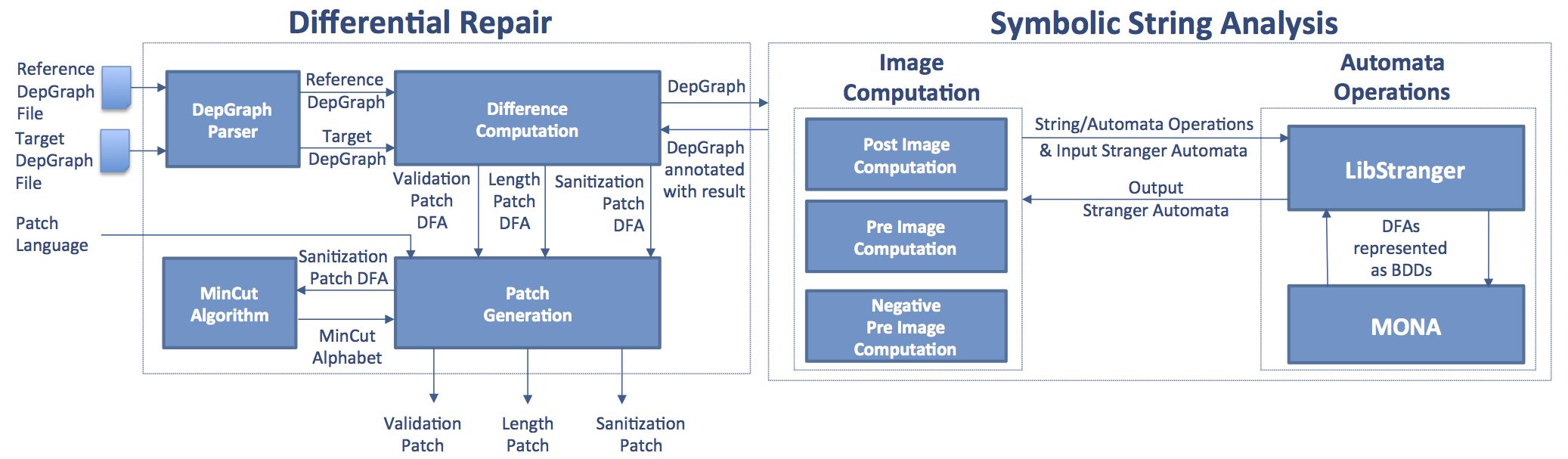 Installing & Running Binary Files ====================================== The fastest way to try SemRep is to download the self-contained Ubuntu 12.04 64-bit binary files in the zip file [SemRepBinaries.tar.gz](SemRepBinaries.tar.gz). This compressed file contains: 1. **SemRep** which is a C++ Linux executable file generated with g++-4.8.1 on 64-bit ubuntu 12.04. 2. **mincut_codegen.jar** which is a java jar file. 3. [MONA](http://www.brics.dk/mona/) and [LibStranger](http://github.com/vlab-cs-ucsb/LibStranger) C shared libraries (**libmonadfa**, **libmonabdd**, **libmonamem**, **libstranger**) that were generated with gcc-4.8.1 on 64-bit ubuntu 12.04. 4. Three C++ shared libraries (**libboost\_regex-1.48**, **libboost\_system-1.48**, **libboost\_filesystem-1.48**, **libboost\_program\_options-1.48**) which are the same that are packaged with ubuntu 12.04. 5. Two python script: **run\_semrep.py** which is used to run the tool and an auxillary one called **patch\_result\_checker.py** to parse the tool output. We will show how to run the tool to analyze and repair the [sample JS target function here](SemRep/test/js_version/target.js) against [the sample JS reference function here](SemRep/test/js_version/reference.js). Both Javascript functions' files come with the binary bundle. We will run the tool with a language-agnostic intermediate representation of the two functions that the tool takes as input which is called dependency graph. It is written in [dot](http://www.graphviz.org) format and will be explained later. To run the tool we need to: (1) clone the repository, (2) uncompress the binary files and (3) run the python script. Here is how to do this: ```bash $> git clone https://github.com/vlab-cs-ucsb/SemRep.git $> mv ./SemRep/SemRepBinaries . $> tar -xzvf SemRepBinaries.tar.gz $> cd SemRepBinaries # if you DO NOT have Java installed on your machine $> sudo apt-get install default-jre # the following will analyze and generate patches for the two example # functions that come with the tool under directory name test $> python run_semrep.py -r ./test/reference_depgraph.dot -t ./test/target_depgraph.dot -l JS -f x $> ls output # Here is the output tree with explanation outputs/ ├── raw_result_row.csv ├ : overall performance results ├── mincut_result_row.csv ├ : mincut performance results ├── generated_patch_codes │ ├── final_patch.html │ ├ : composition of patches generated (js) │ ├── length_patch.html │ ├ : simulation of length patch (js) │ ├── sanitization_patch.html │ ├ : generated code from mincut results. It can contain trim operation and/or escape operation and/or delete operation. (js) │ ├── validation_patch.html │ └ : simulation of length patch (js) ├── generated_patch_automata │ ├── length_patch_BDD.dot │ ├ : BDD that represents actual internal symbolic representation of length patch dfa │ ├── length_patch_dfa_with_ASCII_transitions.dot │ ├ : length patch dfa suitable for view by the user │ ├── length_patch_dfa_with_MONA_transitions.dot │ ├ : length patch dfa that is used to generate length patch simulation code │ ├── reference_dfa_with_MONA_transitions.dot │ ├ : auxilary dfa used by mincut algorithm escape and trim heuristics │ ├── sanitization_patch_BDD.dot │ ├ : BDD that represents actual internal symbolic representation of sanitization patch dfa │ ├── sanitization_patch_dfa_with_ASCII_transitions.dot │ ├ : sanitization patch dfa suitable for view by the user │ ├── sanitization_patch_dfa_with_MONA_transitions.dot │ ├ : sanitization patch dfa used by mincut algorithm to generate mincut alphabet │ ├── validation_patch_BDD.dot │ ├ : BDD that represents actual internal symbolic representation of validation patch dfa │ ├── validation_patch_dfa_with_ASCII_transitions.dot │ ├ : validation patch dfa suitable for view by the user │ ├── validation_patch_dfa_with_MONA_transitions.dot │ └ : validation patch dfa used to generate validation patch simulation code ``` Hopefully, by now you had a successful run (report a bug please if you did not) and your SemRep output directory has the same tree shown above. The most important output is the final\_patch.html file. This file represents the output patch that SemRep generated to remove the difference between the target function and the reference one by strengthening the target against the reference. This patch is supposed to be "composed" with the target function i.e., it is supposed to be run along with (before) the target function as shown in the following picture:  The new patched target function is stronger than the original one and the reference i.e., it does not return a string that is not returned by any of the two. If you chose javascript as patch language (-l JS), you can immediately see the behavior of the final patch (and intermediate ones) by opening (double click) the generated .html files in your browser and trying some input values. So, what did SemRep do? SemRep is an automatic repair tool. It takes two functions, a reference and a target, as its input and **generates a patch code** to strengthen the target function against the reference. 1. SemRep took the two input-validation-and-sanitization functions (represented as [dependency graphs]()) that are in the [test](SemRep/test) directory. 2. SemRep ran the differential repair algorithm described [here](Docs/issta14_paper.pdf) and generated a set of patch-automata under directory outputs/generated\_patch\_automata (see [here](http://en.wikipedia.org/wiki/Deterministic_finite_automaton) for more info on what an automata is). You can use xdot (sudo apt-get install xdot) to double click on any of these automata files and see it. 3. Java Code in MinCut package **generated the patch in Javascript language** (following input flag -l JS) in directory outputs/generated\_patch\_codes. The patch is a composition of a number of auto-generated Javascript patch-functions that either simulate the automata generated by SemRep or uses the MinCut algorithm. Input format: what is a dependency graph? ----------------------------------------- SemRep is language agnostic i.e., it can fix different input validation and sanitization functions from different programming languages against each other. To achieve this, SemRep takes an intermediate representation of a function as its input. We call this representation a Dependency Graph. 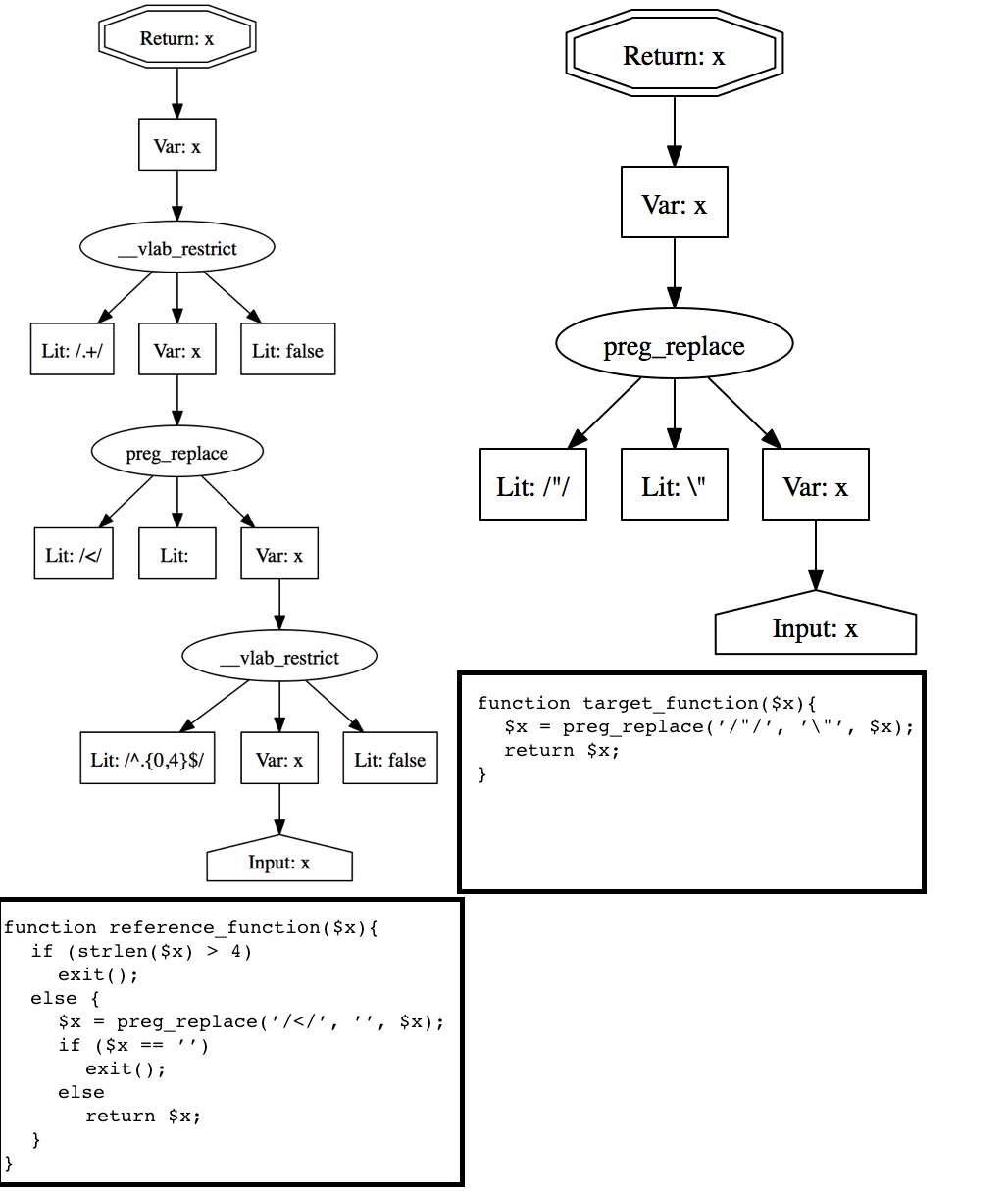 The tool takes as input the dependency graphs of two sanitizer functions as shown in the picture above. A dependency graph specifies the data and control flow in the program. It is a directed graph that has a finite number of nodes and directed edges. If there is an edge from node N1 to N2 this means that the value of N1 depends on the value of N2. There are five types of nodes: 1. An **input** node identifies the data from untrusted parties, e.g., an input from web forms, that is received as input to the sanitizer. 2. A **literal** node is associated with a constant string value, a regular expression value (which is delimited by the symbol **/** at the beginning and the end) or the special value **false**. Both nodes have no successors. In other words, each of these two types of nodes is always a leaf node. 3. A **return** node which is the root. It represents the positive sink at which the sanitizer returns its output. For each sanitizer, only one **input** node and one **return** node is allowed. 4. An **operation** node represents a string manipulation operation. This type of nodes has one or more successors which represent its parameters. There are three types of string operations: 1. General string operations which are **concat** and **replace**. These operations can be used to model a wide range of string functions. 2. Specialized string operations such as **addslashes** and **htmlspecialchars** which allow for more precise and efficient modeling of some complex and common sanitization operations. 3. The special string operation **\_vlab\_restrict** which is used to represent control dependencies on branch conditions. A **concat** node *n* has two successors labeled as the prefix node (*n.p*) and the suffix node (*n.s*), and stores the concatenation of any value of the prefix node and any value of the suffix node in *n*. A **replace** node has three successors labeled as the target node (*n.t*), the match node (*n.m*), and the replacement node (*n.r*). For example, let us look at the dependency graph for reference function above on the left ([click here](Docs/depgraphs/refdepgraph.png) for larger figure). In this dependency graph there is one **replace** operation node *n*. *n.m* has the regular expression **/</** as its value, *n.r* has the string value empty string and *n.t* represents the variable **x**. **replace** performs the following operations for each value of *n.t*: 1. identifies all the matches, i.e., any value of *n.m*, that appear in *n.t*, 2. replaces all these matches in *n.t* with any value of *n.r*, and 3. stores the replaced result in *n*. A **\_vlab\_restrict** node has three successors labeled as the condition node (*n.c*), the target node (*n.t*), and the negation node (*n.g*). The condition node *n.c* is a regular expression representing the constraint enforced by the branch condition. The user is responsible for converting the branch condition constraint into a regular expression. To facilitate this task, we allow for the intersection operator **&** in a regular expression (along with the standard union operator **|**) which returns the intersection of two regular languages encoded by two regular expressions. The intersection operator along with the union operator **|** allow to model the logical AND and OR operators in a branch condition. The negation node is used to decide if the dependency on the branch condition comes from the true branch or the false branch. A value **true** means that we should restrict with the negation of the language of the regular expression *n.c* while a value of **false** means that we should restrict with the language of the regular expression *n.c*. Installation from Source Code ============================= Most of the tool ([SemRep](SemRep)) is written in C++ while the [MinCut](MinCut) algorithm is implemented in Java. SemRep depends on two c libraries: [LibStranger](https://github.com/vlab-cs-ucsb/LibStranger) and [MONA library](http://www.brics.dk/mona/index.html). Instructions for compiling and installing the two libraries can be find on [LibStranger](https://github.com/vlab-cs-ucsb/LibStranger) website. One important thing is to avoid the following conflict: **export** is used as a function name by mona while it is a keyword in C++. To do this change mona header file BDD/bdd_external.h (in /usr/local/include/mona) and add ```c #define export _export_ ``` [SemRep](SemRep) is an Eclipse CDT project. You need to download [Eclipse CDT](http://www.eclipse.org/cdt/downloads.php) IDE then import SemRep project from this git repository into your Eclipse CDT workspace. You can refere to the [screenshots](Docs/SrcShots) in the documentation for more information on how to do that or go to [here](http://wiki.eclipse.org/EGit/User_Guide#Starting_from_existing_Git_Repositories). After that, use eclipse to build SemRep. SemRep need C++11 new features which are available from g++4.8 along with some [boost](www.boost.org) libraries (regex, system, filesystem, program options). To install this on Unbuntu 12.04 do the following: ```bash $> sudo add-apt-repository ppa:ubuntu-toolchain-r/test $> sudo apt-get update $> sudo apt-get install gcc-4.8 g++-4.8 $> sudo update-alternatives --install /usr/bin/gcc gcc /usr/bin/gcc-4.8 50 $> sudo update-alternatives --install /usr/bin/g++ g++ /usr/bin/g++-4.8 50 $> sudo apt-get install libboost-regex1.48-dev libboost-program-options1.48-dev libboost-filesystem1.48-dev # To debug you need to keep in mind that gcc-4.8 and g++-4.8 use dwarf-4 as debugging format by default. # So either download a gdb version which supports this new format or pass option -dwarf-2 along with -g to gcc. ``` [MinCut](MinCut) is an Eclipse Java project. You need to download [Eclipse](http://www.eclipse.org/downloads/) IDE then import MinCut project from this git repository into your Eclipse workspace as described [here](http://wiki.eclipse.org/EGit/User_Guide#Starting_from_existing_Git_Repositories). After that, use eclipse to build MinCut.
