KO
|
EN
gitlite — search
Search
#python
#java
#python3
#arduino
#golang
#machine-learning
#rust
#html
#flask
#javascript
#seismology
#nodejs
zshelldoc
★ 24
Open GitHub ↗
No description available.
Download README (.md)
Explore Similar Repositories
fluttermap_heatmap
:
Heatmap plugin for flutter_map
nextjs-aws-cdk-serverless-ssr
:
Serverless Server Side Rendering with AWS CDK and Next.js
remix-render-starter
:
A remix starter, with deployment to render.com hosting, complete with DB, migrations, ORM, and basic auth
jax-gravity
:
No description available.
Emoji_Keyboard_Custom
:
Custom Emoji Keyboard.
// repository documentation
Was this content helpful?
★ 0
(0 ratings)
Select Rating:
★
★
★
★
★
Submit Feedback
Recent Feedback
×
Download README
Do you want to download the
README.md
file for
zshelldoc
?
Download (.md)
# Zshelldoc - Doxygen For Shell Scripts Parse `Zsh` & `Bash` scripts and outputs `Asciidoc` document with: - list of functions (including autoload functions) - call trees of functions and script body - comments for functions - features used for each function and script body (features like: `eval`, `read`, `vared`, `shopt`, etc.) - distinct marks for hooks registered with `add-zsh-hook` (Zsh) - list of exported variables - list of used exported variables and the variable's origin (i.e., possibly another script) Call trees support cross-file invocations, i.e., when a script calls a function defined in another file. Zshelldoc is written in `Zshell` language. 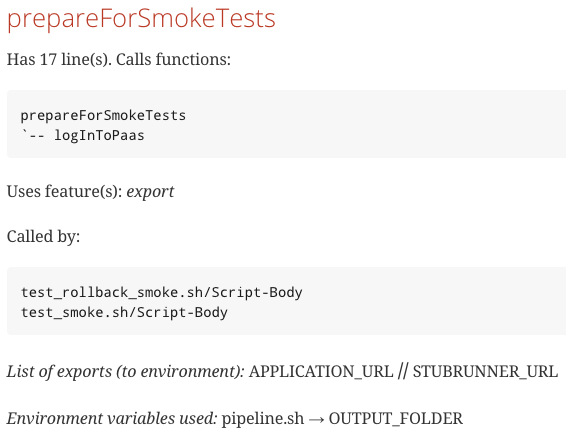 ## Usage ``` Usage: zsd [-hnqv] [--cignore pattern] [--noansi] [--verbose] file [...] The files will be processed and their documentation will be generated in subdirectory zsdoc (with meta-data in subdirectory data). Supported are Bash and Zsh scripts Options: -f, --fpath Paths separated by pointing to directories with functions -h, --help Usage information -n, --noansi No colors in terminal output -q, --quiet No status messages -v, --verbose More verbose operation-status output --bash Output slightly tailored to Bash specifics (instead of Zsh specifics) --blocka String used as block-begin, default: {{{ --blockb String used as block-end, default: }}} --cignore Specify which comment lines should be ignored --scomm Strip comment char # from function comments --synopsis Text to be used in SYNOPSIS section. Line break \"... +\n\", paragraph \"...\n\n\" Example --cignore values: --cignore (\\#*FUNCTION:*{{{*|\\#*FUN:*{{{*) Ignore comments like:# FUN: usage {{{ --cignore \\#*FUNCTION:*{{{* Ignore comments like: # FUNCTION: usage {{{ Synopsis block: # synopsis {{{my synopsis, can be multi-line}}} Environment variables block There can be multiple such blocks their content will be merged. The block can consist of multiple variables using the VAR_NAME -> var-description format. It will be rendered as a table in the output AsciiDoc document. Example: # env-vars {{{ # PATH -> paths to executables # MANPATH -> paths to manuals # }}} Change the default brace block-delimeters with --blocka, --blockb. Block body should be AsciiDoc ``` ## Install Clone and issue `make && make install`. Default install path-prefix is `/usr/local`, you can change it by setting `PREFIX` variable in `make` invocation: ```sh make install PREFIX=~/opt/local install -c -d ~/opt/local/share/zshelldoc install -c -d ~/opt/local/share/doc/zshelldoc cp build/zsd build/zsd-transform build/zsd-detect build/zsd-to-adoc ~/opt/local/bin cp README.md NEWS LICENSE ~/opt/local/share/doc/zshelldoc cp zsd.config ~/opt/local/share/zshelldoc ``` ```sh tree ~/opt /Users/sgniazdowski/opt └── local ├── bin │ ├── zsd │ ├── zsd-detect │ ├── zsd-to-adoc │ └── zsd-transform └── share ├── doc │ └── zshelldoc │ ├── LICENSE │ ├── NEWS │ └── README.md └── zshelldoc └── zsd.config ``` Other available `make` variables are: `INSTALL` (to customize install command), `BIN_DIR`, `SHARE_DIR`, and `DOC_DIR`. ## Examples `Zshelldoc` highly motivates to document code, and `zinit` gained from this. Also, `zinit` documentation demonstrates rich cross-file invocations. [Check out zinit's code documentation](https://github.com/zdharma-continuum/zinit/tree/master/zsdoc). - [zsh-syntax-highlighting](https://github.com/zdharma-continuum/zshelldoc/blob/master/examples/zsh-syntax-highlighting.zsh.adoc), - [zsh-syntax-highlighting PDF](https://raw.githubusercontent.com/zdharma-continuum/zshelldoc/master/examples/zsh-syntax-highlighting.zsh.pdf) - [zsh-autosuggestions](https://github.com/zdharma-continuum/zshelldoc/blob/master/examples/zsh-autosuggestions.zsh.adoc) - [zsh-autosuggestions PDF](https://raw.githubusercontent.com/zdharma-continuum/zshelldoc/master/examples/zsh-autosuggestions.zsh.pdf) ## How to use Here are a few rules helping to use `Zshelldoc` in your project: 1. Write function comments before the function. Empty lines between comments and functions are allowed. 1. If you use special comments, e.g., `vim` (or `emacs-origami`) **folds**, you can ignore these lines with `--cignore` (see [Usage](https://github.com/zdharma/zshelldoc#usage)). 1. If it's possible to avoid `eval`, then do that – `Zshelldoc` will analyze more code. 1. Currently, functions defined in functions are ignored, but this will change shortly. 1. I've greatly optimized the new `Zsh` version (`5.4.2`) for data processing – `Zshelldoc` parses long sources very fast starting from that `Zsh` version. 1. If you have multiple `Zsh` versions installed, then (for example) set `zsh_control_bin="/usr/local/bin/zsh-5.4.2"` in `/usr/local/share/zshelldoc/zsd.config`. 1. Be aware that to convert a group of scripts, you simply need `zsd file1.zsh file2.zsh ...` – cross-file function invocations will work automatically, creating multiple `*.adoc` files. 1. Create `Makefile` with `doc` target, that does `rm -rf zsdoc/data; zsd -v file1.zsh ...`. Documentation will land in `zsdoc` directory. 1. Directory `zsdoc/data` holds meta-data used to create `asciidoc` documents (`*.adoc` files). You can remove it or analyze it yourself. 1. To install `Asciidoctor`, run: ```sh gem install asciidoctor-pdf --pre ``` 1. To generate **PDFs** via [Asciidoctor](http://asciidoctor.org/), run: ```sh asciidoctor -b pdf -r asciidoctor-pdf file1.zsh.adoc ``` If you have trouble, see [zinit's Makefile](https://github.com/zdharma-continuum/zinit/blob/master/zsdoc/Makefile). 1. HTML: `asciidoctor script.adoc`. 1. Obtain manual pages with the `Asciidoc` package via: `a2x -L --doctype manpage --format manpage file1.zsh.adoc` (`asciidoc` is a typical package; its `a2x` command is a little slow). 1. Github supports `Asciidoc` documents and renders them automatically.
