KO
|
EN
gitlite — search
Search
#python
#java
#python3
#arduino
#golang
#machine-learning
#rust
#html
#flask
#javascript
#seismology
#nodejs
cervine
★ 11
Open GitHub ↗
Instagram Desktop Client Built with Electron
Download README (.md)
Explore Similar Repositories
amoy-filters
:
2d filters extension for pixi.js
tensorflow
:
tensorflow项目实战:21个项目玩转深度学习
GPS-Tracker
:
GPS tracker / send data over TTGO T-Call SIM800 GPRS
multicomplex
:
Multicomplex algebra
boom
:
Operator to deploy a defined toolsets into K8s, think paas but less lock-in
// repository documentation
Was this content helpful?
★ 0
(0 ratings)
Select Rating:
★
★
★
★
★
Submit Feedback
Recent Feedback
×
Download README
Do you want to download the
README.md
file for
cervine
?
Download (.md)
# Cervine > An Instagram desktop app featuring dark mode powered by [Electron](https://electronjs.org) Cervine is an unofficial Instagram desktop app for those of us who got tired of waiting for a desktop experience.  ## About Cervine is an unofficial Instagram desktop application that supports a dark mode among other future features. Cervine was born out of my frustration of not being able to respond to people on Instagram quickly. **Why** [IG:dm](https://igdm.me/) exists but uses Instagram's private API to receive and respond to messages. I found the application slow and somewhat buggy (the UI would sometimes bug out and you could send the wrong person a message). Cervine **does not use** Instagram's private API. Rather, it simply uses the Instagram website to send/receive messages. This makes it snappy and quick without having to create a brand new UI. To make dark mode, the application simply overrides Instagram's CSS styles. **Features** - [x] Look at posts - [x] Post pictures - [x] Search for people - [x] Follow people - [x] View stories - [x] Send/receive messages in real time - [x] Cross-platform - [x] **_d a r k m o d e_** 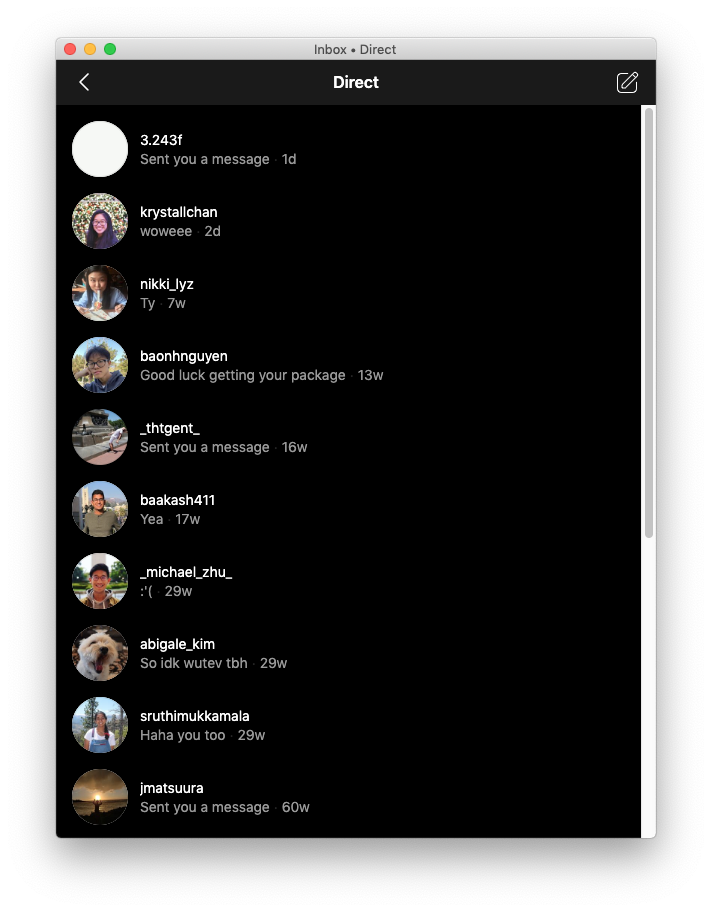 _Cervine mimics the dark mode on Instagram's mobile app_ ### Install _macOS 10.10+, Linux, and Windows 7+ are supported (64-bit only)._ To install, just download the [latest release package](https://github.com/DevinMui/cervine/releases/latest). **OR** You can build the application yourself. Clone the repository `$ git clone https://github.com/DevinMui/cervine` Install necessary packages `$ npm install` Package the application `$ npm run dist` If you would like, you could also package specific targets rather than building every distribution. `$ npm run pack:<target>` Replace `<target>` with `osx`, `linux`, `win32`, or `win`. ### Contribute To contribute to Cervine, clone your fork of Cervine `$ git clone https://github.com/DevinMui/cervine` Install necessary packages `$ npm install` And run the application `$ npm start` When you have finished with your edits, feel free to create a pull request! ### Disclaimer Cervine is a third-party app and is not affiliated with Facebook or Instagram.
