KO
|
EN
gitlite — search
Search
#javascript
#python
#hacktoberfest
#react
#ai
#typescript
#llm
#go
#golang
#android
#machine-learning
#rust
#deep-learning
#linux
svelte-undo
★ 13
Open GitHub ↗
Low level undo functionality for Svelte
Download README (.md)
Explore Similar Repositories
dotnet-clean-architecture-graphql
:
No description available.
rgbi2rgba
:
Commodore 128 RGBI / CGA to Analog RGB
GuidedNet
:
code for GuidedNet
binCraft-decoder
:
A decoder library for readsb *.binCraft files for python
workslikeaJARM
:
Method of finding interesting domains using keywords + JARMs
// repository documentation
Was this content helpful?
★ 0
(0 ratings)
Select Rating:
★
★
★
★
★
Submit Feedback
Recent Feedback
×
Download README
Do you want to download the
README.md
file for
svelte-undo
?
Download (.md)
# @gira-de/svelte-undo Provides low-level utility functions to use Svelte [Stores](https://svelte.dev/tutorial/writable-stores) in combination with redo/undo capabilities. Relies on [immer.js](https://immerjs.github.io/immer/). [Example App](https://github.com/gira-de/svelte-undo-example) 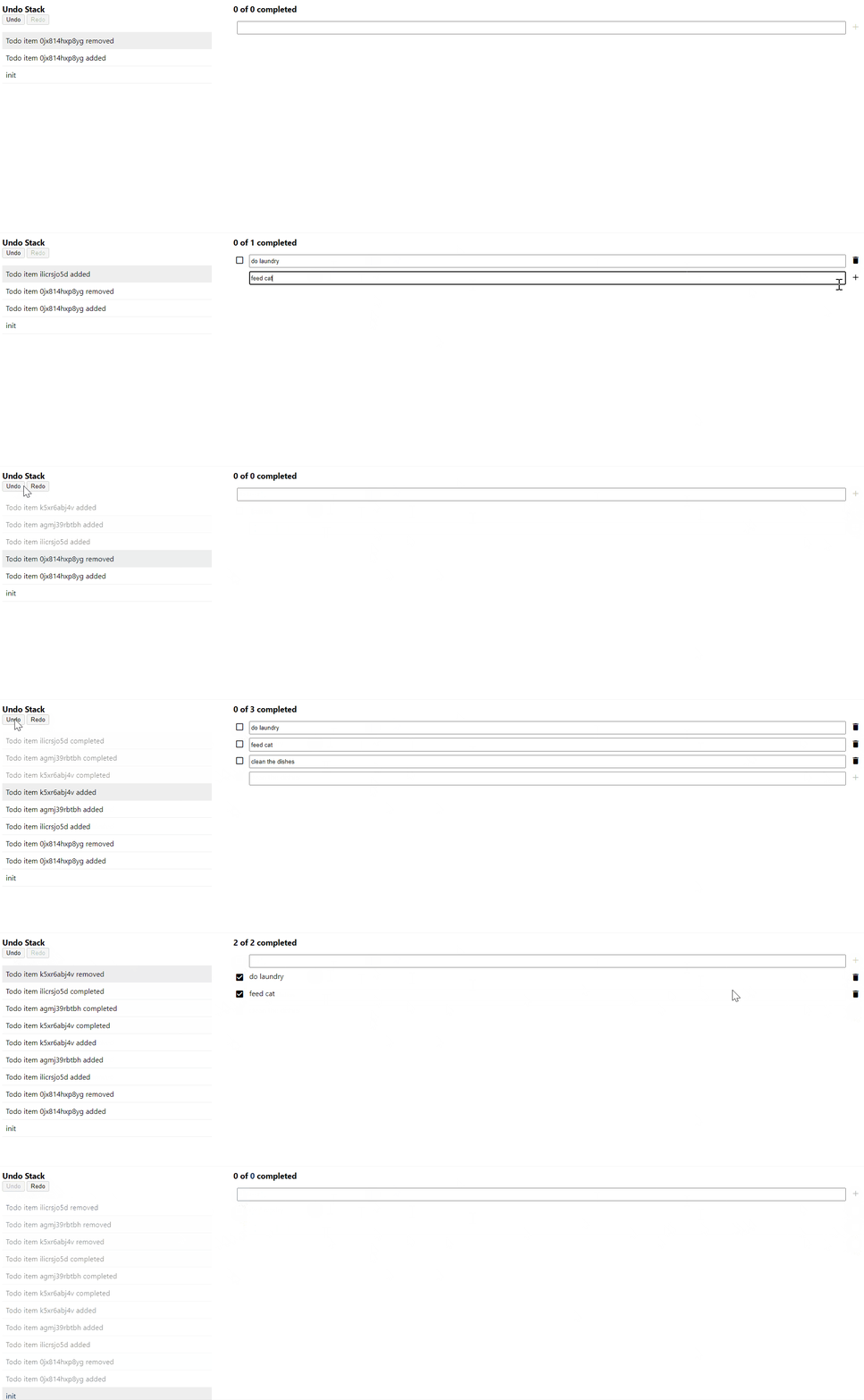 ## Features - **UndoStack** contains the history of all changes - **Undo/Redo/Goto** reverts the model to a specific state - **Transactions** map multiple changes in one undo step - **Commit Messages** for every undo stack entry - **immer.js** keeps the undo stack small by using patches - **Snapshots** export/import the undo stack to/from JSON - **Typescript** support ## Installation ```bash # using npm npm install -D @gira-de/svelte-undo # or using pnpm pnpm install -D @gira-de/svelte-undo # or using yarn yarn add -D @gira-de/svelte-undo ``` ## Usage examples ### Push actions to undo stack ```ts import { undoStack, SetAction } from '@gira-de/svelte-undo'; // create undo stack const myUndoStack = undoStack('first stack message'); const msgStore = writable('old value'); // create a new action to update the store value const action = new SetAction(msgStore, 'new value', 'set new value'); // apply the action action.apply(); console.log($msgStore); // 'new value' // push action onto the undo stack myUndoStack.push(action); // call undo() to revert the changes myUndoStack.undo(); console.log($msgStore); // 'old value' ``` ### Use transactions Creating actions and manually pushing them to the undo stack might create a lot of boilerplate code. The use of a Transaction simplifies this. ```ts import { undoStack, transactionCtrl } from '@gira-de/svelte-undo'; // create a store as usual const personStore = writable({ name: 'John', age: '23' }); // create undo stack and a transaction controller const myUndoStack = undoStack('created'); const myTransactionCtrl = transactionCtrl(myUndoStack); // apply model changes on the draft state let personDraft = myTransactionCtrl.draft(personStore); personDraft['age'] = 24; // apply all changes made to the drafts myTransactionCtrl.commit('happy birthday'); console.log($personStore); // { name: 'John', age: '24' } // call undo() to revert the changes myUndoStack.undo(); console.log($personStore); // { name: 'John', age: '23' } ``` Limitations: The transaction controller can only be used with Svelte stores that hold an Object-like value (object, array, map, set). ### Save from & load to undo stack ```ts import { undoStack, transactionCtrl } from '@gira-de/svelte-undo'; // push an undo step to the undo stack const myUndoStack = undoStack('created'); const myTransactionCtrl = transactionCtrl(myUndoStack); const personStore = writable({ name: 'John', age: '23' }); myTransactionCtrl.draft(personStore)['age'] = 24; myTransactionCtrl.commit('happy birthday'); // provide a store id for each store used in the undo stack const stores = { person: personStore, }; // create a snapshot const undoStackSnapshot = myUndoStack.createSnapshot(stores); // snapshot can easily be stringified to json const json = JSON.stringify(undoStackSnapshot); console.log(json); // { // index: 1, // actions: [ // { type: 'init', msg: 'created' }, // { type: 'mutate', msg: 'happy birthday', storeId: 'person', data: ... } // ] // } // later: load the undo stack snapshot myUndoStack.loadSnapshot(JSON.parse(json), stores); ``` ## Documentation ### undoStack The _undoStack_ is basically a Svelte store with various properties and functions. It always contains at least one undo step (action). #### Instantiation examples: `const myUndoStack = undoStack('first undo stack message');` `const myUndoStack = undoStack({ user: 'xyz', msg: 'project created' });` #### Properties - $myUndoStack.**actions** - a list of all actions that are currently on the undo stack - $myUndoStack.**selectedAction** - the current active step whose changes are applied to the model - $myUndoStack.**canUndo** - _true_ if the _selectedAction_ is not the first action on the undo stack - _false_ otherwise - $myUndoStack.**canRedo** - _true_ if the _selectedAction_ is not the last action on the undo stack - _false_ otherwise - $myUndoStack.**index** - the index of the current _selectedAction_ - e.g. is _0_ if _canUndo_ is false #### Functions - myUndoStack.**push(action)** - pushes a new action onto the undo stack and selects the action - does not apply the action state, this has to be done manually - it's recommended to use the transaction controller instead of pushing actions manually - myUndoStack.**undo()** - reverts the state of the selected action and selects the previous action - does nothing if there's no previous action on the undo stack - myUndoStack.**redo()** - selects the next action and applies its state - does nothing if there's no next action on the undo stack - myUndoStack.**goto(seqNbr)** - selects the action for the specified sequence number (_action.seqNbr_) and applies/reverts all actions between - has basically the same effect as calling undo/redo in a loop - myUndoStack.**clear()** - removes all actions from the undo stack and creates a new init action - has the same effect as if a new undo stack has been created - myUndoStack.**clearRedo()** - Removes all redoable actions from the stack - This is the same as would happen if a new action is pushed while not being at the latest state, just without pushing the action - myUndoStack.**clearUndo()** - Deletes all previous undo actions - If the current position is the top of the stack, this effectively deletes the whole undo stack - If not at the top of the stack, undo actions are still available and undo is possible - myUndoStack.**createSnapshot(stores)** - creates and returns a snapshot of the undo stack - the snapshot can be easily serialized since it does not contain any store references etc. - myUndoStack.**loadSnapshot(undoStackSnapshot, stores)** - clears the undo stack and then loads the specified snapshot - myUndoStack.**erase(seqNbr?)** - removes undo/redo capability from actions to reduce the size of the undo stack - all actions starting from the specified sequence number are erased - starts erasing from the top of the stack if seqNbr is undefined - erased actions are still included on the undo stack in form of log entries - this function is currently experimental and might not always yield the expected state ### transactionCtrl #### Instantiation `const myTransactionCtrl = transactionCtrl(myUndoStack);` #### Functions - myTransactionCtrl.**draft(store)** - returns a new draft object for the specified store - all changes to the draft object must be followed by a commit, otherwise they will not visible in the store - myTransactionCtrl.**commit(msg)** - applies all draft changes to the corresponding stores - calling _commit_ without having any draft changes has no effect - myTransactionCtrl.**rollback()** - discards all draft changes since the last commit - calling _commit_ after a _rollback_ has no effect ## Known issues - Working with arrays (pushing/removing items) might create very large undo stack entries. ## Contributing Contributions are always welcome! Please have a look at our [CONTRIBUTING.md](CONTRIBUTING.md)
