KO
|
EN
gitlite — search
Search
#javascript
#python
#hacktoberfest
#react
#ai
#typescript
#llm
#go
#golang
#android
#machine-learning
#rust
#deep-learning
#linux
hkAlium
★ 24
Open GitHub ↗
UICollectionView with different cell sizes
Download README (.md)
Explore Similar Repositories
PlatformerPhysics
:
Simple & solid physics system for grid based platformers
WeDefend
:
⛔🛡️ WeDefend - Monitor and Protect Windows from Remote Access Trojan
ITUscheduler
:
This project is DEPRECATED, check out the new implementation below.
cosmosdb-gremlin-flights
:
Demo of Cosmos DB and its Gremlin API
django-pg-copy
:
Utilities for backing up and restoring PostgreSQL databases for Django.
// repository documentation
Was this content helpful?
★ 0
(0 ratings)
Select Rating:
★
★
★
★
★
Submit Feedback
Recent Feedback
×
Download README
Do you want to download the
README.md
file for
hkAlium
?
Download (.md)
# hkAlium - UICollectionView with different cell sizes ## What is it? This lib allows you to set cells with different heights on the same **UICollectionView vertical flow**. See the picture below:  ## How it works? The vertical flow follows a logic presented below determined by the number of specified columns, independent of the cell sizes.  ## How to import it? Add the pod 'hkAlium' in your podfile or just copy the UICustomCollectionViewLayout.swift file in your project: Example: > source 'https://github.com/CocoaPods/Specs.git' > > use_frameworks! > > target 'sample' do > pod 'hkAlium' > end ## How to setup it? First, you need to implement a UICollectionView and latter you must set a custom layout as you can see in the image below: 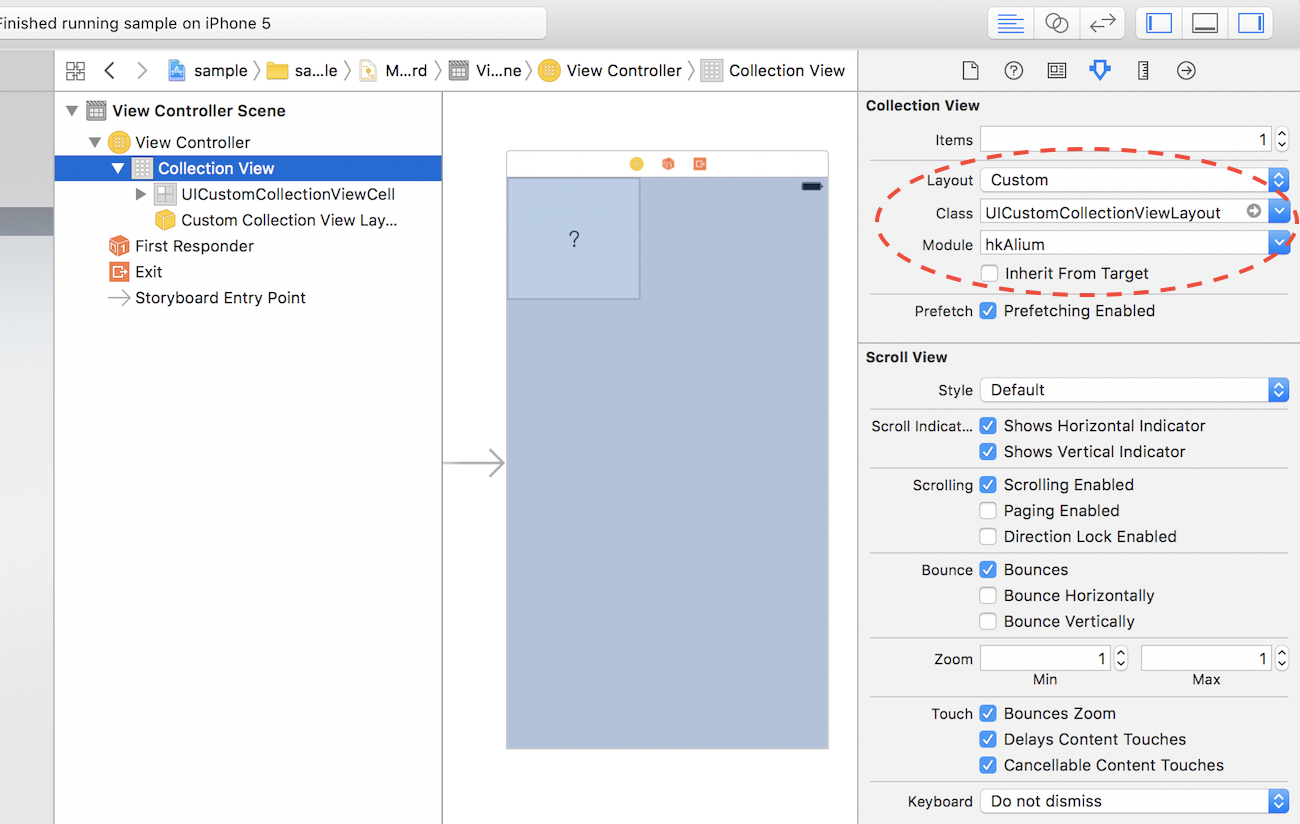 ## Complete example If you want to see it running, clone the repo and execute the included sample project. The example is self-explained, you must implement a delegate CustomLayoutDelegate to specify the size of each item. Good luck! ```swift // ViewController.swift import UIKit import hkAlium class ViewController: UICollectionViewController, CustomLayoutDelegate { public var customCollectionViewLayout: UICustomCollectionViewLayout? { get { return collectionViewLayout as? UICustomCollectionViewLayout } set { if newValue != nil { self.collectionView?.collectionViewLayout = newValue! } } } struct Model { var index: Int var isBig: Bool } private let dataSet = [Model(index: 1, isBig: false), Model(index: 2, isBig: false), Model(index: 3, isBig: false), Model(index: 4, isBig: true), Model(index: 5, isBig: false), Model(index: 6, isBig: false), Model(index: 7, isBig: false), Model(index: 8, isBig: false), Model(index: 9, isBig: false), Model(index: 10, isBig: false), Model(index: 11, isBig: false), Model(index: 12, isBig: false)] override func viewDidLoad() { super.viewDidLoad() self.customCollectionViewLayout?.delegate = self self.customCollectionViewLayout?.numberOfColumns = 2 //self.customCollectionViewLayout?.cellPadding = 30 } override func collectionView(_ collectionView: UICollectionView, numberOfItemsInSection section: Int) -> Int { return dataSet.count } override func collectionView(_ collectionView: UICollectionView, cellForItemAt indexPath: IndexPath) -> UICollectionViewCell { let cell = collectionView.dequeueReusableCell(withReuseIdentifier: "UICustomCollectionViewCell", for: indexPath) as? UICustomCollectionViewCell cell?.label.text = "\(dataSet[indexPath.row].index)" return cell ?? UICollectionViewCell() } func collectionView(_ collectionView: UICollectionView, heightForItemAt indexPath: IndexPath, with width: CGFloat) -> CGFloat { let heightSizes = [100,216] return CGFloat(heightSizes[dataSet[indexPath.row].isBig ? 1 : 0]) } } ```
