KO
|
EN
gitlite — search
Search
#javascript
#python
#hacktoberfest
#react
#ai
#typescript
#llm
#go
#golang
#android
#machine-learning
#rust
#deep-learning
#linux
XCGuideMaskView
★ 9
Open GitHub ↗
自定义的新手引导视图,使用方便
Download README (.md)
Explore Similar Repositories
MIAPPE-ontology
:
Modelling of MIAPPE
NSFW_Detection
:
To check if the input video contains Nudity or any other NSFW content and label them.
esanpy
:
Python Text Analyzer based on Elasticsearch
cordova-plugin-apkInstaller
:
Cordova Apk Installer Plugin.
nodecg-streamlabs
:
NodeCG bundle that exposes the StreamLabs streaming API to other NodeCG bundles.
// repository documentation
Was this content helpful?
★ 0
(0 ratings)
Select Rating:
★
★
★
★
★
Submit Feedback
Recent Feedback
×
Download README
Do you want to download the
README.md
file for
XCGuideMaskView
?
Download (.md)
# XCGuideMaskView [](https://travis-ci.org/fanxiaocong/XCGuideMaskView) [](https://cocoapods.org/pods/XCGuideMaskView) [](https://cocoapods.org/pods/XCGuideMaskView) [](https://cocoapods.org/pods/XCGuideMaskView) [](https://www.apple.com/nl/ios/) *** |Author|小小聪明屋| |---|---| |E-mail|1016697223@qq.com| |GitHub|https://github.com/fanxiaocong| |Blog|http://www.cnblogs.com/fanxiaocong| *** ## Example 自定义新功能引导视图 ### 效果图 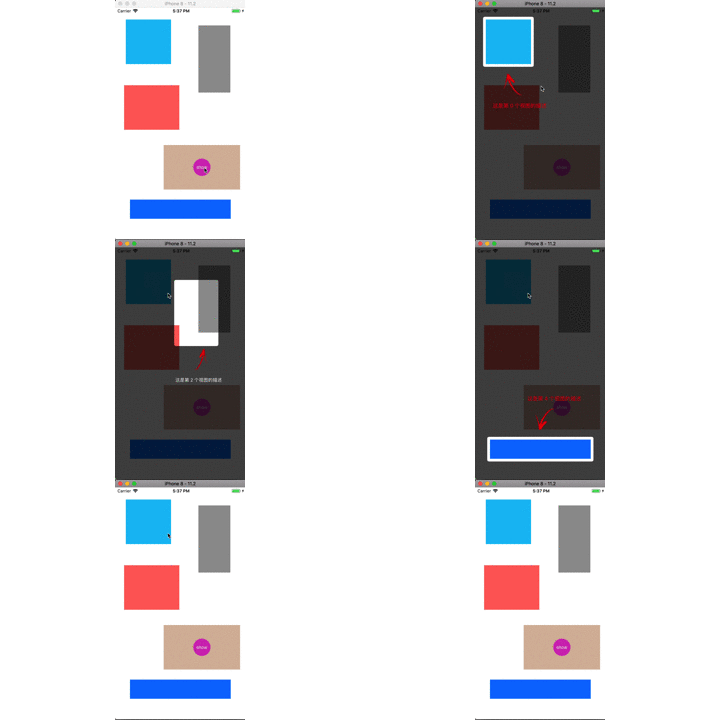 ### 代码 创建视图,设置数据源和布局,并实现相关的方法。 ```objc XCGuideMaskView *maskView = [[XCGuideMaskView alloc] initWithDatasource:self]; maskView.layout = self; /// 当视图消失之后的回调 maskView.dismissHandle = ^{ NSLog(@"消失了"); }; [maskView show]; ``` #### `XCGuideMaskViewDataSource` 数据源方法 `- (NSInteger)numberOfItemsInGuideMaskView:(XCGuideMaskView *)guideMaskView` 需要进行引导的 item 的个数,每个 item 包括三个部份:源视图、描述文字、箭 头 <img src='Screenshots/item.png' width='300px'> `- (UIView *)guideMaskView:(XCGuideMaskView *)guideMaskView viewForItemAtIndex:(NSInteger)index` 每个 item 中的源视图 `- (NSString *)guideMaskView:(XCGuideMaskView *)guideMaskView descriptionForItemAtIndex:(NSInteger)index` 每个 item 中的描述文字 `- (UIColor *)guideMaskView:(XCGuideMaskView *)guideMaskView colorForDescriptionAtIndex:(NSInteger)index` 描述文字的颜色 `- (UIFont *)guideMaskView:(XCGuideMaskView *)guideMaskView fontForDescriptionAtIndex:(NSInteger)index` 描述文字的字体 #### `XCGuideMaskViewLayout` 布局协议方法 `- (CGFloat)guideMaskView:(XCGuideMaskView *)guideMaskView cornerRadiusForViewAtIndex:(NSInteger)index` item 中源视图对应的圆角大小 <img src='Screenshots/corner.png' width="300px"> `- (UIEdgeInsets)guideMaskView:(XCGuideMaskView *)guideMaskView insetForViewAtIndex:(NSInteger)index` item 中源视图与蒙板的边距 <img src='Screenshots/insets.png' width='300px'> `- (CGFloat)guideMaskView:(XCGuideMaskView *)guideMaskView spaceForItemAtIndex:(NSInteger)index` 源视图、箭头、描述文字之间的间距 <img src='Screenshots/margin.png' width='300px'> `- (CGFloat)guideMaskView:(XCGuideMaskView *)guideMaskView horizontalInsetForDescriptionAtIndex:(NSInteger)index` 描述文字与左右边框间的距离,如果文字的宽度小于当前可视区域的宽度(源视图的宽度+边距),则会相对于箭头图片居中对齐 <img src='Screenshots/label_margin.png' width='300px'> ## Installation ### CocoaPods ```objc pod 'XCGuideMaskView' ```
